DeepSeek vs ChatGPT: Research, Code, Price
Compare DeepSeek and ChatGPT for research, coding, daily work, pricing, privacy, and APIs, with current rates and benchmark scores from primary sources.
Table of Contents
A founder has three jobs on the same desk. She needs to check a market brief against real sources, fix a small Python bug, and turn customer notes plus a spreadsheet into a clear update.
One chatbot can help with all three. But not the same way each time.
A 2026 federal evaluation shows why simple verdicts fail. On five of seven included benchmarks, DeepSeek V4 Pro cost less than GPT-5.4 mini when the comparison covered only tasks both models solved correctly. Yet the gap moved with the task, from 53% cheaper to 41% more expensive. Cheap tokens did not always produce the cheapest accepted result.
In practice, ChatGPT carries more of the workflow around the answer. DeepSeek becomes more compelling when the work stays mostly in text, can be checked quickly, or runs at enough volume for price to matter.
The better choice depends on the work before the answer, the checks after it, and what comes next.
Key Takeaways
ChatGPT carries more of the path from a question to sources, files, analysis, code checks, and finished work.
DeepSeek's economic case is strongest for off-peak or cache-heavy work, especially when the result is easy to verify.
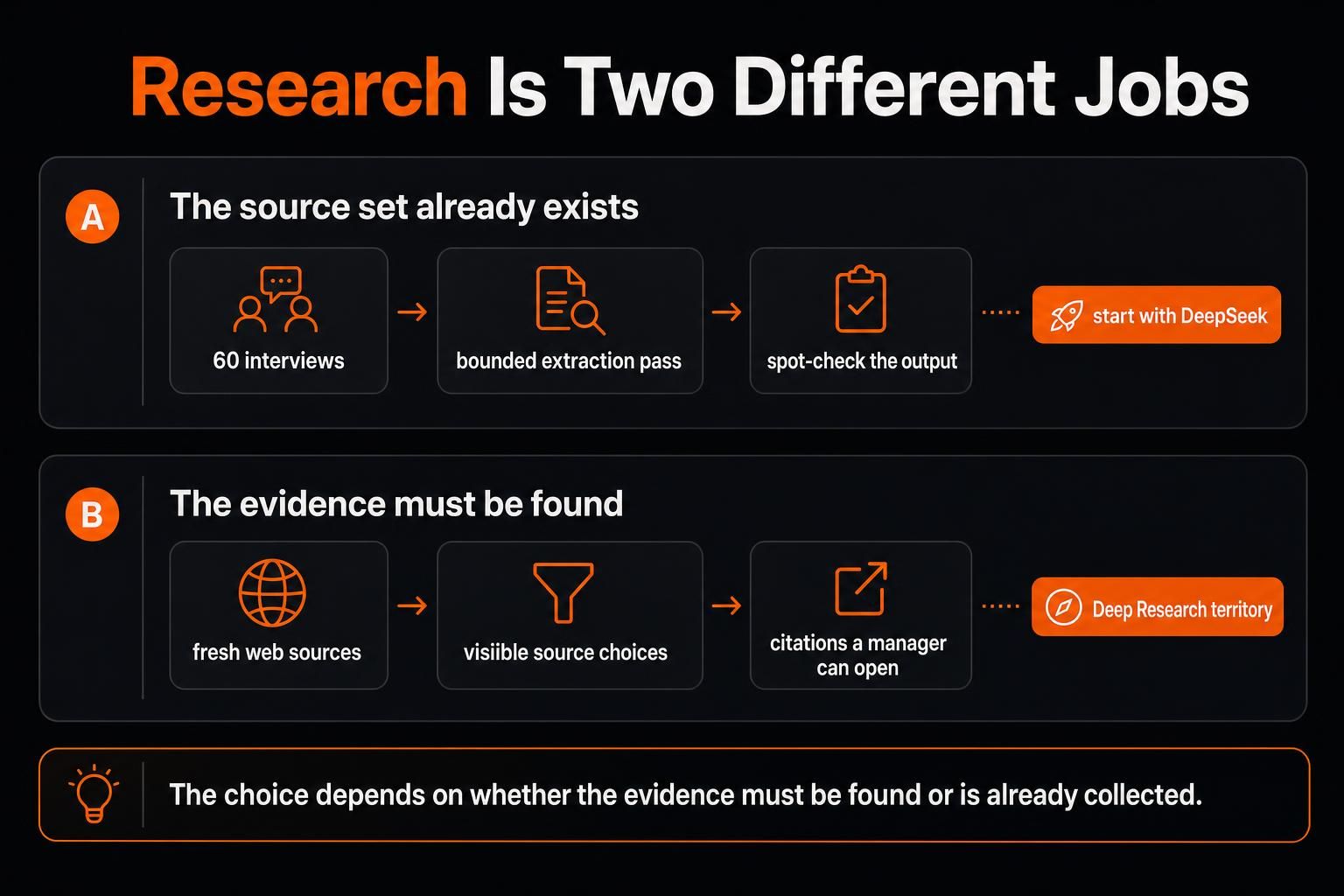
The research choice depends on whether the evidence must be found or is already collected.
A coding answer becomes a software workflow once repositories, commands, tests, and visual review enter the job.
Privacy follows the service and setup, not the logo.
First, Compare the Right Things
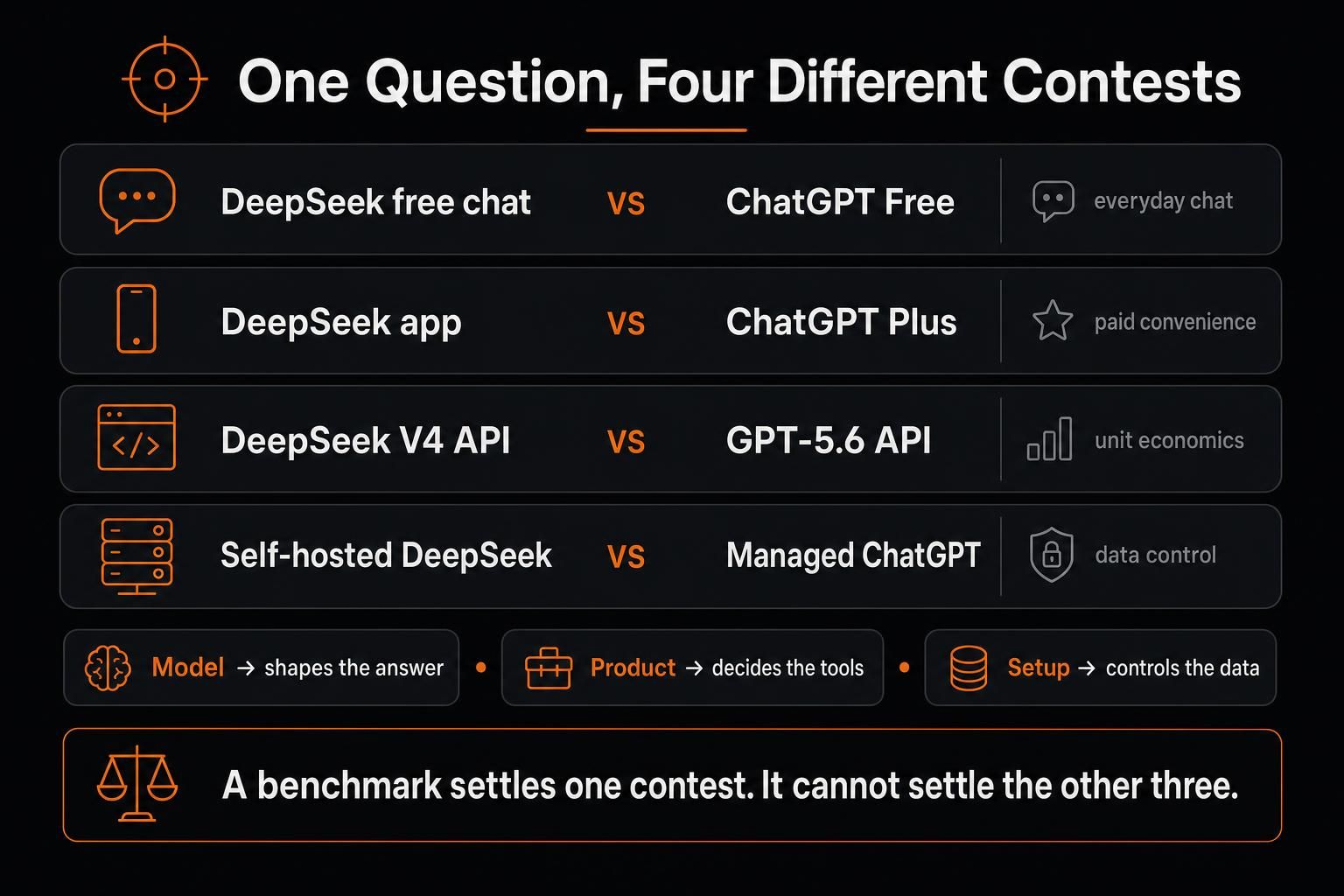
"DeepSeek vs ChatGPT" sounds like one choice. There are at least four.
| Decision | What You Are Comparing |
|---|---|
| Free versus free | DeepSeek's hosted chat and ChatGPT Free |
| Hosted versus paid | DeepSeek's app and ChatGPT Plus |
| API versus API | DeepSeek V4 models and GPT-5.6 models |
| Private versus managed | Self-hosted DeepSeek and managed ChatGPT |
I also separate the model from the product and the setup. The model shapes the answer. The product decides which tools can help finish the job. The setup controls where the work runs and what happens to the data.
A benchmark can help with the first question. It cannot settle the other two.
DeepSeek Free vs ChatGPT Free
For free users, the practical split is text depth versus tool breadth.
DeepSeek currently offers free access through its consumer experience on the web and app. Its April 2026 V4 release says one-million-token context is standard across official DeepSeek V4 services. When the material is already in front of me, and the answer can remain text, DeepSeek is a strong place to start for reports, passage comparisons, code review, or short scripts.
The choice shifts when the task turns into a spreadsheet, chart, image, or reusable file. ChatGPT Free includes web search, data analysis, file and image uploads, image creation, GPTs, and 500 MB of Library storage, with usage limits.
My switch point is practical: DeepSeek for supplied material and text; ChatGPT when the work changes format.
ChatGPT Plus costs $20 a month and adds higher limits plus broader access to voice, images, file analysis, ChatGPT Deep Research, and custom GPT creation. It earns the $20 only when that wider workspace removes repeated work. API use is separate.
DeepSeek vs ChatGPT for Research
Research is a process, not a prompt.
I break it into six jobs: find, judge, read, resolve, cite, and produce. That sequence explains most of the difference.
When the Source Set Already Exists
Consider Mia, a composite strategy lead with 60 interviews, 12 competitor pages, and five market reports. She wants repeated complaints, price changes, useful quotes, and rare problems.
Because the material already exists and each finding can be checked, DeepSeek is a sensible first pass. Its V4 API models support one million tokens of context, two reasoning modes, structured output, and tool calls. Repeated passes can stay economical, especially off-peak or when much of the input is cached.
Mia could request a fixed price table, then group similar complaints in a second pass. She can sample the results, adjust the rules, and process the rest. Bounded output makes mistakes easier to spot.
When the Evidence Must Be Found
The job changes when Mia turns that analysis into a five-page brief. Now she needs fresh sources, internal files, visible source choices, and citations a manager can open.
Deep Research can use the public web, selected sites, uploaded files, and connected apps. It proposes a plan, accepts scope changes, and returns a structured report with citations or source links.
That still does not make every citation correct. An older study of 400 references from eight free chatbots found 26.5% fully correct, 33.8% partly correct, and 39.8% wrong or fabricated. Its older products and narrow task cannot name today's winner, but the result shows why a polished reference list is not proof.
When sources disagree, compare what each measured, its date, sample, and original evidence.
I trust a report more when I can follow the trail than when the prose simply sounds sure.
DeepSeek vs ChatGPT for Coding
"Best for coding" is too broad to help.
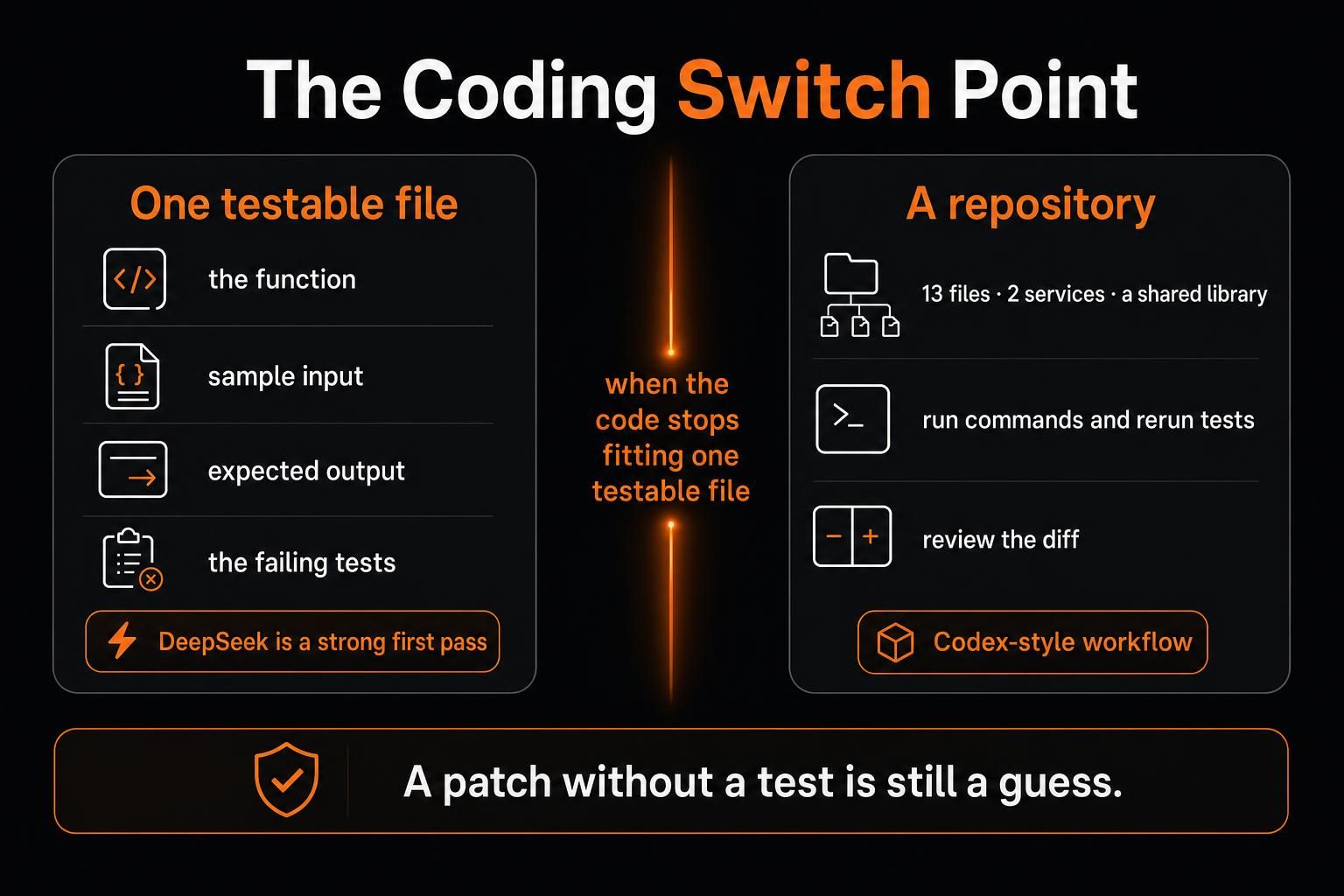
One function is very different from a repository, where a patch may affect distant files and services. I switch tools when the code stops fitting inside one testable file.
Small, Testable Problems
Daniel is a composite developer with a 420-line import script. Six tests fail on mixed date formats. They can provide the function, sample input, expected output, error, and failed tests.
DeepSeek is a strong starting point. It can inspect the logic, suggest a patch, add edge cases, and explain the cause.
Daniel already has an editor and test runner, so the model need not manage the whole process. His finish line is concrete: all six date-format tests pass without breaking the rest of the suite.
For a bug, I care less about the first patch than the proof: a test that fails before the fix and passes after it.
A patch without a test is still a guess.
Repositories, Tools, and Visual Work
Now let the issue spread across 13 files, two services, and a shared library. The first change causes four new failures. The work now needs repository access, commands, revised patches, rerun tests, and review.
At this point, the model must do more than suggest code. I am now comparing more than model output: DeepSeek inside an existing development setup versus ChatGPT's broader Codex workflow. Codex can navigate a repository, edit files, run commands, execute tests, and leave changes for review.
Front-end work adds visual judgment. GPT-5.6 accepts image input. DeepSeek's current V4 API documentation lists image input only on deepseek-v4-flash-vision-exp, an experimental model that bills images as input tokens by dimension. The two production models, V4 Flash and V4 Pro, are text-only.
An independent 2026 evaluation gives useful context. DeepSeek V4 Pro scored 74% on SWE-Bench Verified against GPT-5.5's 81%, then 44% against 78% on CAISI’s non-public PortBench software-engineering benchmark. It predates GPT-5.6 and used its own prompts, tools, and token limits, so it cannot settle every coding task.
One leaderboard is not a reason to change a team's stack. Test both systems on five jobs from the team's own codebase:
A small bug
A multi-file feature
A failed build
A migration
A review task
Track accepted fixes, retries, passing tests, and review time. That says more than one public score.
Which Is Better for Everyday Work?
Everyday work rarely stays inside one format.
Imagine starting with meeting notes, adding a 2,000-row spreadsheet, checking one web claim, creating a chart, and finishing with a client update.
DeepSeek may handle the notes, themes, and first draft well. The harder part begins when the work changes shape. ChatGPT can keep the spreadsheet, source check, chart, and final file together through its web, file, image, and data tools, with limits that vary by plan.
Every handoff creates repairs: copying context, fixing formatting, and checking that part of the thread was not lost.
Singular Bank offers a useful example. CEO Javier Marín describes Singularity, the bank's internal assistant powered by ChatGPT and Codex. It supports portfolio analysis, meeting preparation, and compliant follow-ups. The bank reports saving 60 to 90 minutes per banker each day. Meeting preparation fell from about 20 minutes to under one, while staff completed more than 3,500 operations across 19 workflows in 30 days.
These are vendor-published results, not an independent study. The useful lesson is that the system worked with approved data, repeatable steps, and human review, not a public chatbot alone.
The more often a task changes shape, the more I value keeping the files, checks, and final output in one place.
DeepSeek API vs OpenAI API Pricing
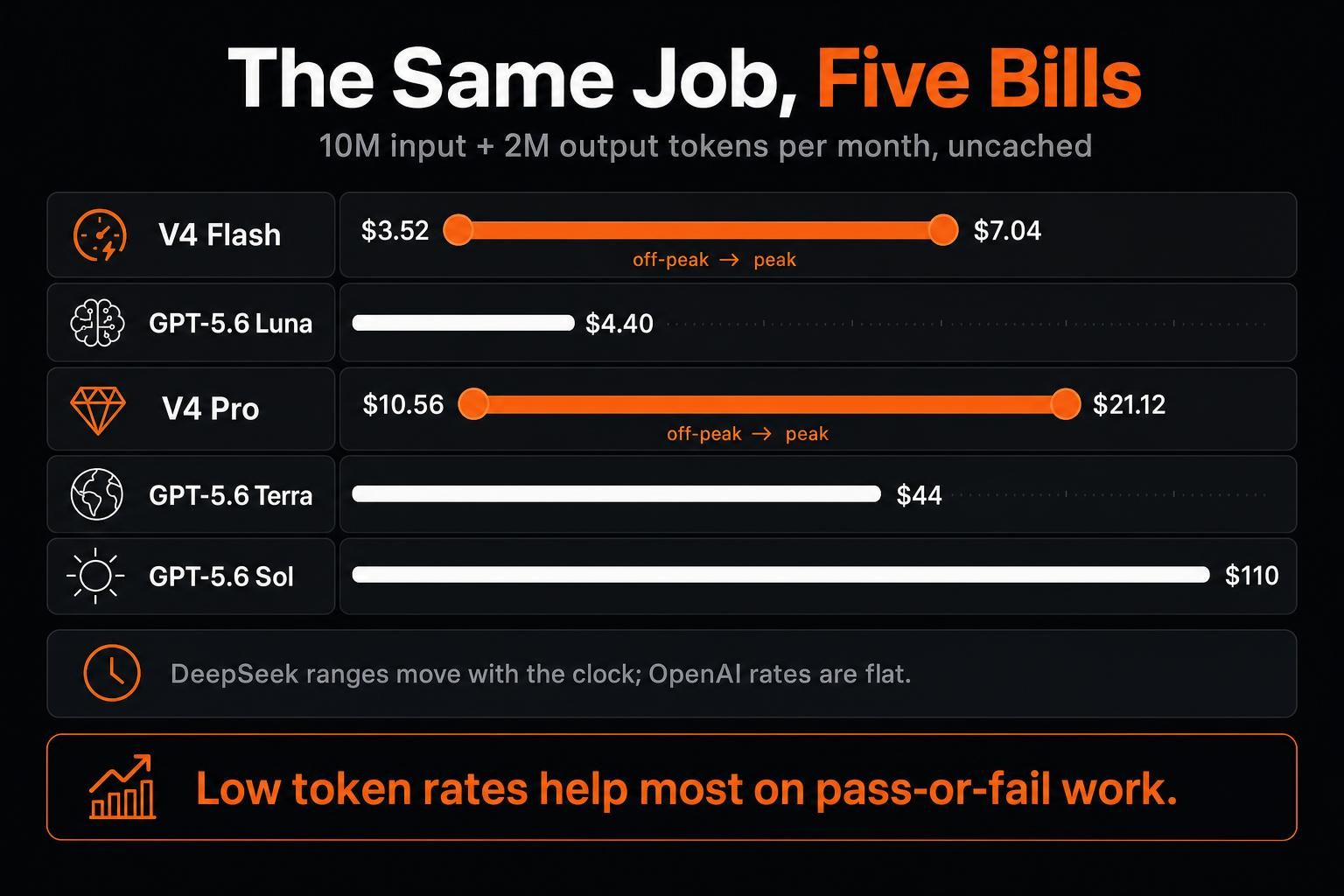
At current rates, GPT-5.6 Luna has the lowest uncached input rate in this comparison at $0.20 per million tokens. DeepSeek V4 Flash ranges from $0.22 off-peak to $0.44 at peak, while V4 Pro ranges from $0.66 to $1.32.
On output, V4 Flash ranges from $0.66 to $1.32 and Pro from $1.98 to $3.96, compared with Luna at $1.20.
DeepSeek’s current V4 pricing varies by peak and off-peak hours, with additional discounts for cache-hit input.
| Model | Uncached input / 1M tokens | Output / 1M tokens |
|---|---|---|
| DeepSeek V4 Flash | $0.22 off-peak / $0.44 peak | $0.66 off-peak / $1.32 peak |
| DeepSeek V4 Pro | $0.66 off-peak / $1.32 peak | $1.98 off-peak / $3.96 peak |
| GPT-5.6 Luna | $0.20 | $1.20 |
| GPT-5.6 Terra | $2.00 | $12.00 |
| GPT-5.6 Sol | $5.00 | $30.00 |
DeepSeek's peak windows are 01:00–04:00 and 06:00–10:00 UTC, Monday through Friday; all other hours, including weekends, use off-peak pricing. Cache-hit input is cheaper still: $0.007 off-peak / $0.014 peak on Flash and $0.022 / $0.044 on Pro. The OpenAI figures are standard API rates; very long requests and some tools or service tiers can cost more.
Both providers discount cached input. The DeepSeek table above uses uncached-input pricing.
A monthly job with 10 million uncached input tokens and two million output tokens costs about $3.52–$7.04 on V4 Flash, $4.40 on Luna, $10.56–$21.12 on V4 Pro, $44 on Terra, or $110 on Sol. The DeepSeek range depends on whether the calls run off-peak or at peak.
The ratio now depends on the model, token type, and time of day. Sol costs about 3.8–7.6 times more than V4 Pro for uncached input and 7.6–15.2 times more for output, depending on the window. Luna's uncached input rate is below both DeepSeek models. Its $1.20 output rate sits between Flash's $0.66 off-peak and $1.32 peak prices. “50 times cheaper” means little without this context.
I prefer cost per accepted result: model use, retries, tools, hosting, review, and the time needed to move the answer forward.
The same federal cost test compared only questions both models solved correctly, so it measured cost on successful work rather than raw token price alone.
The evaluation used an earlier DeepSeek price of $1.74 per million uncached input tokens and $3.48 per million output tokens. Those historical figures should not be mixed with today's rates, which now vary between peak and off-peak hours.
Low token rates can create real savings on pass-or-fail work. On fuzzy work, the cheapest response may still be expensive to check.
DeepSeek vs ChatGPT Privacy
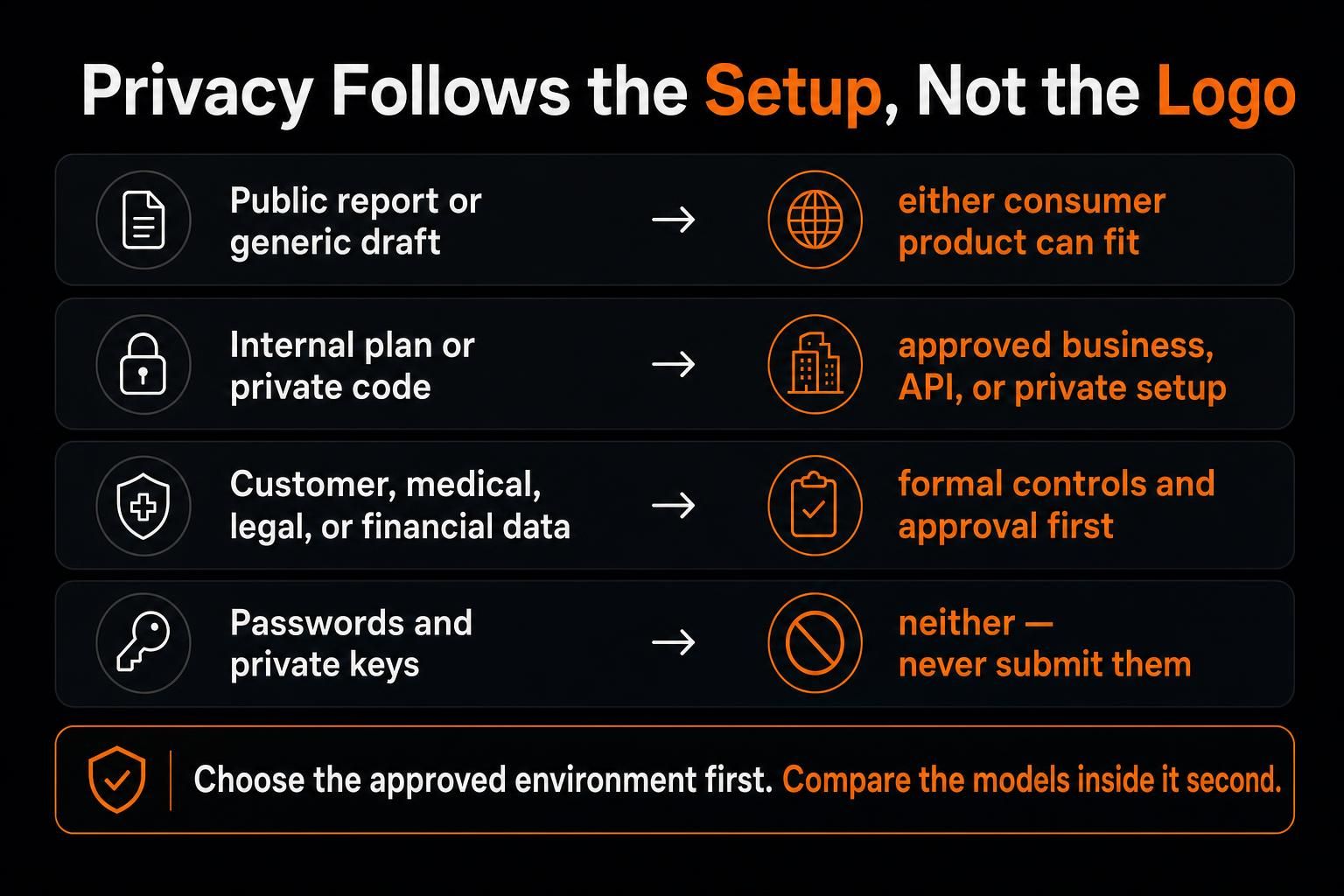
Imagine using the same instruction with a public report, an internal launch plan, and a customer record. The task is the same. The safe setup is not.
DeepSeek's hosted privacy policy covers prompts, files, photos, voice input, feedback, chat history, and device data. It says covered personal data is processed and stored in China. Users can opt out of training use, while third-party apps may follow different policies.
On a personal ChatGPT workspace, users can turn off model-improvement sharing for new chats. Temporary Chats stay out of history, create no memories, are not used for training, and may be kept for up to 30 days for safety.
For managed services, Business, Enterprise, Edu, and API inputs and outputs are not used for training by default.
Self-hosted DeepSeek is another path. Its V4 Pro weights use an MIT license, so qualified teams can run them in a controlled environment. That changes the data path but shifts hardware, access, logs, updates, monitoring, backups, and security to the team.
| Data | Better Starting Setup |
|---|---|
| Public report or generic draft | Either consumer product may fit |
| Internal plan or private code | Approved business, API, or private setup |
| Customer, medical, legal, or financial data | Formal controls and approval |
| Passwords and private keys | Neither, do not submit them |
My rule is simple: choose the approved environment first. Compare the models inside it second.
When Using Both Makes Sense
Begin with one model: one account, one bill, one privacy setup, and less routing logic.
A second model helps only when the workload has a clear split. Ask four questions:
Does it need new sources?
Can success be tested?
Which files, images, tools, or systems are involved?
What would a wrong result cost?
Cheap, easy-to-check text work can start with DeepSeek. Source-heavy, visual, repository-level, or difficult work may need ChatGPT's wider environment. Sensitive work follows the approved setup; high-impact results stop for human review.
Two models can agree on the same mistake. A solo user should not build a complex routing system to save a few cents.
When Model Choice Is No Longer Enough
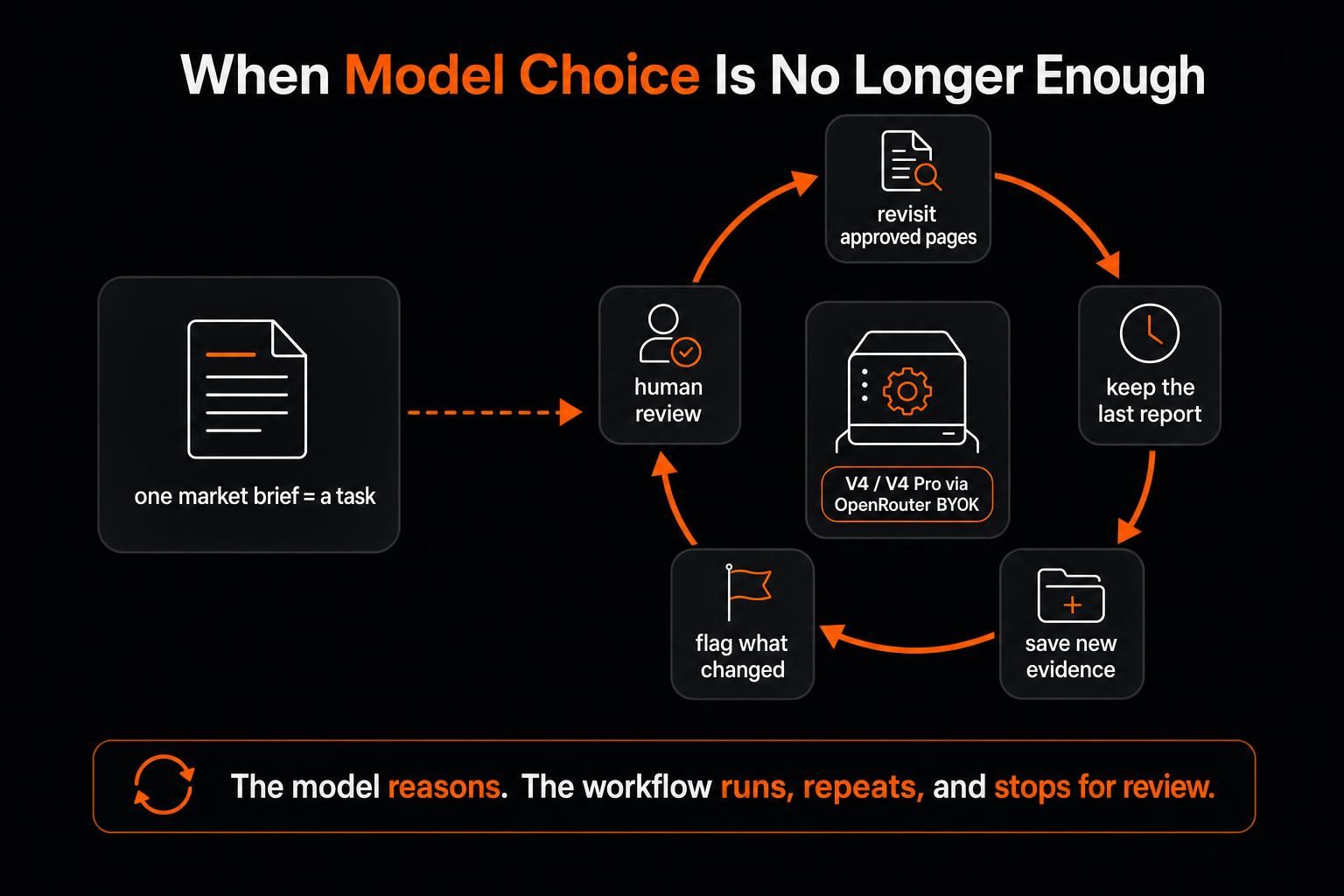
Mia's first market brief is a research task. The monthly update is a process.
When the routing must work again next month, model choice is no longer enough. The workflow must keep files, revisit sources, remember the last result, and pause for review.
MoClaw provides that execution layer. Through its DeepSeek integration, V4 or V4 Pro can drive the work while browser control, the cloud computer, files, and scheduled jobs continue around the model.
A monthly workflow could revisit approved pages, keep the last report, save new evidence, and identify changes. DeepSeek could handle a bounded extraction pass. The workflow could flag uncertain findings for human review or a second model pass before approval.
MoClaw is not the third chatbot here. The model handles reasoning; MoClaw gives the work a place to run, repeat, and stop for review.
Final Verdict
For someone choosing one general-purpose assistant, I would usually start with ChatGPT. Its advantage grows when work moves into fresh sources, mixed files, data, code checks, projects, and finished output.
Paying for a broader setup makes little sense when DeepSeek can finish the task, and I can verify the result in seconds. Pushing DeepSeek through a source-heavy or mixed-format job just to save on token rates makes even less sense.
For the founder at the start, that means ChatGPT for the sourced market brief and mixed-file update. DeepSeek is a sensible first choice for the small bug she can test, especially off-peak.
The better choice removes the most work without leaving more doubt behind.
Frequently Asked Questions
Is DeepSeek Better Than ChatGPT?
It can be a better fit for some low-cost, long-text, API, coding, and self-hosted jobs. ChatGPT covers more when work needs sources, mixed files, projects, or coding tools.
Which Is More Accurate, DeepSeek or ChatGPT?
Neither wins across every task. Accuracy changes with the model, prompt, evidence, tools, and subject. Important results still need direct checks.
Is DeepSeek Free?
DeepSeek offers free hosted chat. API calls are billed by token use, while self-hosting brings hardware and operating costs.
Is ChatGPT Plus Worth Paying For?
It can be worth $20 when higher limits and tools for research, files, images, voice, or longer work remove repeated effort. API use is separate.
Can DeepSeek Replace ChatGPT?
It can replace ChatGPT for many text, code, and API tasks. Replacement becomes harder when the work needs source discovery, mixed files, images, connected apps, or finished deliverables.
Continue Reading
More Comparison
ChatGPT vs Microsoft Copilot: Which Fits You?

Gemini vs ChatGPT for Work: Which Is Better?

Cursor Cloud Agent vs Grok Bot

GPT-5.6 Sol vs Terra vs Luna: Pick One

Gemini 3.7 Flash vs 3.1 Pro: Is Pro Over?
Qwen 3.8 vs Kimi K3: Cheaper Isn't Simpler
The MoClaw editorial team writes about workflow automation, AI agents, and the tools we build. Default byline for industry overviews, listicles, and collaborative pieces.
Choosing between tools? Let MoClaw run the work.
Always-on AI assistant on its own cloud computer. No switching required, no setup.
References: CAISI Evaluation of DeepSeek V4 Pro · Introducing DeepSeek App · ChatGPT Free Tier FAQ · What Is ChatGPT Plus? · DeepSeek Models and Pricing · Deep Research in ChatGPT · Assessing the Performance of Eight AI Chatbots in Bibliographic Reference Retrieval · Using Codex With Your ChatGPT Plan · OpenAI API Pricing · Singular Bank Case Study · DeepSeek Privacy Policy · Temporary Chat FAQ · Business Data Privacy · DeepSeek V4 Pro MIT License