AI Business Process Automation, Step by Step

Learn how AI business process automation improves workflows by removing waste, keeping rules where they fit, and using AI only where interpretation is needed.
Table of Contents
AI adoption can move faster than process redesign.
In a global survey, only 21% of respondents who reported using generative AI said their organizations had fundamentally redesigned at least some workflows. Of the 25 organizational factors tested, workflow redesign had the strongest relationship with reported EBIT impact from generative AI.
That was an association, not proof that redesign itself causes higher profit. A faster task can still be part of a slow process.
AI business process automation looks at the wider path. You trace work from input to outcome, remove steps that no longer help, keep clear logic in normal software, and use AI where changing information needs interpretation. Cases with weak evidence or higher stakes get a clear route to a person.
Key Takeaways
Start with the business outcome and the real path used to reach it.
Remove waste before deciding what to automate.
Keep known logic in rules, APIs, scripts, or RPA when they already solve the problem well.
Define what an AI step must return, including missing or conflicting information.
Measure the whole process, including exceptions and the human work that remains.
What Is AI Business Process Automation?
AI business process automation uses AI inside a wider business process when one or more steps need more than fixed rules.
A business process links activities to one result. An invoice moves from receipt to posting. A support request moves from intake to resolution. A supplier moves from application to approval.
Business process automation can coordinate workflow software, APIs, RPA, business rules, AI, cloud tools, and human steps across that path.
Workflow automation moves work through known steps.
Robotic Process Automation often handles repetitive, rules-based actions in software.
Business process management (BPM) takes the wider view of managing and improving the process.
AI adds another capability when the process reaches an email, document, image, conversation, or other input that fixed rules cannot handle reliably. In many useful designs, AI handles that one interpretation step, then hands the work back to normal software.
Start With What “Done” Means
Rachel runs IT procurement at a 45-person software company that handles about 120 software purchase requests each month.
The company says it wants to “automate software approvals with AI.”
That is too broad to design around.
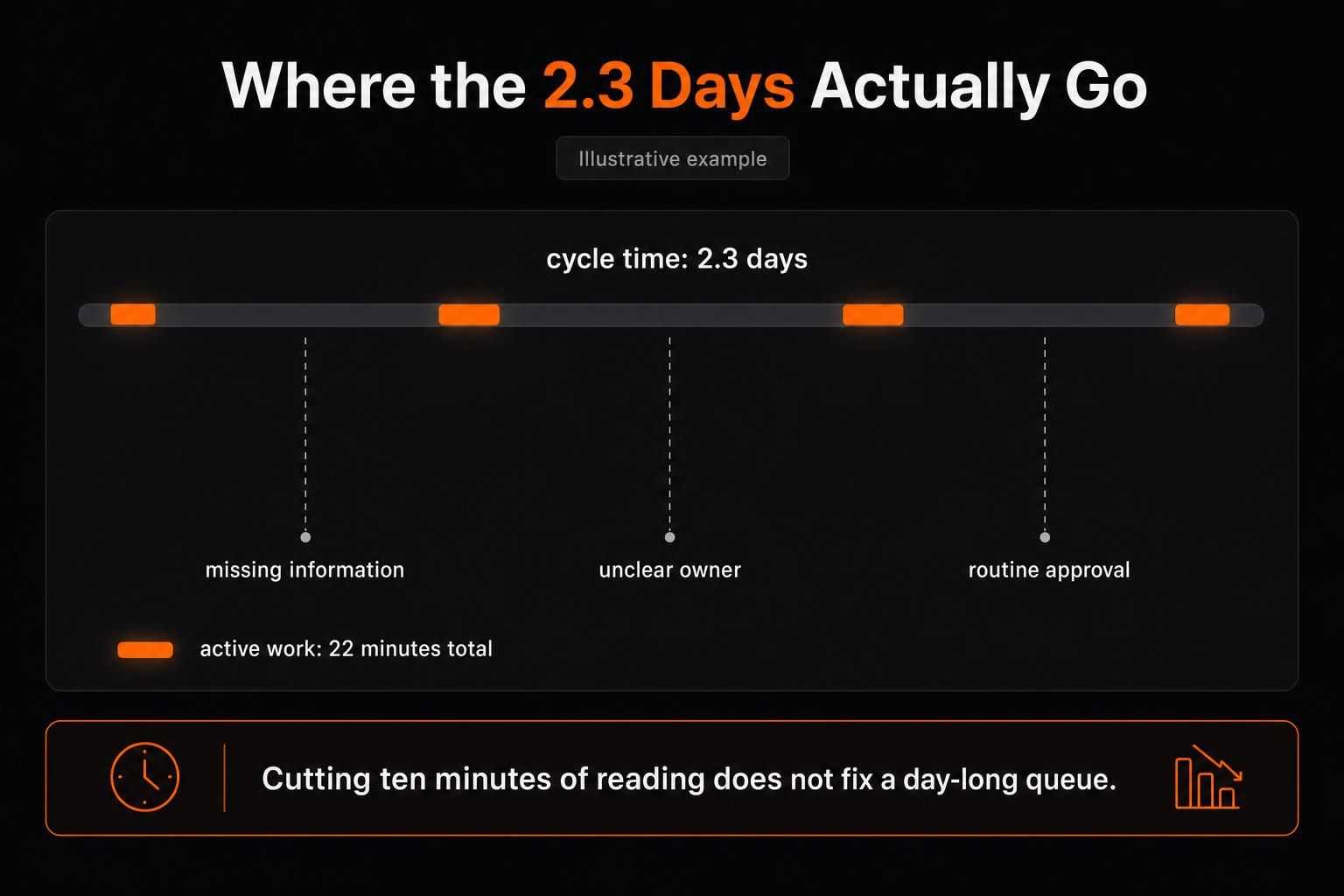
She reviews 40 recent requests. A typical request uses about 22 minutes of active staff time but takes 2.3 days from submission to decision. Most of that delay comes from missing information, unclear ownership, and one routine approval. Rachel is fictional and these figures are illustrative, but the shape of the problem is ordinary.
Now she can define the finish line:
A valid purchase request reaches the right decision-maker with required budget, security, and vendor information checked, while unusual cases are clearly flagged.
That gives the team something concrete to improve. Rachel can now ask what each step contributes to that outcome before deciding whether AI belongs there.
Map the Process People Actually Use
The official workflow may fit into four boxes:
Submit → review → approve → purchase
Real work is rarely that clean.
One request arrives with a missing field, so operations follow up. Finance checks the budget owner. Security may ask for a detail already buried in an attachment, while a low-value purchase waits for the same approval as a much riskier one.
For a process like this, I’d start with real cases. Mark where each one waits, changes owner, repeats work, or leaves the normal path.
Larger teams can also use process mining on event logs to see how workflows actually unfold and where bottlenecks appear.
Map only enough detail to see what is blocking the outcome.
Remove Work Before You Automate It
Old processes often keep fixes long after the original problem is gone.
One bad incident can leave an approval behind. A spreadsheet may outlive the system gap that created it, while a second check can survive even after the first becomes reliable.
Rachel finds that every software request goes to a director, even when the cost stays inside an approved team budget, and no sensitive data is involved.
The team removes that approval for standard low-risk requests and keeps it for defined exceptions.
In Rachel’s illustrative example, average cycle time falls from 2.3 days to 11 hours before AI touches the process.
That matters because automation can make an unnecessary step faster without making it useful.
Choose the Simplest Reliable Method for Each Step
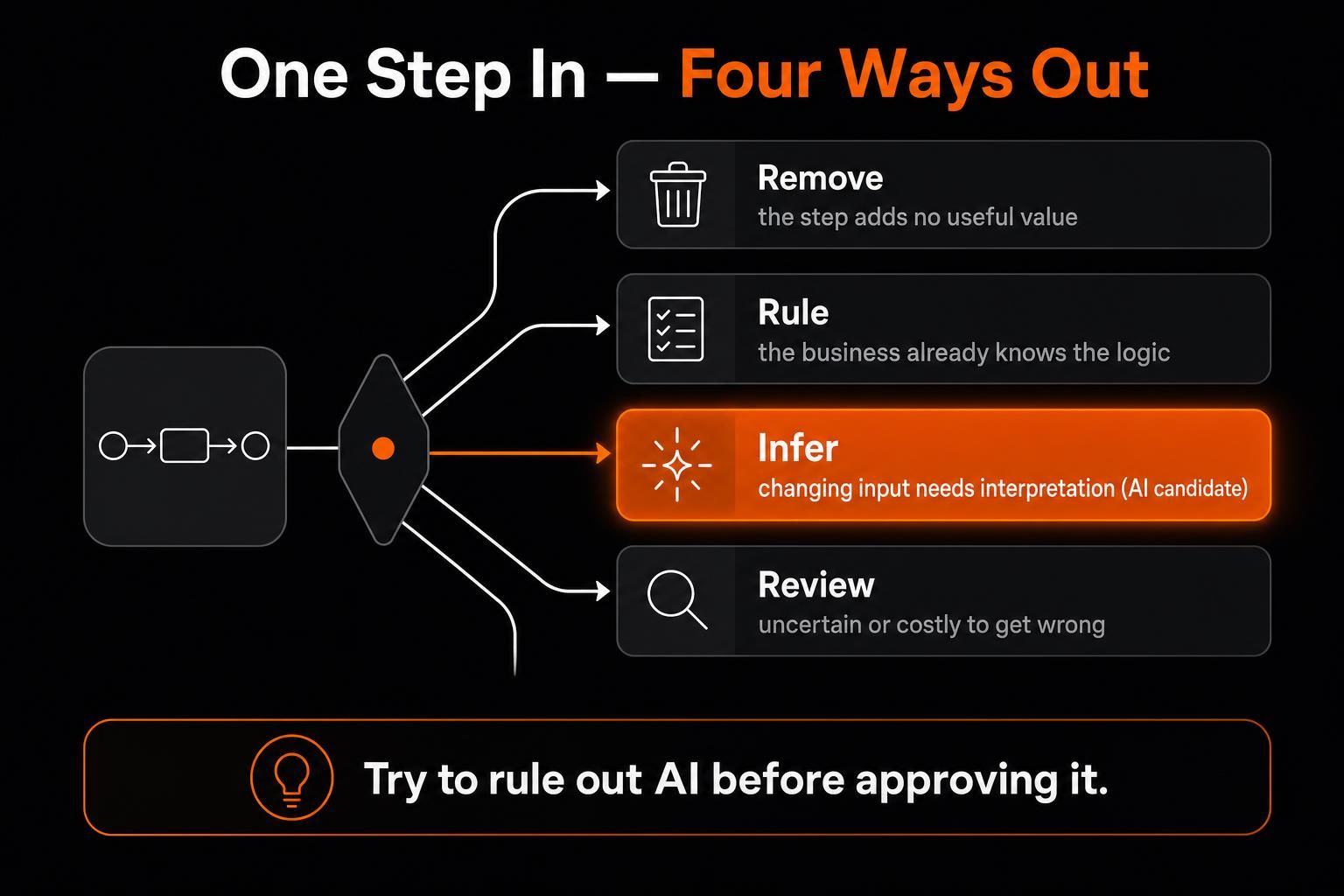
Once the process is visible, try to rule out AI before approving it.
Most steps fall into four useful groups.
Remove
The step adds no useful value.
Duplicate entry, outdated approvals, repeated checks, and old workarounds belong here.
Rule
The business already knows the correct logic.
Rachel’s process has several examples:
Is the budget code present?
Does the vendor already exist?
Is the request above $5,000?
Has the required security check been completed?
A workflow rule, API, script, database check, or RPA bot can handle this work.
There is little reason to ask a model to reason about an answer the business has already defined.
Infer
The process cannot continue until someone makes sense of changing information.
Employees describe why they need software in free text. Some requests are one sentence; others run for several paragraphs and mix client deadlines, failed tools, data-sharing limits, and migration plans.
That is a stronger AI candidate.
Review
The case is uncertain, hard to check, or costly to get wrong.
The review may involve an unusual contract, conflicting records, sensitive customer data, or an action that is difficult to reverse.
Use the route that fits the work, even when that means less automation.
Define the Output Before You Ask AI to Read the Input
Before the model reads anything, decide what the next step needs back. A prompt like “Read this request and summarize it” leaves too much undefined.
Rachel’s process might require:
request type
team
budget owner
monthly cost
existing alternative checked
sensitive data involved
deadline
missing information
status
One request could become:
Request type: Design software
Team: Product design
Budget owner: Product lead
Monthly cost: $180
Existing alternative checked: Yes
Sensitive data involved: No
Deadline: September 15
Missing information: None
Status: Ready for rule checks
Another might return:
Request type: Unclear
Team: Not provided
Budget owner: Not provided
Monthly cost: $4,800
Existing alternative checked: Not confirmed
Sensitive data involved: Unclear
Deadline: Not provided
Missing information: Team, budget owner, existing alternative check, whether sensitive data is involved, deadline
Status: Review required
The second result is useful because it keeps uncertainty visible. A polished summary can sound complete while hiding a missing fact that matters. Missing fields, conflicting evidence, and unconfirmed facts should remain explicit in the output.
Keep the output consistent enough for the next step, even when the input varies.
Check Whether AI Really Deserves the Step
I would test a possible AI step in three ways.
How much does the input vary?
A six-field form leaves little to interpret.
Contracts from different suppliers, customer emails, images, and mixed documents can vary much more in form and meaning.
Can the result be checked quickly?
Extracting a vendor name and contract date is easy to compare with the source.
Deciding whether a strategic customer deserves a pricing exception is harder. A reviewer may need to repeat much of the original reasoning.
What happens if it is wrong?
A bad internal label may cost a few minutes.
A bad payment, access change, or customer promise can create a larger problem.
More variable input can make AI useful. Hard-to-check or high-impact results need tighter limits or human review.
A Real Process Shows Why the Mix Matters
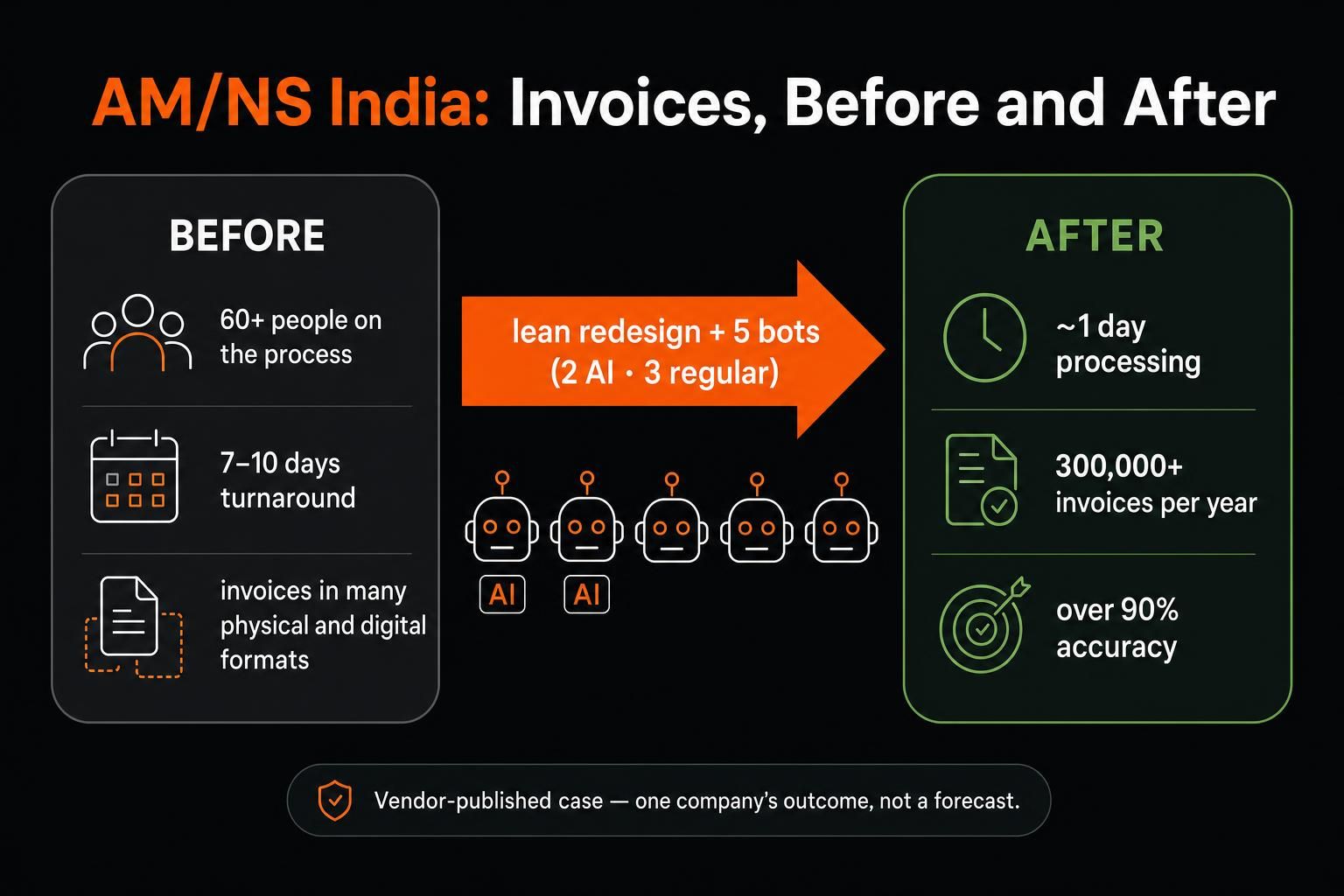
AM/NS India gives us a useful end-to-end example.
Before its invoice redesign, the company reported that more than 60 people worked on the process and invoice turnaround took about seven to ten days. Its invoices also arrived in different digital and physical formats.
Rajesh Chitti, who led RPA work for the company, says the team used lean process principles to remove redundant and non-value steps while restructuring the workflow.
The redesigned process used five bots, including two AI bots and three regular bots. The company reports processing more than 300,000 invoices each year with accuracy above 90%. Processing time fell to about one day.
Because these results come from a vendor-published customer story, treat them as one company’s outcome rather than a forecast for another business.
The useful lesson is in the mix: variable invoice data needed interpretation, structured checks stayed rule-based, and the team removed waste before either type of automation took over.
Design the Review Boundary Before You Scale
A normal route is only part of the process.
Before allowing more cases to move through on their own, define the conditions that must stop them.
A review rule might cover:
missing evidence
conflicting records
an unsupported input type
a high-value transaction
a sensitive customer impact
an answer that is hard to verify
a policy threshold set by the business
A model’s confidence score does not need to set that boundary. If every purchase above $20,000 needs approval, keep the threshold as a clear business rule.
The handoff needs just as much thought.
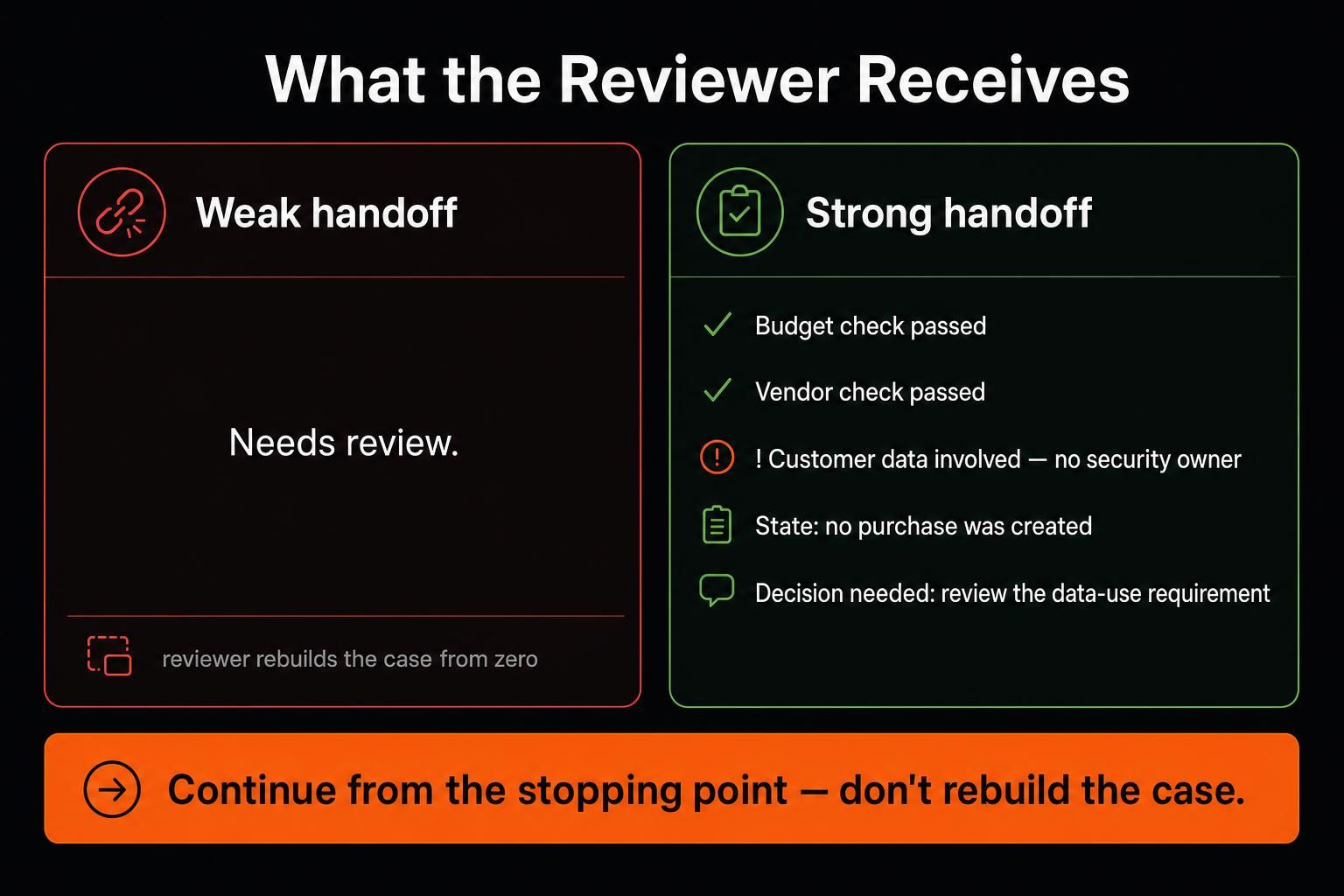
A weak review item says:
Needs review.
A stronger one says:
Budget and vendor checks passed. The request involves customer data, but no security owner was provided. No purchase was created. Review the data-use requirement and choose the next route.
The reviewer can continue from the stopping point instead of rebuilding the case.
Redesign the Human Work That Remains
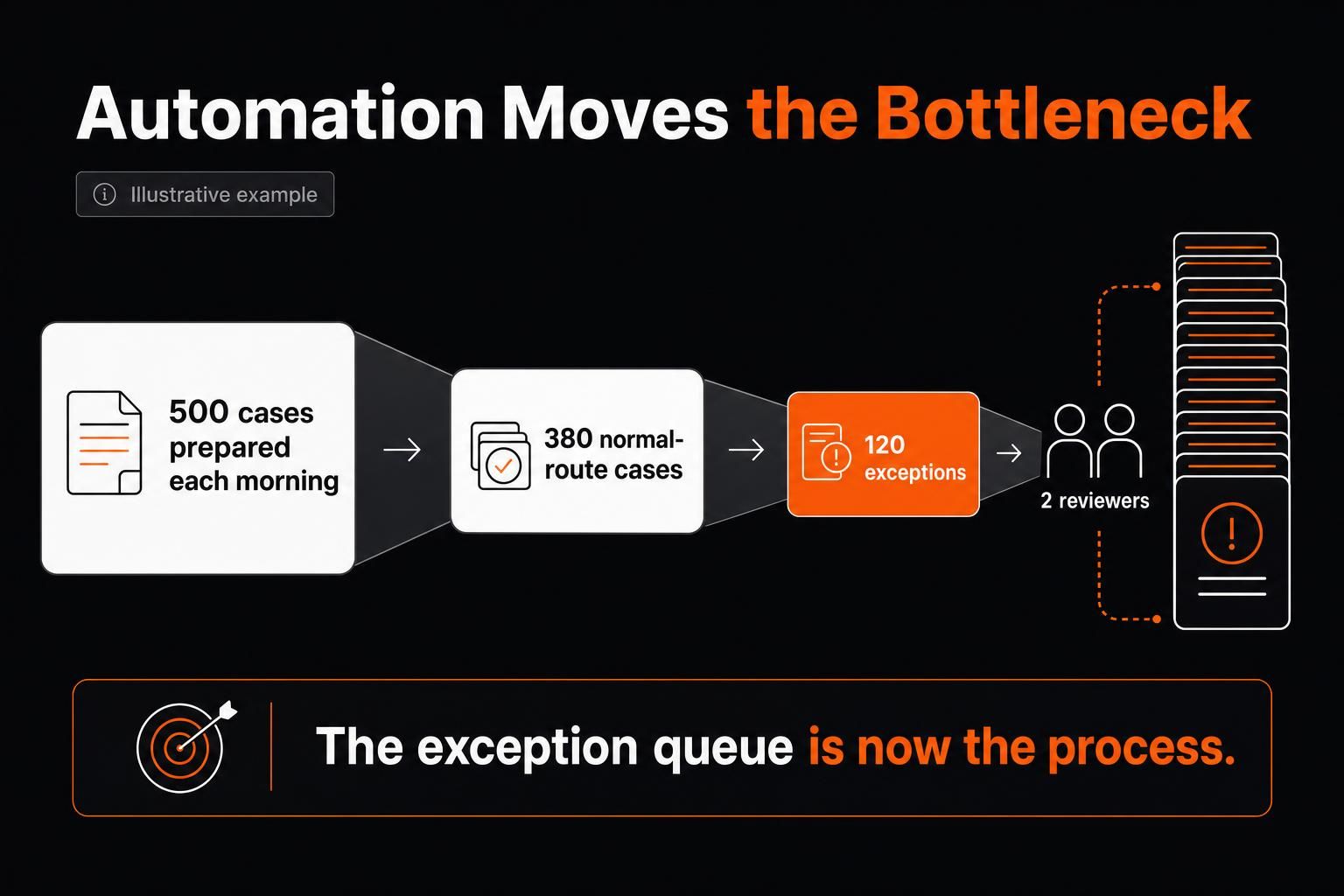
Automation can shift the bottleneck to another part of the process.
Imagine a system that prepares 500 cases each morning but sends 120 exceptions to two reviewers. Even with a fast AI step, those exceptions can still create a long queue.
Define the remaining human work with care. Give exceptions an owner and a clear decision. Send the evidence with the case. If the same exception keeps returning, ask whether the process needs a new rule or a better intake field.
Rachel’s team sees the same shift.
After removing the routine approval and improving intake, normal requests move faster. Reviewers now spend more of their time on unusual contract terms and data-risk questions.
That can be a better use of their time, but only if the new work has a clear owner and manageable volume.
Measure the Process From the Baseline
Record where you started before changing the workflow.
For her baseline, Rachel records:
120 requests per month
2.3-day average cycle time
22 minutes of active handling per request
review rate
rework rate
requests returned for missing information
Rachel’s numbers show why handling time and cycle time both matter. A typical request uses 22 minutes of active staff time but takes 2.3 days to reach a decision. Cutting ten minutes of reading would not fix a day-long approval queue.
Judge success at the process level. Useful measures include straight-through processing rate, cycle time, throughput, exception rate, accuracy, error rate, and cost per transaction. Then connect them to the business KPI the workflow is meant to change.
Treat saved hours carefully too. Ten staff hours freed by automation are not automatically ten hours of payroll savings. Record whether that capacity became more volume, better service, less overtime, or higher-value work.
Keep Watching After Launch
A process that works in a pilot will meet new cases later.
Documents, policies, customer language, and source fields can all change after launch. A rare exception may become common.
That is why monitoring continues after launch. Deployed AI systems can face performance degradation, drift, fragmented logging, and the difficulty of scaling human monitoring as AI use expands. Controlled testing cannot cover every condition a live system will meet.
For a business process, watch practical signals:
exception rate
correction rate
review time
failed rules
new input types
repeated manual overrides
If the exception rate rises, do not jump straight to a new model. Check whether the inputs changed, a rule went stale, or the review boundary no longer fits the work. Sometimes the process itself needs another redesign.
When MoClaw Makes Sense
MoClaw becomes useful after the process has been defined and one part needs an ongoing AI work environment.
Its AI Cloud Computer provides a private cloud machine with a filesystem, shell, browser, and persistent state. Files, installed tools, and browser sessions can stay available across sessions. Its Cron and Schedules feature can run recurring prompts and workflows in the cloud.
Consider Jordan, a vendor manager at a fictional 60-person startup. Their team reviews 35 supplier renewals each month.
The process is already defined. The team knows which suppliers are active, when they renew, what evidence is required, and which changes need approval.
A script can check dates and fixed fields.
Some renewals are harder. A supplier may publish new terms in a PDF or change information on a public page. Those updates need reading before the team knows whether anything important changed.
MoClaw could keep approved files in one workspace, open permitted pages, compare new material with prior records, and prepare the changed cases for Jordan’s review on a schedule.
The desired outcome is simple: routine renewals stay routine, while material changes reach Jordan with the relevant evidence already gathered.
Their company still decides which sources count, what creates an exception, and who can approve a renewal.
There is also a clear non-fit.
If the job is only to copy one clean CSV into a database every night using a fixed mapping, a normal scheduled script may be the better choice.
MoClaw becomes more useful when recurring work also needs files, browser access, tools, saved state, or interpretation.
AI Business Process Automation Checklist
Before building, ask:
What exact outcome marks the process as complete?
How does the process actually run today?
Where does work wait, repeat, or change owners?
Which steps should disappear?
Which steps already have exact rules?
Where does changing information need interpretation?
What exact facts should the AI step return?
How will it show missing or conflicting information?
How easily can the result be checked?
What happens if the result is wrong?
Which cases can continue without review?
What rule or threshold sends a case to a person?
What should that person receive, and who owns the decision?
Which baseline measures will show whether the redesign worked?
Would a simpler tool produce the same useful result?
Frequently Asked Questions
How should an AI-automated process handle sensitive data?
Give the AI step only the data it needs. Use least-privilege access, restrict data sources, and sanitize sensitive inputs where appropriate. The business still decides what data the workflow is allowed to process and who can see the output.
What should you retest when the model, prompt, or workflow changes?
Re-run representative normal cases, difficult cases, and cases that should stop for review. Check the full workflow, not just the model’s wording: routing, tool calls, handoffs, and downstream actions can regress too. Repeat the evaluation after model changes, major knowledge updates, new integrations, and production incidents.
What should an AI-automated process log?
Keep enough information to reconstruct an important case: the source or input, rule checks, AI output, tool actions, review or override, and final outcome. The exact record depends on the process and its risk, but logging system processes and outcomes supports auditability.
How much historical data do you need?
It depends on the method.
A generative AI workflow may use instructions and examples without training a custom model. A custom predictive model may need much more representative data.
Build Around the Outcome
A good AI business process should still make sense if you hide the model names. The workflow has a clear finish line, simple logic stays in ordinary software, and uncertain cases have an owner. AI belongs where changing information must be interpreted before the work can continue.
After launch, judge the redesign by cycle time, exceptions, corrections, and the quality of the final outcome. If one well-placed AI step solves the real constraint, there is no reason to add another.
Continue Reading
More Guide
Skill Zoo: Reusable Agent Skills for AI Workflows

Hunyuan 3D as an Agent Tool for 3D Asset Workflows

Automating Fast-Changing Data Needs Review

AI Browser Automation Tool: 2026 Guide

How AI Automation Evolved: From Zapier to Adaptive Agents

AI Token Consumption: Count It, Then Cut It
The MoClaw editorial team writes about workflow automation, AI agents, and the tools we build. Default byline for industry overviews, listicles, and collaborative pieces.
Ready to put this into practice?
MoClaw runs browser tasks, research, and schedules automatically. Try it free.
References: What Is Business Process Automation? · What Is Process Mining? · The State of AI: How Organizations Are Rewiring to Capture Value · AM/NS India Invoice Processing Case · Core Business Process Transformation Pattern · Challenges to the Monitoring of Deployed AI Systems · OWASP Sensitive Information Disclosure · Microsoft Agent Evaluation Checklist · NIST AI RMF Playbook – Measure