AI Token Consumption: Count It, Then Cut It

Learn what AI token consumption includes across prompts, files, tools, retries, and model calls, and how to reduce cost without weakening the result.
Table of Contents
At Care Access, where Josh Brandoff leads Applied Machine Learning & Analytics, a production medical-record workflow handled 300 to more than 500 records each day. Much of each record stayed the same while the questions changed.
After that stable content was cached, reported Amazon Bedrock costs fell by 86%. Processing time per record fell by 66%, and the team saved four to eight or more hours of processing time each day.
Those results belong to one production system. The lesson reaches beyond caching: to understand AI token consumption, follow the full path from source material to accepted output.
Track tokens per accepted result across the complete task. That measure keeps usage tied to work that still passes review.
Key Takeaways
One visible request can create several model calls, tool actions, and retries.
Input, output, caching, reasoning, and context limits answer different questions about a run.
Token volume and cost can move in different directions because rates vary.
Reduce usage by changing one measured cause, rerunning the same task, and checking the accepted result.
Input vs. Output Tokens: What AI Token Consumption Measures
AI token consumption covers the input and output used across the model calls needed to finish a task. Depending on the provider, usage records may also break out cached input and reasoning as separate details.
A token is a model-specific piece of content. It may be a full word, part of a word, punctuation, a space, or a few characters. For rough English planning, one token is often about four characters or three-quarters of a word. The count can change with the model, language, code, numbers, and formatting.
Input tokens include far more than the typed prompt. A request may carry system rules, selected history, file excerpts, examples, tool definitions, and results from an earlier step.
Output tokens cover content the model creates. That may include the final answer, structured data, code, tool arguments, or other generated work. Some providers also report reasoning used before the visible answer. That figure records usage; it does not reveal a private reasoning transcript.
Cached input is repeated content processed through a cache. It still belongs to the request and may occupy active context. Reuse can lower its price or processing time without making the content disappear.
A context window answers a separate question. It sets the active capacity of one model call. A complete task can use far more tokens across several calls than any single context window can hold.
Tool fees, storage, and general compute are separate from the token total. They can raise the technical cost of a task without becoming token categories.
One Request Can Become a Full Task
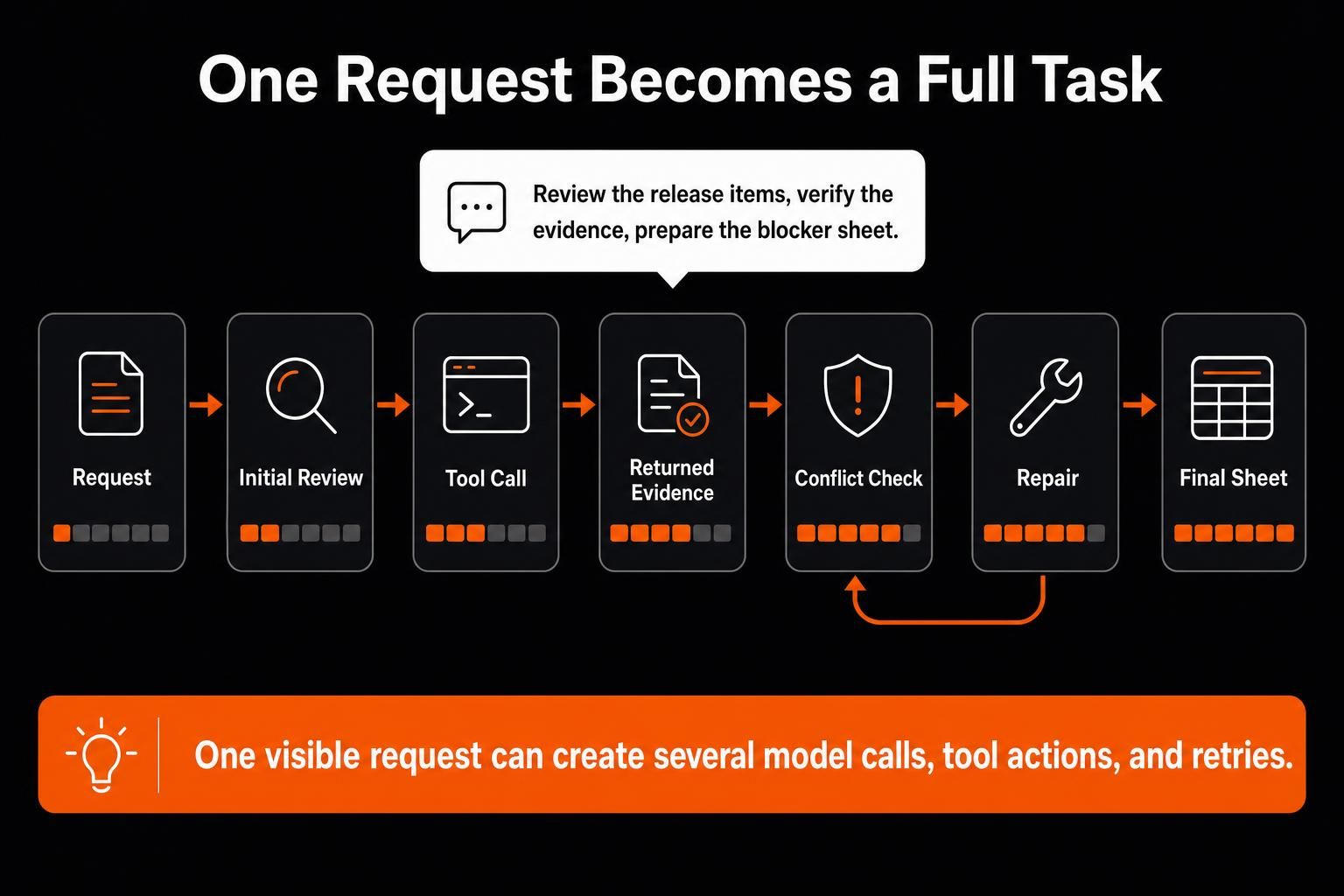
Consider Olivia, an illustrative composite release manager. Her team is preparing a release review for 58 product changes.
The source pack includes issue records, test results, screenshots, support notes, and documentation checks. Olivia needs one blocker sheet with five fields:
Change ID
Test and documentation status
Evidence for each status
Open blocker and owner
Human decision when the evidence is incomplete
Her visible request is short:
Review the release items, verify the available evidence, and prepare the blocker sheet.
The work may still follow this path:
Request → Initial Review → Tool Call → Returned Evidence → Conflict Check → Repair → Final Sheet
The first call receives the review rules, output format, and selected records. A browser tool checks a live help page. With a client-run tool, the model requests an action. The application performs it and returns the result in another request.
That round trip adds a call. Server-run tools can execute inside the provider’s loop and may carry separate usage fees.
One page fails, so a repair call receives the error and unresolved item. The final call builds the blocker sheet from approved evidence. Olivia sees one task; the provider may record several calls and several kinds of usage.
Read the Complete Task Receipt
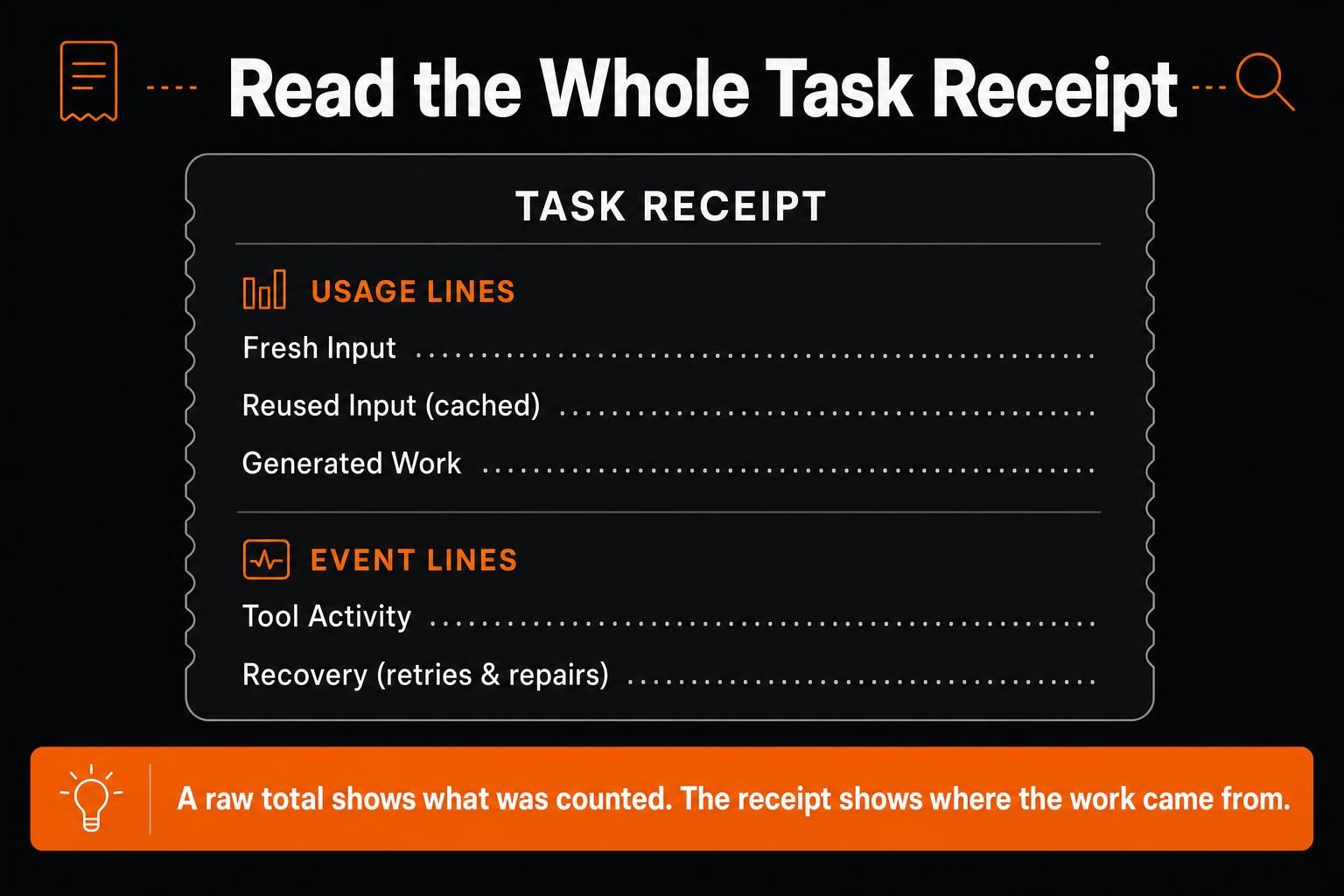
A raw total shows how much was counted. I use a “Task Receipt” to show where that usage came from.
I split the Task Receipt into two layers:
Fresh Input, Reused Input, and Generated Work are usage lines.
Tool Activity and Recovery are events that can create more tokens or add separate charges.
| Receipt Line | What to Record | Common Cause of Growth |
|---|---|---|
| Fresh Input | New rules, selected history, file excerpts, retrieved text, and returned tool results | Broad retrieval, repeated setup, or oversized returns |
| Reused Input | Cached instructions, schemas, documents, examples, and tool definitions | Large stable prefixes reused across calls |
| Generated Work | Final prose, structured data, code, tool arguments, and reported reasoning | Broad outputs, high reasoning settings, or repeated drafts |
| Tool Activity | Tool requests, browser actions, screenshots, and returned evidence | Too many actions, billable tools, or verbose returns |
| Recovery | Retries, repair calls, repeated context, and escalation packets | Weak success rules or unresolved failures |
That split prevents several accounting mistakes. Cached input should stay visible because discounted processing does not remove it from the task. Tool cost and tool-related tokens also need separate treatment. A browser action may have its own fee, while the page it returns can become fresh input in the next call.
Reasoning should not be added twice. Some usage records include it inside output and expose it only as a detail. The provider’s schema controls the final math.
Stored files become model input only when their content enters a request. A workflow can parse a 200 MB CSV and send only 40 uncertain rows to the model. In that setup, the full file never crosses the model boundary.
Where the Task Receipt Finds Waste
Olivia’s receipt becomes useful when the run is split by function. A script validates IDs, removes duplicates, and narrows 58 records to nine uncertain cases before any model call begins. Only those nine records need judgment.
The browser return reveals the first clear source of waste. It contains a full page with menus, old release notes, and legal text. The next decision needs only the current status, date, and source link.
A failed page creates another warning. The repair receives all 58 records again, even though it needs one failed item, a compact error, and the missing evidence.
Approved findings then feed the blocker sheet. I audit that sheet in reverse: Which evidence supports each row? Which call used it? Which repeated work never changed the result?
The increase now has three causes: too much source material in the first call, browser output that inflated later input, and a broad repair that repeated work the final result did not need.
Calculate AI Token Cost Without Counting Twice
Keep token charges separate from nearby operating costs:
Model Token Charges = Ordinary-input charges + Cache-write charges + Cache-read charges + Output charges across all calls
Technical Task Cost = Model Token Charges + Separately billed tool, compute, and storage fees
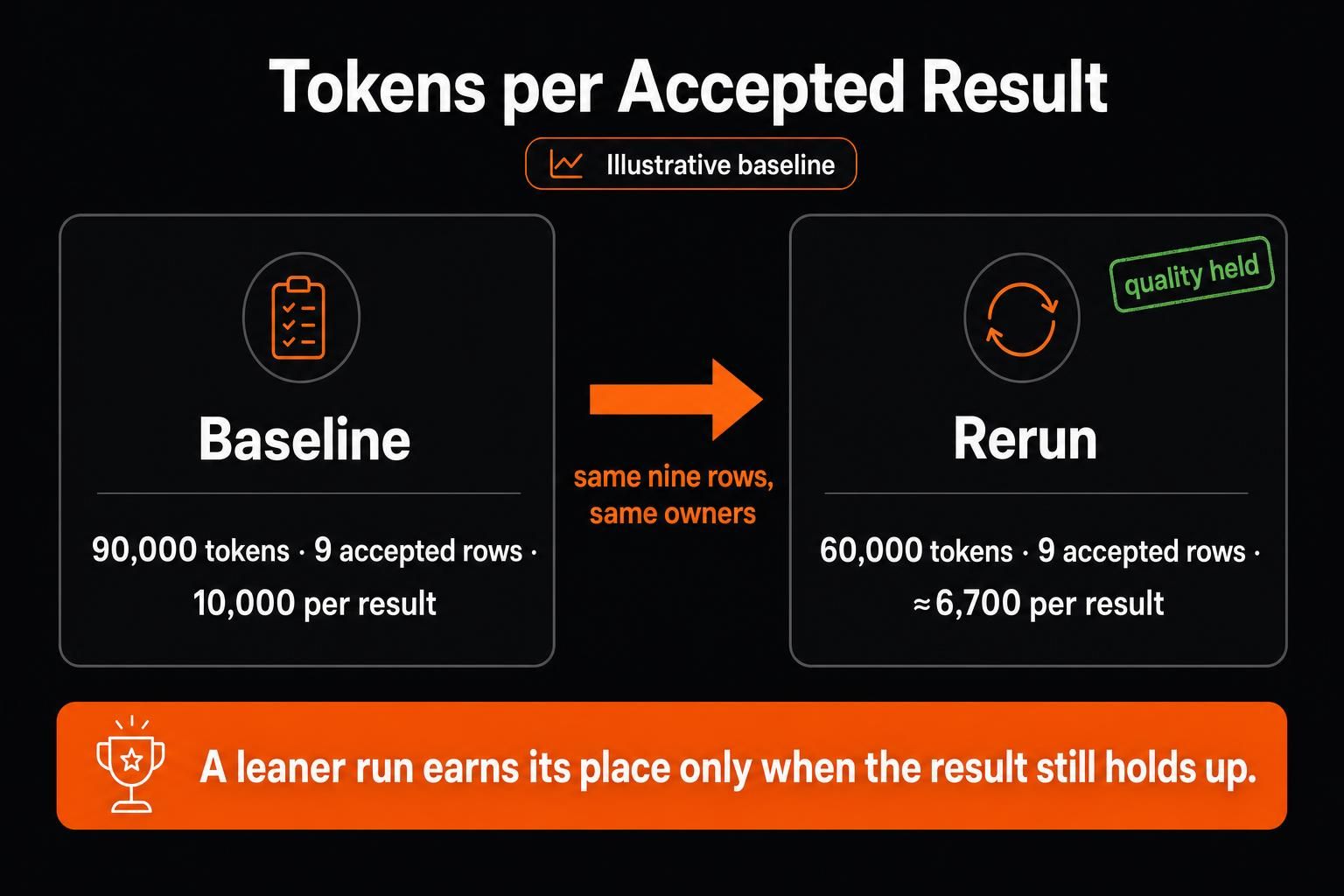
The fields and rates depend on the provider and model. Take Claude Haiku 4.5 as an example: ordinary input costs $1 per million tokens, five-minute cache writes $1.25, cache reads $0.10, and output $5.
40,000 ordinary input tokens: $0.040
20,000 cache-write tokens: $0.025
60,000 cache-read tokens: $0.006
13,000 output tokens: $0.065
Total model cost: $0.136
The cache-read field contains the most tokens and creates the smallest charge. Output contains fewer tokens and creates almost half the model cost. Token volume and cost share therefore need separate analysis.
Before accepting the calculation, check how the provider reports usage. Cached tokens may already roll into a broader input total, while output may already include reasoning.
Keep tool fees separate from the tool result. The fee pays for the action. Returned content may create fresh input in a later call.
Human review, setup, maintenance, and business value belong in a broader AI agent ROI calculation.
Reduce Usage Without Weakening the Result
A lower token total has little value when the output loses evidence or creates more human repair. Start with a run that already works, then improve one cause at a time.
Call count is the first number I inspect. Several moderate calls often explain a high total better than one visible prompt.
Scale exposes waste that a small test can hide. A rule block may be reasonable once and expensive when repeated for every item. Batching, caching, or fixed preprocessing can keep that setup from multiplying.
Establish a Working Baseline
Olivia’s baseline must produce the correct blocker rows, source links, and owners. Record the source pack, call count, usage fields, failures, latency, cost, and human review needed to accept the sheet.
Measure the full task, then divide its provider-reported tokens by the number of outputs that pass the acceptance standard:
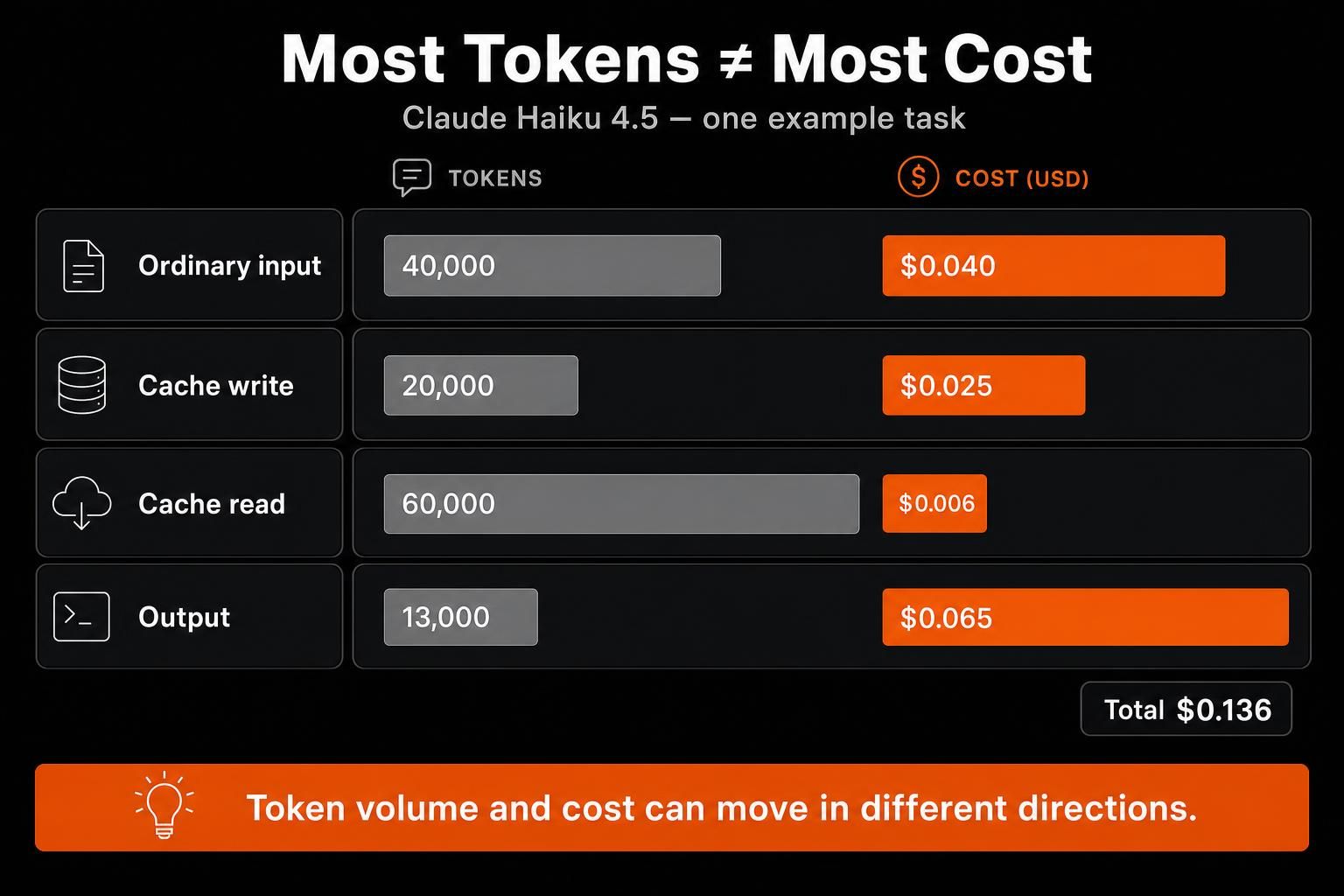
Tokens per Accepted Result = Complete Task Tokens ÷ Accepted Results
This measure is most useful when each result has similar scope. For mixed work, group comparable outputs before using it.
Change One Known Cause
The right control depends on where the receipt grew:
Context: Select stronger passages and remove stale material after it has served its purpose.
Reuse: Cache stable instructions and batch items that follow the same rules.
Tools: Return smaller results and stop repeated failures at a clear limit.
Routing and State: Use a cheaper model for narrow work and carry forward confirmed evidence, open questions, failed paths, and the next action.
Before I approve an expensive call, I check four things: the decision it must make, the evidence it needs, the form of its return, and the condition that should stop it.
A cheaper model can lower the cost of a wasteful loop without fixing the loop. Diagnosis comes first, routing follows.
Rerun, Then Keep or Revert
Use the same release records and acceptance rules. Keep the model and tool path stable unless one of them is the variable under test.
In Olivia’s illustrative baseline, the complete task uses 90,000 tokens and produces nine accepted blocker rows. That equals 10,000 tokens per accepted result. Better source selection and a smaller browser contract cut the rerun to 60,000 tokens. The same nine rows, source links, and owners remain, so the rate falls to about 6,700 tokens per accepted result.
The figures are illustrative, not production results. They also expose a point that call count alone can miss: four large calls may use more tokens than six small ones.
Keep the edit when the accepted result remains complete, and review does not become harder. Revert it when the saving comes from missing evidence, hidden uncertainty, or more human repair.
I would not cut a large token category until I knew what useful work it was carrying.
Four Limits That Often Get Mixed
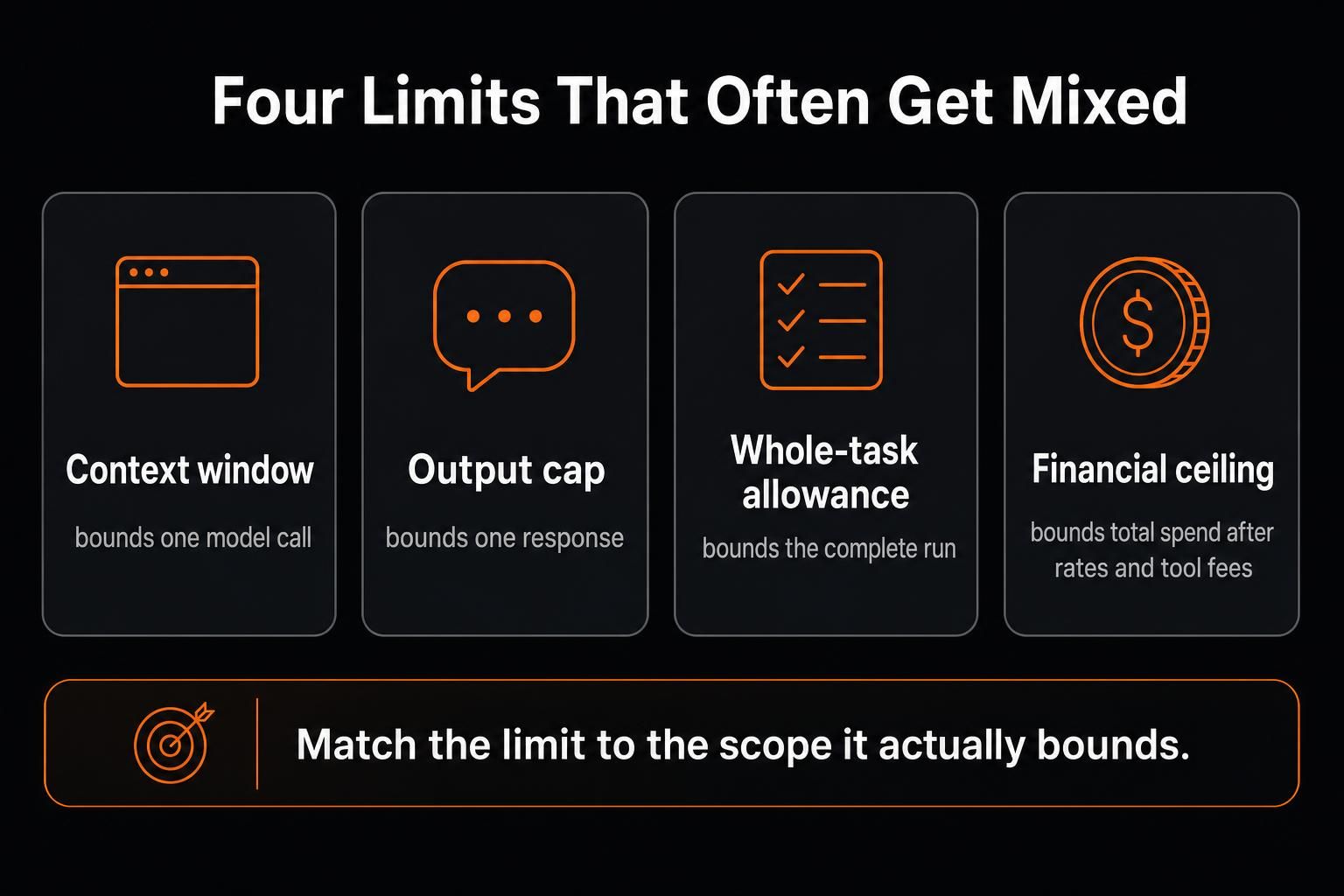
Context window: Active capacity in one model call
Output cap: Maximum generated content in one response
Whole-task allowance: Planned usage across the complete run
Financial ceiling: Maximum cost after token rates and tool fees
An output cap governs one response, while later calls can keep growing. A larger context window gives the model more room, though relevance still depends on what enters it. Whole-task limits work best when they reserve enough capacity for a clear exit.
That exit should preserve completed work, checked sources, unresolved items, failed tools, and the next owner. For longer runs, a compact state can carry confirmed evidence, uncertainty, failed paths, and next actions. The next call can use that record instead of replaying a growing transcript.
Keep the Task Beside Its Evidence
Provider usage and billing records remain the source of truth for model-token usage and charges. They rarely explain which file, browser result, or failed step made those tokens necessary.
MoClaw gives the surrounding task a persistent cloud computer with files, shell tools, browser sessions, and saved state. Olivia can keep source exports, scripts, browser evidence, failed items, and final sheets in one working environment across chats.
That continuity makes the Task Receipt easier to investigate. A scheduled job can reuse the environment, retain its run history, and apply a per-job budget cap. Files remain when the cloud computer sleeps, while ordinary running processes stop.
Scheduled jobs or supported long-running processes handle work that must resume later, so a task that spans hours does not restart its context from scratch.
Context choices and savings still depend on the workflow. MoClaw keeps the task and its evidence close enough to trace what changed.
Frequently Asked Questions
Can AI Token Consumption Be Estimated Before a Task Runs?
Known input can often be counted before a call. Output, tool results, reasoning, and retries remain less predictable. Use a measured range from comparable completed tasks instead of promising one exact total.
Do Images, Audio, and Screenshots Affect Token Usage?
Yes. Providers may convert multimodal input into tokens or another billable unit. The method depends on the model, resolution, duration, and provider, so check the relevant usage record.
Are Tool Credits the Same as API Tokens?
Usually, no. Credits are product-specific units that may cover models, browsing, images, storage, or other services. A direct conversion exists only when the platform publishes one.
Should Raw Token Totals Be Compared Across Models?
Use caution. Different models can split the same content into different token counts. Their rates for input, caching, reasoning, and output can also differ. Compare cost and accepted-result quality alongside the raw total.
Make the Total Explain the Work
A token total becomes useful when it explains the path from evidence to accepted work.
Trace the complete run and find the step that grew. Change one cause, then check the same acceptance standard again. A leaner workflow earns its place when the result still holds up under review.
Continue Reading
More Guide
AI Document Automation: What Really Needs AI?

AI Business Process Automation, Step by Step

What Is DeepSeek Harness (DSH)?

Qwen 3.8 27B Overthinking: Turn Down xhigh

DeepSeek Vision API: What It Sees and Misses

Claude Code Voice Mode: What /voice Can't Do
The MoClaw editorial team writes about workflow automation, AI agents, and the tools we build. Default byline for industry overviews, listicles, and collaborative pieces.
Ready to put this into practice?
MoClaw runs browser tasks, research, and schedules automatically. Try it free.
References: How Care Access cut Bedrock costs 86% with prompt caching - AWS · What are tokens and how to count them - OpenAI · Anthropic - Tool Use · Anthropic - Pricing · Microsoft Research