AI Document Automation: What Really Needs AI?

Learn how AI document automation uses OCR, IDP, rules, document generation, human review, and agents, and how to choose the right layer for each step.
Table of Contents
A utility invoice looks predictable until hundreds of suppliers send it in hundreds of layouts. At Concentrix, principal architect Syed Rasheed’s team now handles more than 100,000 utility invoices each month. The files come from over 100 providers and more than 300 layouts. Its older setup had fallen to about 65–70% extraction accuracy as that mix grew. The newer flow averages about 96% and reached 99% in January 2026.
Yet the underlying business task stayed the same while the files changed.
That is the core challenge in AI document automation. A field moves, a scan gets worse, or a contract says the same thing in new words. Even after the right data is found, a person may need to check it, or another system may need to act on it.
The useful question is where AI removes real friction. Some steps need document intelligence, while others are safer and easier with rules, templates, or a person.
Key Takeaways
AI document automation can cover reading, extraction, validation, document generation, routing, and later business actions.
OCR helps with scans and images. Intelligent document processing fits better when fields, layouts, or document types vary.
Rules and templates still fit stable work, such as exact checks, approval limits, and approved wording.
Human review works best when it focuses on uncertain or high-impact results instead of every document.
A strong first project starts with real files, a clear finish line, and a few measures for exceptions, corrections, review time, and completed work.
What AI Document Automation Actually Covers
AI document automation uses AI with workflow software, rules, and other tools to reduce manual document work.
The file might be an invoice, contract, claim, purchase order, application, report, ID, or form. It may be read or classified, then have selected facts extracted and checked. From there, the flow can create another file, route an exception, update a system, or save the final record.
That makes the category broader than intelligent document processing, or IDP. IDP mainly scans, reads, classifies, extracts, and organizes useful information from documents. In a real business flow, that information often has somewhere else to go. Reference designs therefore separate extraction from validation, human correction, later workflow steps, and reporting.
Document generation belongs here too. Teams create contracts, statements of work, service agreements, letters, reports, and other recurring files from trusted data and reusable templates.
Document work moves in two directions: incoming files become usable data, while trusted data can become a new document.
Follow the Document From File to Action
I find it easier to map the work by following the file rather than starting with product names.
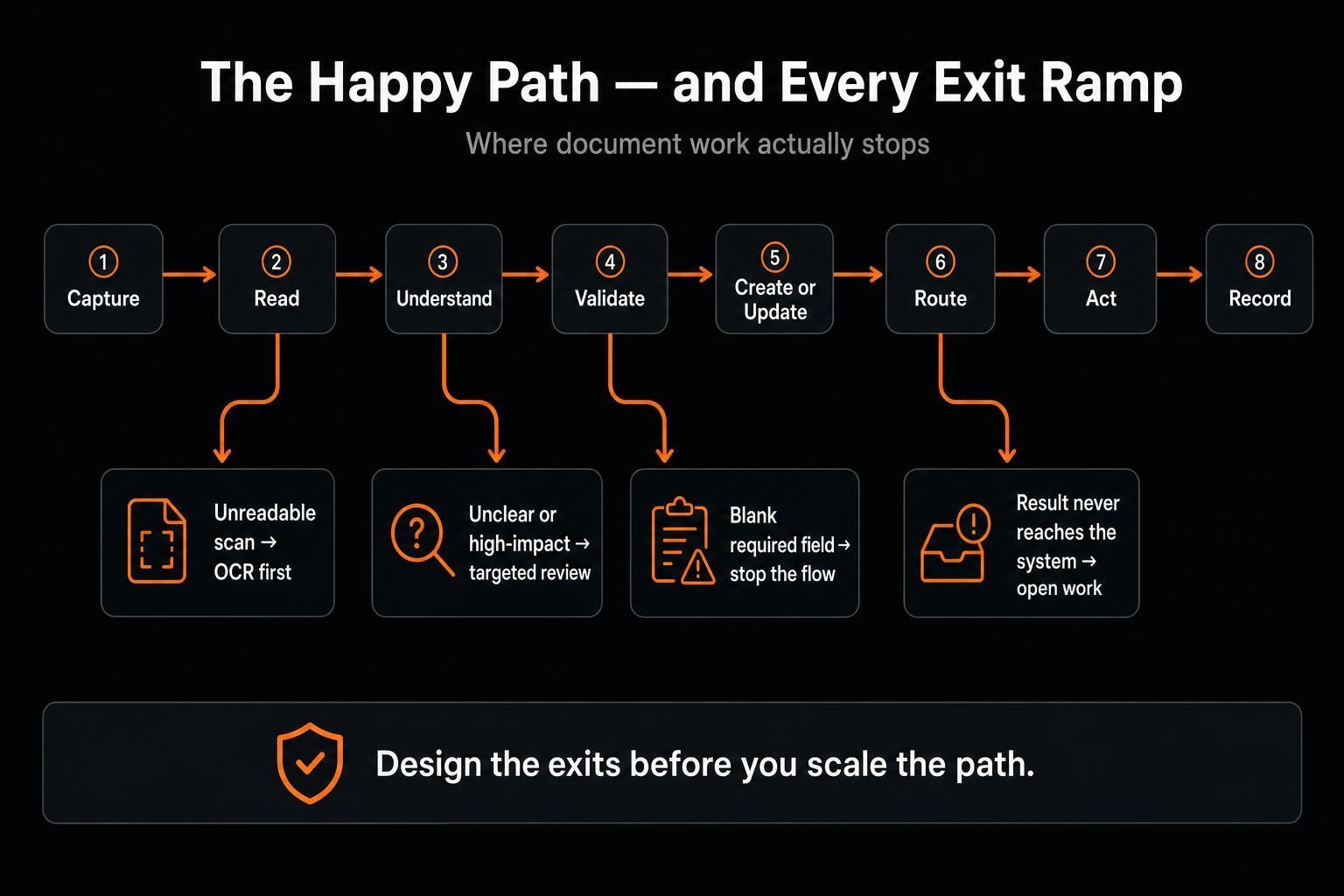
A document may arrive by email, form, scanner, shared drive, or API. A scan may need OCR so software can read the text. The next layer may classify the file and pull out the fields, tables, clauses, or facts the team needs.
Then comes validation. A purchase-order number may need to match the ERP before the file can move on. Blank required fields can stop the flow, while totals can be compared with line items or another trusted record. Unclear or high-impact cases can stop for review.
After that, the result may update a database, create a document, trigger approval, start another task, or go into storage. This is where document workflow automation matters: it connects the extracted result to the rest of the job.
A clean extraction that never reaches the right system is still unfinished work.
Where AI Actually Earns Its Place
Start with recent files before choosing a model. Twenty documents from one workflow can reveal a lot, especially when the sample includes the awkward files people already complain about.
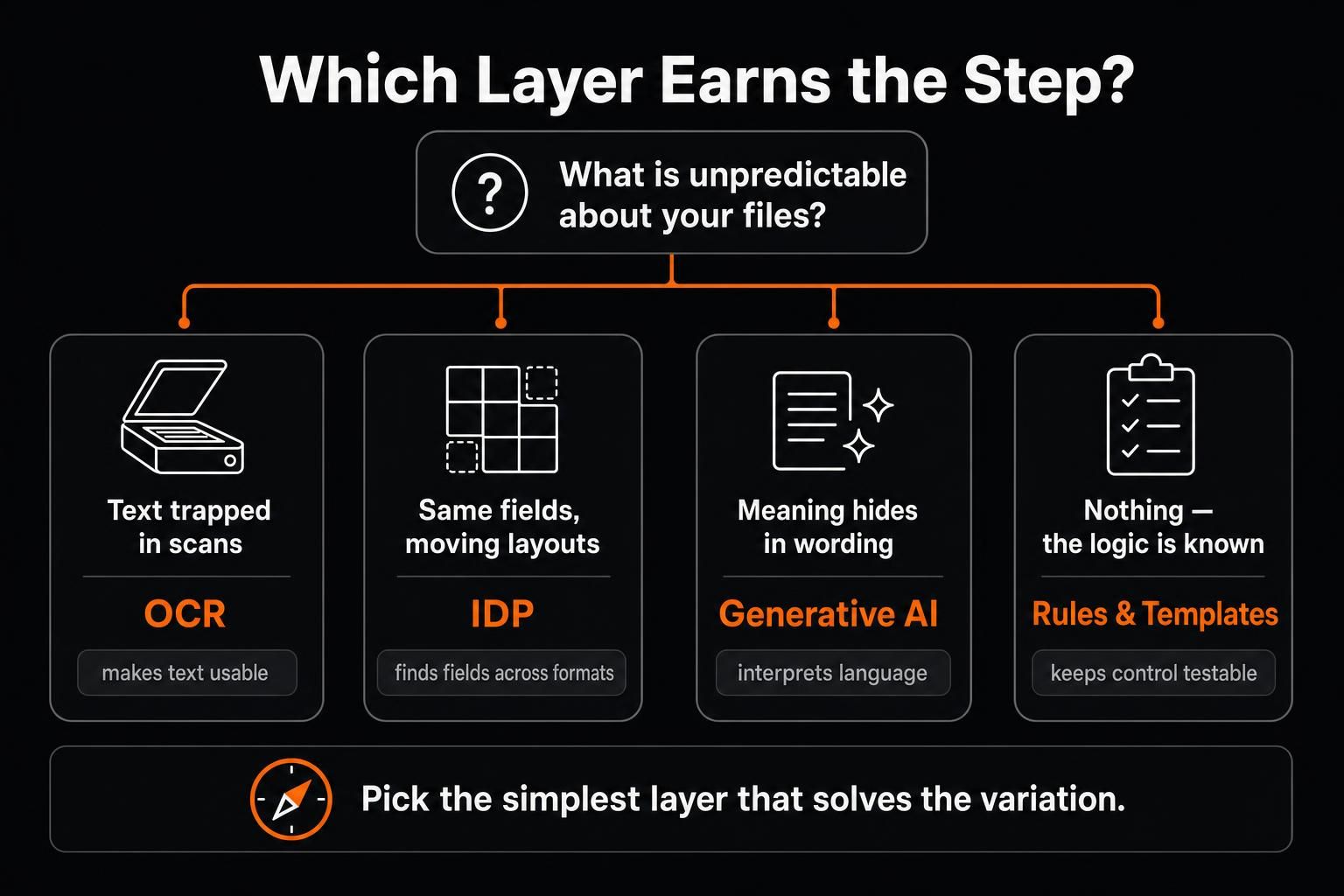
Look for the point where the files stop being predictable. A fixed digital form with six known fields may only need a parser and rules. The scanned version may need OCR first. When the same six fields move across many layouts, IDP can help. Loose language creates a different problem, and a generative model may be useful there.
Each layer solves a different kind of problem.
OCR helps when text is trapped in an image or scan. It makes the text usable by software, but the renewal date may still need interpretation.
IDP fits better when the team knows what information it needs, but the layout changes. In invoice automation, the targets may stay the same: supplier, invoice number, tax, total, and purchase-order number. The hard part is finding them across many vendor formats.
Generative AI becomes useful when language creates the uncertainty. The same renewal rule can appear in several forms. A long report may hide the answer across many pages. Keep the task narrow enough to check. “Find the renewal date, notice period, and any clause that changes the normal renewal rule” gives a reviewer a clear target.
Stable steps can remain explicit. Fixed approval limits, exact math, required fields, known routing paths, and approved clauses are easier to test when rules and templates stay in control.
Documents Move in Both Directions
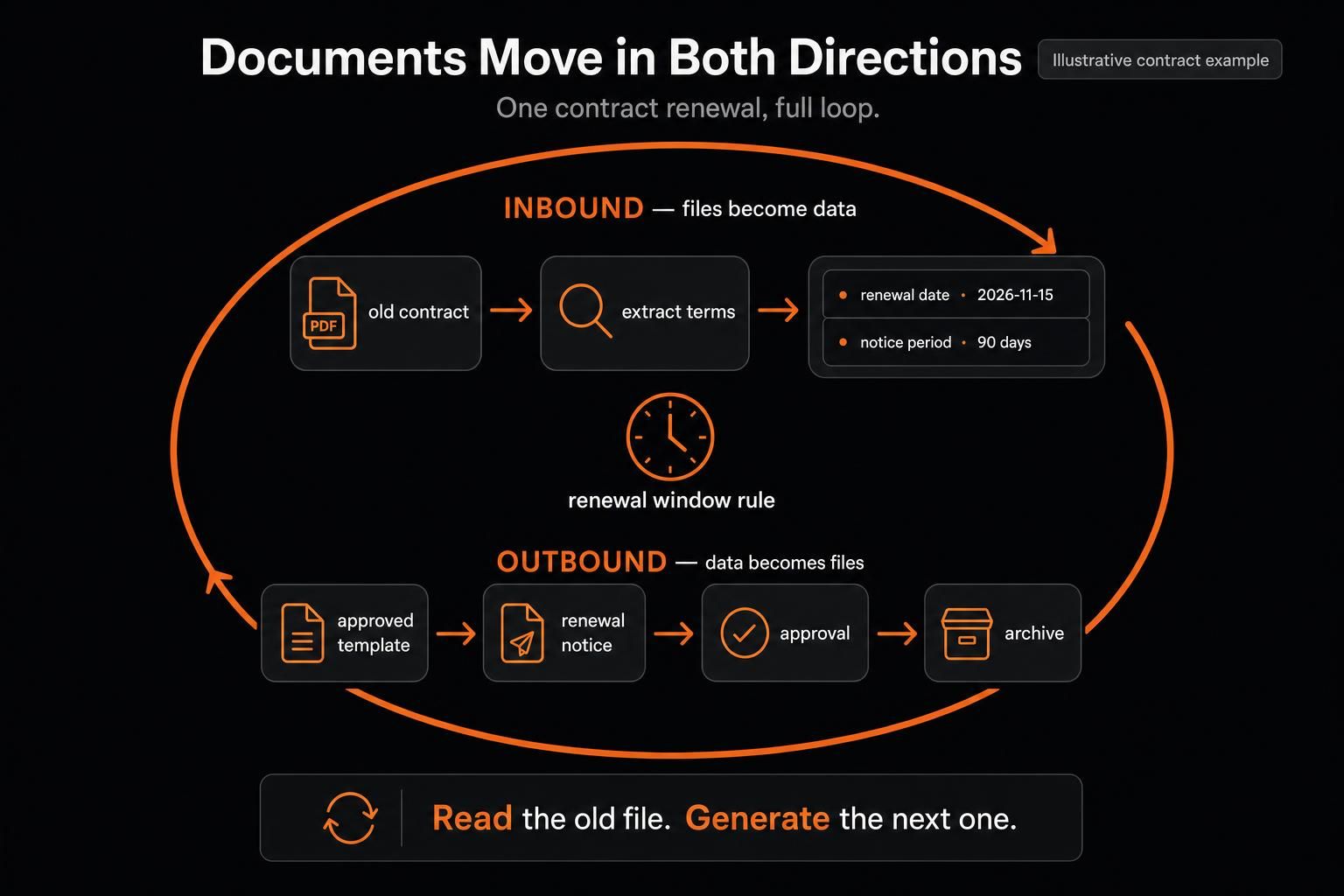
A lot of AI document processing starts with a file coming into the business. Document automation also covers files the business needs to create.
Some service agreements keep pages of approved wording while only names, dates, prices, and a few terms change. The same pattern appears in renewal notices and weekly reports: most of the structure stays fixed while a smaller part changes.
Document generation and document assembly handle much of this work. A template can keep exact content stable while trusted systems fill known fields. Generative AI can handle the smaller parts where flexible language adds value.
This keeps control close to the risk. In contract automation, approved clauses can stay fixed while names, dates, prices, or selected terms change. Generative AI may still help when notes from several sources need to become a short draft for review.
A contract renewal can connect both sides. The old contract is read and selected terms are extracted. A rule checks the renewal window, and an unclear clause goes to a person. Once the terms are confirmed, trusted data can fill a notice template before the file moves to approval or storage.
Human Review Should Be Targeted
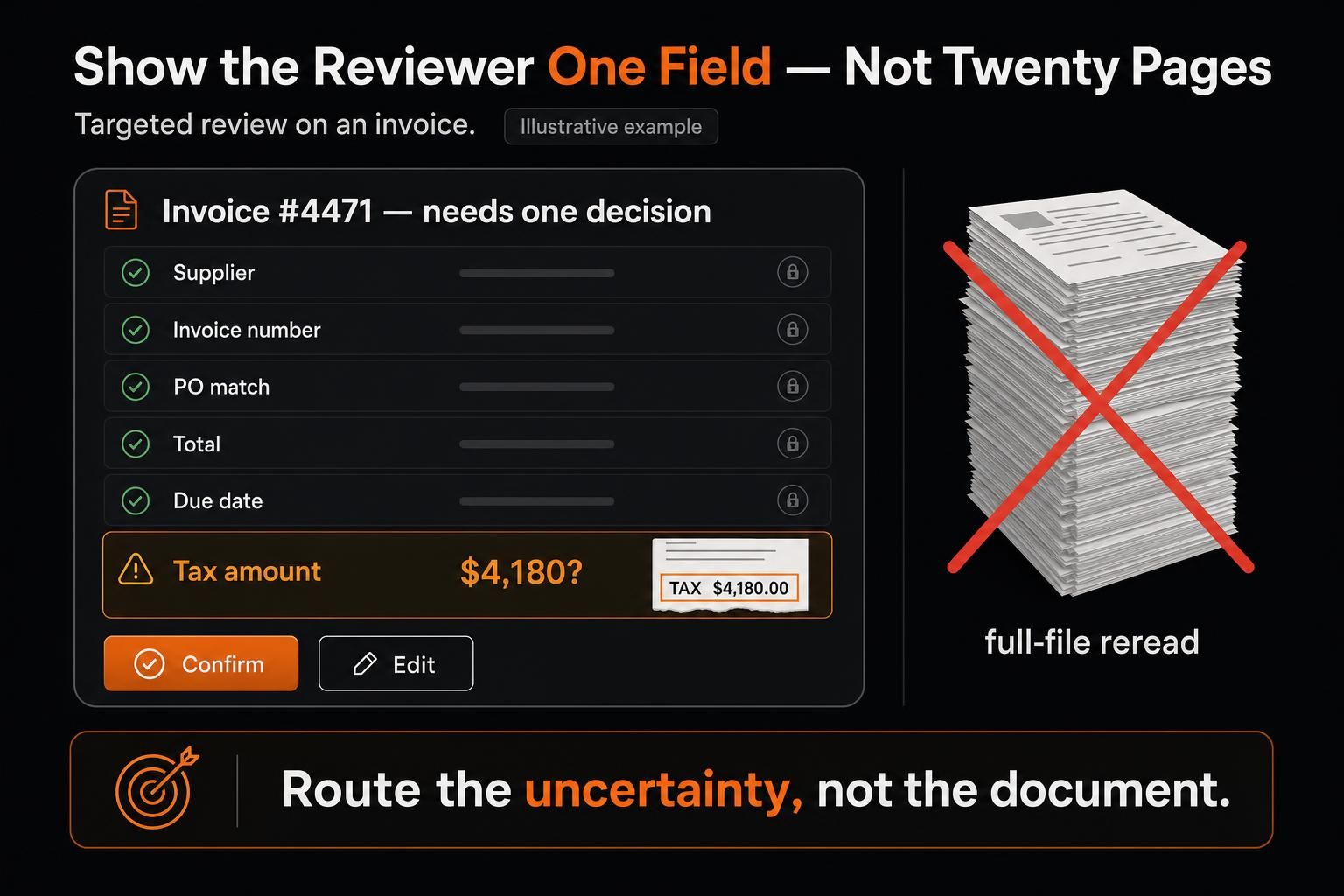
Human review can erase much of the gain if every uncertain result sends the whole file back to a person.
A better review step shows the narrow issue that needs attention. For an invoice, five fields may pass while the tax amount remains unclear. Show the reviewer that field, the extracted value, and the source area. On a 20-page contract, one doubtful date should not force a reread from page one.
Confidence scores can help route this work, but they do not prove a field is correct. Current Document AI guidance uses precision, recall, and F1 rather than one broad accuracy score. It also shows a tradeoff in thresholds. A higher threshold often improves precision but lowers recall, so more correct results can end up in review.
The review rule should match the field and the cost of an error. A draft summary can allow more uncertainty than a bank account number or a clause that changes a legal duty.
DentalXChange offers a useful check on this idea. CTO Navin Narayanan described an older, template-based OCR flow where up to 40% of forms needed extra review. Its newer document-processing system reports extraction accuracy of 98% or higher while cutting manual review to 1%.
KONE shows the next handoff. Lulu Zhang’s team uses an AI-supported flow that processes more than 54,000 service contracts each year. Extracted contract data is checked against SAP records. Mismatches go to an employee, and approved data returns to SAP to create or update the contract.
Both examples point to the same operational lesson: review should resolve the small set of cases the workflow cannot safely settle on its own.
Choose the First Workflow Before the Tool
A first project should be narrow enough that everyone can explain what “done” means.
Use five questions to test the fit.
Repetition: Does this document path happen often enough to matter?
Variation: What changes across real files: the scan, layout, wording, document type, or next step?
Checkability: Can the result be checked against a trusted source or reviewed quickly?
Consequence: What happens if the result is wrong?
Next action: Does the work end after extraction, or must it update a system, create a file, trigger approval, use another tool, or continue later?
Take a supplier onboarding flow that receives about 60 forms a week. The number is illustrative. Give the first version one clear finish. It might extract six required fields, send complete records to a staging table, and route missing or unclear fields for review.
That scope makes the choices easier. Scans may add an OCR step, while shifting layouts may call for IDP. Required-field checks can stay rule-based, and a normal workflow can update the table. The reviewer only needs to see the exceptions.
Measure the Work That Still Comes Back
Model quality matters, but the workflow should show whether manual work is shrinking.
I would start with five measures: document volume, straight-through rate, correction rate, review time, and full cycle time.
Straight-through rate shows how many documents reach the finish without manual help. Correction rate shows how often a reviewer changes the result. Review time catches a problem that a simple review count can hide.
The numbers matter when they point to a fix. Poor scans may mean the input needs work. One bad field may deserve focused changes. A very low correction rate can mean the review rule is too strict. If clean documents wait for hours in approval, the model is not the slow part.
When the next action is part of the job, track that too. A correctly extracted invoice that never reaches AP is still open work.
When Your Document Starts a Bigger Job
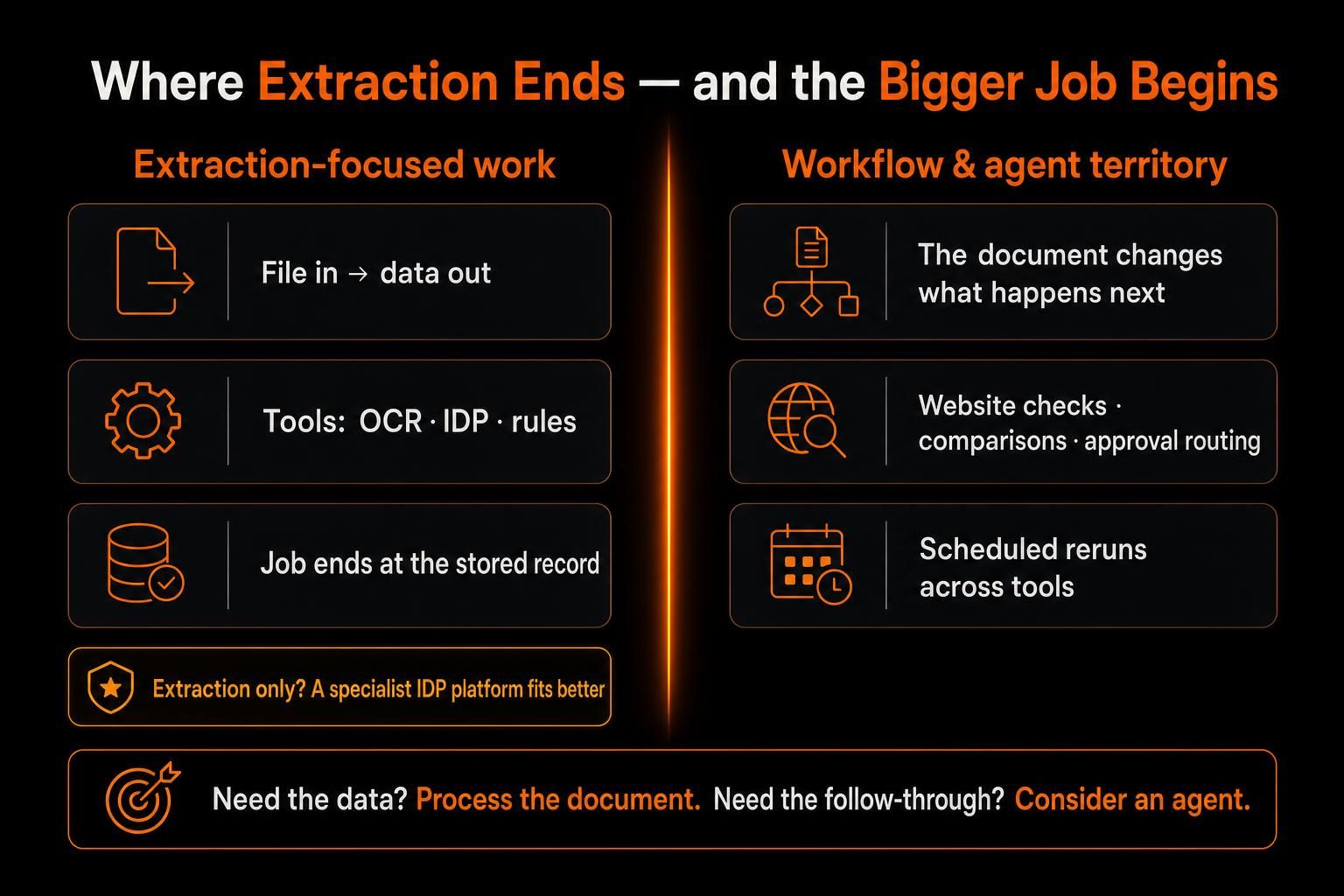
Sometimes, your document is only the starting point.
You may need to compare it with earlier files, check an approved website, run a calculation, update a report, save the result, or return to the same work later. Once that happens, extraction is no longer the whole job. You are working across files, tools, and multiple steps.
That is when an agent can help you.
For example, you might receive a new set of research PDFs each week. You could compare selected facts with earlier files, check approved web sources, run a script when needed, and save an updated report for review. If the same process repeats, you could schedule the workflow instead of starting from scratch each time.
With MoClaw, you can keep files and work state available across sessions through its persistent cloud computer, use browser or shell access when needed, and schedule recurring prompts. You can also connect Gmail and Google Drive through MCP today, while the broader Google Workspace connector is still marked as coming soon.
You do not need that setup just to extract six known fields from thousands of invoices. If high-volume extraction is the main problem, a specialist IDP platform is the more direct category to evaluate.
You can keep the distinction simple. If you mainly need information pulled from a document, document-processing tools may be enough. If what the document says determines what you need to research, create, check, or do next, you may get more value from an agent.
Frequently Asked Questions
Does AI document automation learn from every document?
Not automatically. Some systems support feedback loops, but improvement may still require people to select examples, label them, and retrain the model.
One current AI Builder feedback-loop feature, still in preview for custom document processing models, can save selected production documents for later review. People still tag those examples and retrain the model; it does not change itself after every file.
How much document volume makes automation worthwhile?
There is no universal minimum. A low-volume process can still be worth automating.
Each file may take a long time, errors may be costly, or the work may block a larger process. Repetition, checkability, and the cost of exceptions matter more than one document-count threshold.
Can document automation work without OCR?
Yes. Text-native PDFs, digital forms, structured data, and system records may already be machine-readable.
OCR is useful when the text is trapped in an image or scan. Adding it to every workflow only creates another step to maintain.
When should a document workflow stay mostly manual?
Manual work can still make sense when the volume is tiny or each case needs deep judgment. It also stays useful when reliable checks are hard to define or a wrong action would carry high cost.
In those cases, AI may still help with a narrow draft or extraction step without owning the full process.
Build Around the Document
Strong document workflows become clearer once the real files and handoffs are visible. The files show where variation enters. Trusted systems show what can be checked. Review rules show where mistakes carry weight, and the finish line shows whether extraction is enough.
That keeps AI focused on the parts where it earns its place. Rules, templates, and people can keep the rest of the flow easier to test and easier to trust.
For a first project, I’d choose one repeated document path with a useful end state. Once that path runs well, its exceptions will show what deserves the next layer of intelligence.
Continue Reading
More Guide
AI Token Consumption: Count It, Then Cut It

AI Business Process Automation, Step by Step

What Is DeepSeek Harness (DSH)?

Qwen 3.8 27B Overthinking: Turn Down xhigh

DeepSeek Vision API: What It Sees and Misses

Claude Code Voice Mode: What /voice Can't Do
The MoClaw editorial team writes about workflow automation, AI agents, and the tools we build. Default byline for industry overviews, listicles, and collaborative pieces.
Ready to put this into practice?
MoClaw runs browser tasks, research, and schedules automatically. Try it free.
References: Concentrix invoice-processing case - Microsoft Learn · AI document-processing reference architecture - Microsoft Learn · Content Assembly - Microsoft 365 · Document AI evaluation guidance - Google Cloud · DentalXChange document-processing case - AWS / Quantiphi · KONE contract-processing case - Microsoft · AI Builder Feedback Loop - Microsoft Learn