AI Copilot vs AI Agent for Recurring Work
Compare AI copilots, agents, fixed automation, and hybrid workflows to decide what recurring work to delegate and where people should stay involved.

Table of Contents
Maya, a composite customer success manager, works at a software company with 120 active accounts. Every Monday, she reviews product use, support cases, billing notes, renewal dates, and recent messages.
The routine is familiar, but the meaning shifts from one account to the next. Low use may point to poor adoption or simply reflect a delayed launch. A healthy dashboard can hide three tense emails, and a late invoice may already have an approved extension.
AI can gather the facts, but Maya still has to interpret them. When I compare a copilot with an agent, I first look for the moments that require someone to read the situation, change direction, or approve an action. How often the work repeats comes later.
A peer-reviewed study of 5,172 customer support agents shows how AI can create value while people remain responsible for the work. Access to a generative AI assistant increased issues resolved per hour by 15% on average. The assistant offered guidance during customer chats, while the worker remained in charge of the conversation.
Key Takeaways
- Choose a copilot when a person still needs to shape each cycle.
- An agent fits a clear, checkable result when the route may change within firm limits.
- Use fixed automation when the inputs, rules, and result remain stable.
- A schedule tells the system when to start. It does not prove the work is safe to delegate.
- Many recurring processes work best as a mix. Routine preparation happens first, while people review exceptions or approve sensitive actions.
AI Copilot vs AI Agent: What’s the Difference
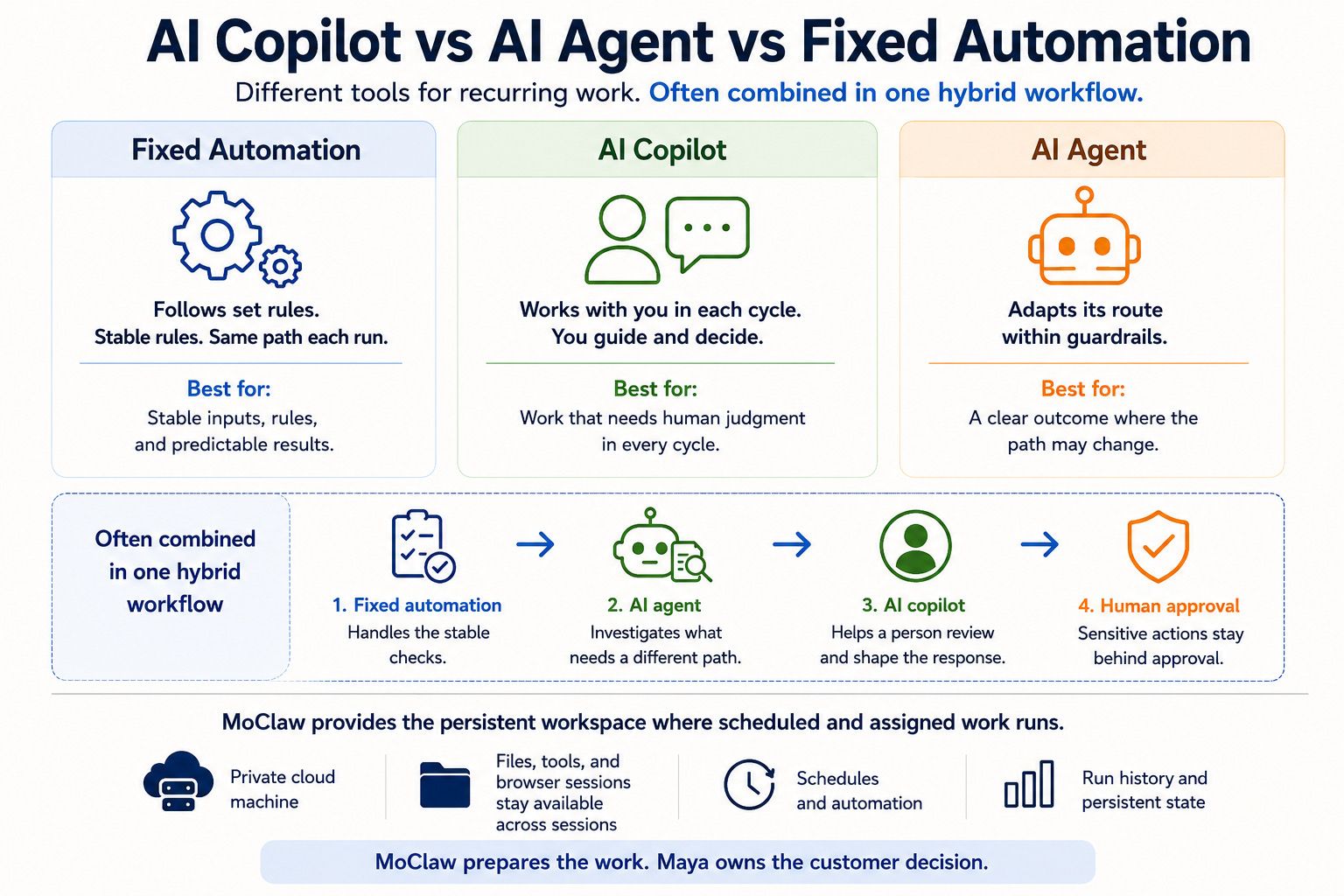
“AI assistant” is the broadest term in this comparison. A copilot works beside you during the task. You bring the context, steer the work, and decide when the result is ready. It can search, compare, draft, or use tools, but you remain part of every run.
An agent works toward a defined result. A request, schedule, event, or condition can start the work. It then chooses tools and adjusts its route within agreed limits. The result still needs a clear finish line. When the agent reaches an exception, the work should return to a person.
Some recurring jobs need neither a copilot nor an agent. When the route is already known, fixed automation is often the better choice: an approved form arrives, five fields move into the CRM, and the same type of input leads to the same kind of action. Nothing has to decide what happens next.
One process may use all three. Fixed rules clear the stable checks, while an agent investigates cases that need more flexible handling. When those cases reach a person, a copilot can help compare the evidence or shape a response. Sensitive actions remain behind approval. This is human-in-the-loop AI in practice.
| Work pattern | Best starting point | Human role |
|---|---|---|
| Inputs, rules, and result stay stable | Fixed automation | Set the rule and review failures |
| A person must shape each cycle | Copilot | Guide the work and judge the result |
| The result is clear, but the route may change | Agent | Set limits and handle exceptions |
| Routine preparation leads to a sensitive action | Hybrid workflow | Review the evidence or approve the action |
Product names can blur these roles. Microsoft Copilot Tasks can carry out multi-step work, use websites and files, and run immediately or on a recurring schedule. Users can watch or stop the task. For sensitive actions, the Copilot may ask for approval or hand control back. The feature remains in preview.
Judge the workflow rather than the label. Trace how it starts, how far the system can act, and where a person returns.
Recurring Work Is Not Always Repeatable
A task can return every week and still be too unstable to hand over. The schedule only sets the time. It becomes repeatable when the team can define the result, understand the usual route, and recognize the cases that do not fit.
When I map recurring work, I start by writing down what comes in, what a good result looks like, and where one case can force a different path.
A weekly tax calculation may use fresh numbers while following the same approved formula. Fixed automation can handle it.
Maya’s review has more variation. One account may depend on a support case and a launch note. Another may hinge on billing context and recent emails. The output remains familiar, but the useful path through the evidence can change.
An agent may help when fresh evidence changes how the task must be completed. It can follow a support case for one account and check billing notes for another while keeping both results in the same review format.
Maya should stay close when context can change the customer decision or the next action carries real weight. The agent may prepare the evidence, but it should not contact a customer just because an account crossed a risk line.
How a Hybrid Workflow Could Run on Monday
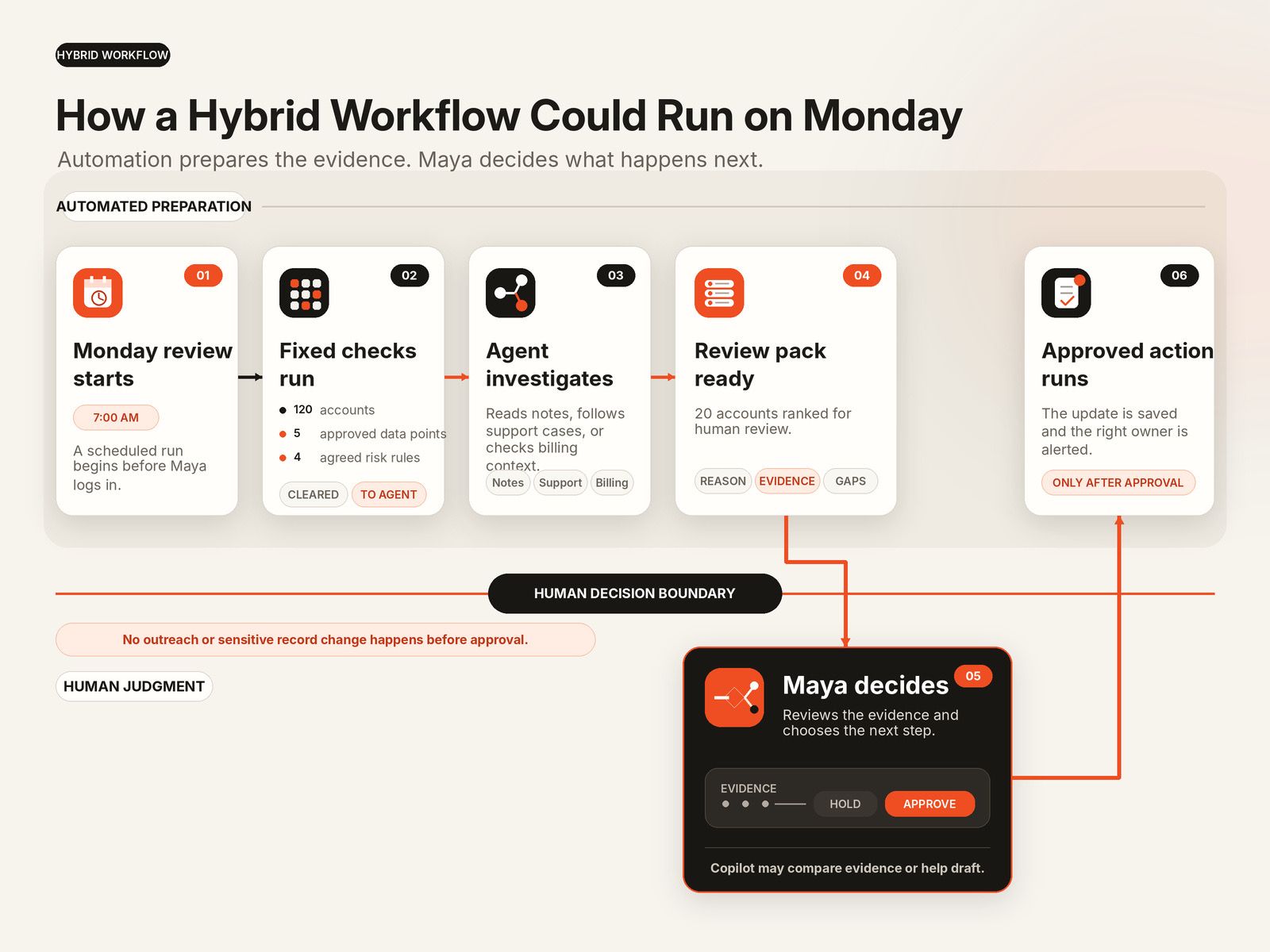
At 7 a.m., a schedule starts Maya’s review. A fixed workflow pulls five approved data points for all 120 accounts. It applies four agreed risk rules and clears the straightforward cases without model judgment.
Some accounts will contain missing or conflicting signals. An agent may need to read notes, follow a support case, or check whether finance approved an exception. The path changes, but every account still has to fit the same review format.
By the time Maya starts work, she receives a ranked list of the 20 accounts that deserve attention. Each entry includes linked evidence, visible gaps, and a short reason for appearing.
At that point, the work changes shape. Maya decides what each customer needs, while a copilot helps her compare two readings of the evidence or draft a careful reply. After she approves the next step, automation records it and alerts the right owner. When Maya logs in, the evidence is ready. She can focus on the accounts that actually need judgment.
Count the Work Around the Draft
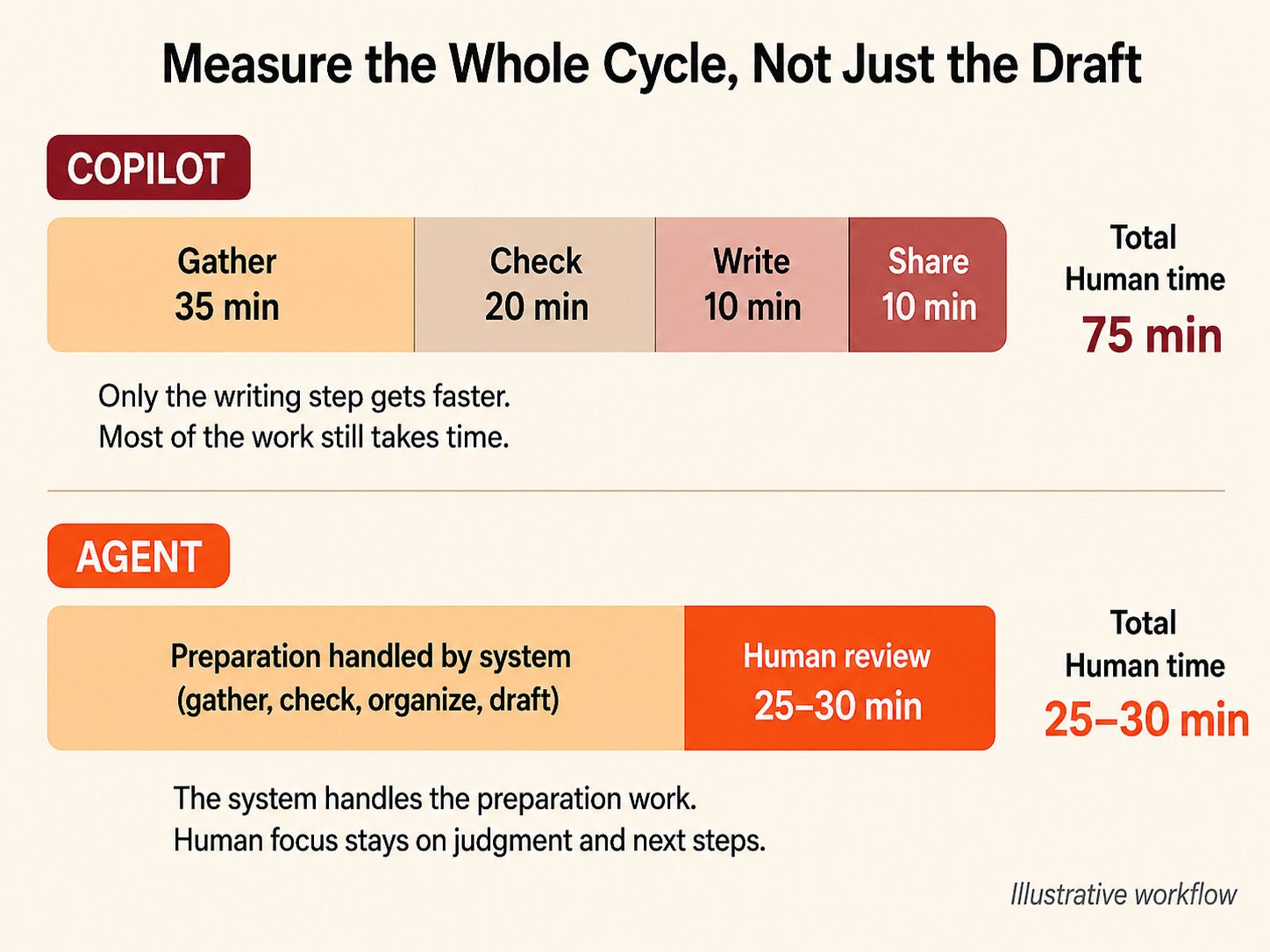
Drafting gets most of the attention because its output is visible, even when gathering and checking the evidence take longer. That is why I measure the full cycle, from gathering evidence to sharing the brief.
Nina, a composite sales manager, prepares a weekly pipeline brief for 50 open opportunities. The full process takes about 90 minutes: 35 minutes to gather updates, 20 to check dates and deal values, 25 to write, and 10 to format and share the brief.
Suppose a copilot cuts the writing step from 25 minutes to 10. Nina saves 15 minutes, but the full cycle still takes about 75 minutes because she must gather and check the evidence, shape the brief, and send it.
A well-scoped agent could take on more of that preparation by gathering updates, flagging conflicts, building the brief, and linking key claims to their sources. Nina could then spend 25 to 30 focused minutes reviewing uncertain deals before approving the result.
These figures are illustrative, not promised outcomes. To compare an AI copilot with an agent fairly, count the whole workflow rather than the most visible step.
The Five Checks I Use Before Delegating Recurring Work
1. What starts the work?
A reliable trigger is easy to detect: 7 a.m. each Monday, a new file, an incoming ticket, or a changed record.
“Whenever the team seems concerned” is different. Someone must first notice the concern and decide that work should begin. When the trigger itself requires judgment, keep a person at the start.
2. What changes between runs?
New data alone does not require an agent. Fixed automation can handle fresh numbers when the formula and source list remain stable.
An agent earns its extra complexity when the next step depends on what it finds. It may need to follow a reference, resolve conflicting records, or switch sources before it can finish.
The finish line still needs to be clear. “Prepare a cited review of the 20 highest-risk accounts” can be checked. “Keep researching until you understand our customers” cannot.
Use the simplest setup that can finish the job safely. A copilot is often easier to start with because a person remains inside the work. An agent takes more setup. It is worth that effort only when it saves more time than the team spends testing outputs, reviewing uncertain results, and recovering from failures.
3. What proves completion?
For Maya, a valid result covers all 120 accounts, ranks the 20 that need review, links the evidence, marks missing information, and contacts no customer.
The test is simple: she should be able to confirm the result without reopening every source.
A weak handoff says:
Please check this report.
That sends Maya back into the research.
A useful handoff gives her a decision to make:
All 120 accounts were checked. Seventeen met at least one fixed risk rule. Three are missing renewal dates, and two contain conflicting signals. Source links are attached. Please choose which accounts need outreach.
She can now judge the cases instead of rebuilding the work. The report also shows why each account appeared and where the evidence is thin. A finished report has little value if its reasoning cannot be checked.
4. What may the system change?
Begin with read access, where mistakes are easier to address. The system may inspect approved sources, compare records, use a browser, run a script, and save a report.
Customer messages, payments, deletions, and key record changes should remain behind approval. Expand that authority only after normal cases hold up, unusual cases remain easy to spot, and mistakes can be undone. The system needs no more access than the job requires.
5. Who owns recovery?
Plan for expired sessions, missing sources, records that disagree, unfinished outputs, and failed checks. The workflow may retry or pause, but a named person must own what it cannot resolve.
A useful failure notice tells the owner what finished, where the run stopped, what remains unclear, and whether anything changed. Keep the source trail, failed checks, and partial result with the saved record so the next person can continue without repeating the job. Assign that owner before the workflow is scheduled.
A Real Hybrid Workflow at Scale
Maya’s workflow is illustrative. TELUS shows the same split at a much larger scale.
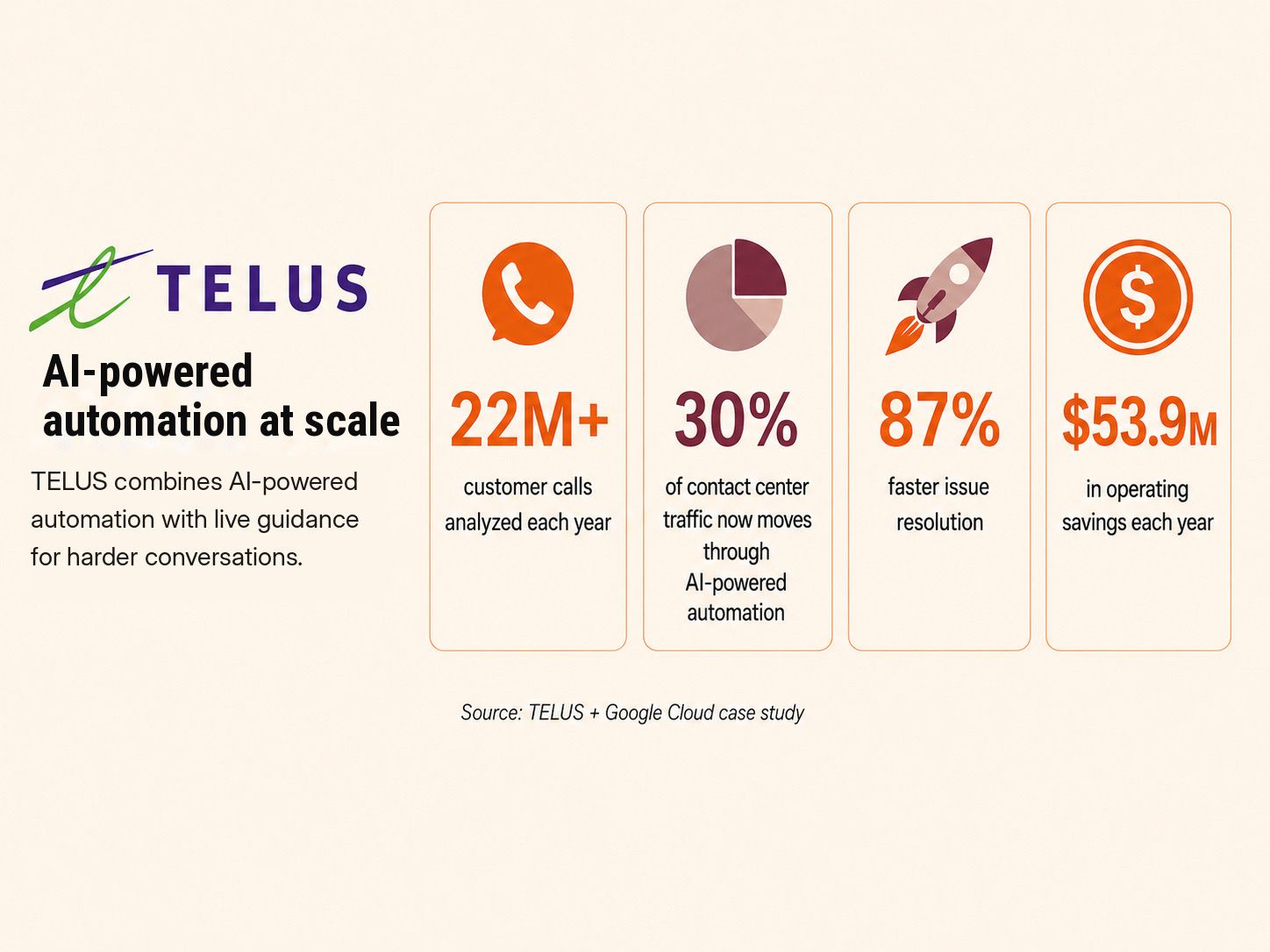
Its AI systems analyze more than 22 million customer calls each year. TELUS says 30% of its contact center traffic now moves through AI-powered automation. It also reports 87% faster issue resolution and $53.9 million in yearly operating savings.
During harder conversations, frontline teams receive live guidance. Mike Kellner, TELUS’s global senior director for AI and generative AI, credits connected company data with helping the system give accurate, consistent answers across channels.
These figures come from one large company and its technology provider, so they are not a normal forecast for a startup. What transfers is the handoff design: routine cases move ahead, and harder conversations reach people with the right context already attached. Empathy and customer history can still change the answer.
Where MoClaw Fits
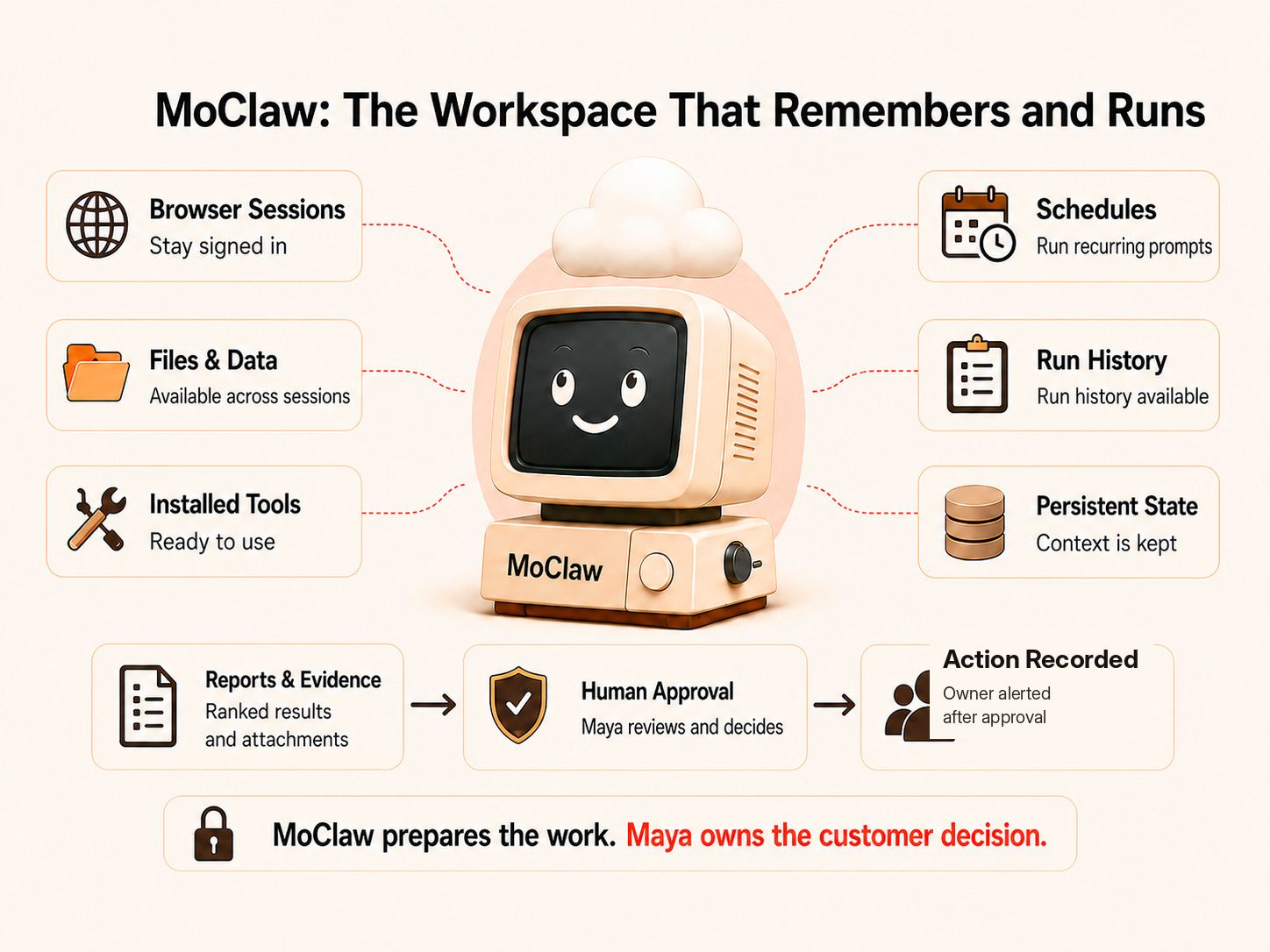
Maya uses the same approved files, tools, browser sessions, and past results every Monday. MoClaw keeps this setup on a private cloud computer. Each review can start with the right context instead of rebuilding it.
At 7 a.m., a schedule could start the review. MoClaw would collect the five approved data points and apply the fixed risk rules. It would save the clear cases first. For accounts with missing or mixed signals, it could check linked notes or look for an approved exception. It would then add those accounts to Maya’s review list.
The ranked list could arrive in Slack, Telegram, or MoClaw’s web inbox. Each item would show the evidence and any missing details. Maya could review past runs, pause or edit the schedule, and check failed runs in the history. MoClaw retries failed scheduled work before sending an error notice. Maya’s team would still need to choose who handles recovery.
The team could limit the workflow to approved sources. Customer messages and sensitive record changes would stay behind approval. Maya would receive the accounts that need attention with the research already prepared. She could question a result, compare the evidence, or use a copilot to draft outreach without opening every source again.
Frequently Asked Questions
What should a recurring agent record after every run?
Keep enough of each run for another person to understand what happened without repeating it. Save the trigger and source trail with the tools used, checks performed, any changes made, and the final or partial result.
After a failure, note the stopping point, what remains unresolved, and who owns the next step.
How should a team test an agent before scheduling it?
Run it by hand on normal cases and known exceptions. Compare the result with an accepted output. Make sure the evidence is visible, then check whether a reviewer can spot failures without repeating the full process.
Name the exception owner before turning on the schedule.
Can a workflow begin with a copilot and later become an agent?
Yes. Copilot use often reveals which instructions, sources, checks, and exceptions repeat.
A step may be ready to run on its own once it has a clear trigger, a result the team can check, limited access, and a recovery path.
Wrap Up
By Monday morning, the stable checks, uncertain accounts, and supporting evidence should already be waiting for Maya.
I would automate that preparation so she can spend her time deciding which customers need help and what the company should do next.
Continue Reading
More Comparison
MoClaw vs ChatGPT Agent vs Zapier (2026)

Codex vs MoClaw: Code Agent vs Work Assistant

Travel Agency App vs AI Workflow for Clients

Grok 4.5 vs GPT-5.5 for Agent Tasks

Opus 5 vs Fable 5: Two Different Rankings

Opus 5 vs Kimi K3: A Tie, Then a Choice
The MoClaw editorial team writes about workflow automation, AI agents, and the tools we build. Default byline for industry overviews, listicles, and collaborative pieces.
Choosing between tools? Let MoClaw run the work.
Always-on AI assistant on its own cloud computer. No switching required, no setup.
References: Generative AI at Work: The Quarterly Journal of Economics · Using Copilot Tasks: Microsoft Support · Building Effective Agents: Anthropic · TELUS Resolves Customer Calls 87% Faster With Agentic AI: Google Cloud