career-ops on GitHub: Free to Install, Not Free to Run

career-ops turns an AI CLI into a job-search pipeline. What it refuses to do, the 26,000-token floor per evaluation, and the API key that bills you twice.
Table of Contents
The career-ops GitHub repository crossed 65,000 stars this week, four months after its first commit, and the pitch on the page is easy to like: point an AI at the job market, get back scored evaluations and a tailored CV per role. The install really is one command. What the star count does not tell you is that the software being free has almost nothing to do with what running it costs.
The project's own site leads with the line "You got the job, and it didn't cost you a thing." True of the licence, not quite true of the run. Every evaluation ships roughly 26,000 tokens of instructions before your CV is even attached, and the most common support question in the project comes from people who pay for a Claude subscription and get billed per token anyway. Both are documented by the maintainer, with numbers.
Key Takeaways:
- career-ops is a filter, not an auto-applier. It never submits, sends, or clicks anything.
- 65,390 stars against a 2026-04-04 first commit, MIT licensed, with the name reserved under a separate trademark policy.
- An interactive evaluation loads about 26,000 tokens of instructions per role, before your CV and the job description.
- An
ANTHROPIC_API_KEYin your shell silently overrides the subscription you already pay for. - It runs on free and local models, so no paid CLI is strictly required.
What it does, and the one thing it refuses to do
career-ops turns an AI coding CLI into a job-search pipeline. Paste a job URL and it scores the role across five weighted dimensions, drafts an ATS-oriented CV for that listing, researches the company, identifies a person worth contacting, and files everything in a tracker. It ships a terminal dashboard, a scanner pre-configured against Ashby, Greenhouse, Lever and Wellfound across more than 100 companies, and a batch mode for evaluating roles in parallel.
The evaluation runs as blocks A through F, plus a separate block G assessing whether the posting itself is legitimate. Block G is the interesting one: it flags scams and ghost jobs, and is deliberately kept out of the 1-5 score so a suspicious listing is not quietly downgraded into looking like a poor fit. A work-authorisation signal sits alongside it and treats an explicit no-sponsorship line as a hard blocker rather than a deduction.
The refusal is worth reading twice. career-ops does not apply to anything. It drafts cover letters and application emails and stops, leaving the send button to you. The README is blunt that this is not a spray-and-pray tool and recommends against applying to any role scoring below 4.0 out of 5. In a category where most tools sell volume, building the opposite into the defaults is a position, not marketing.
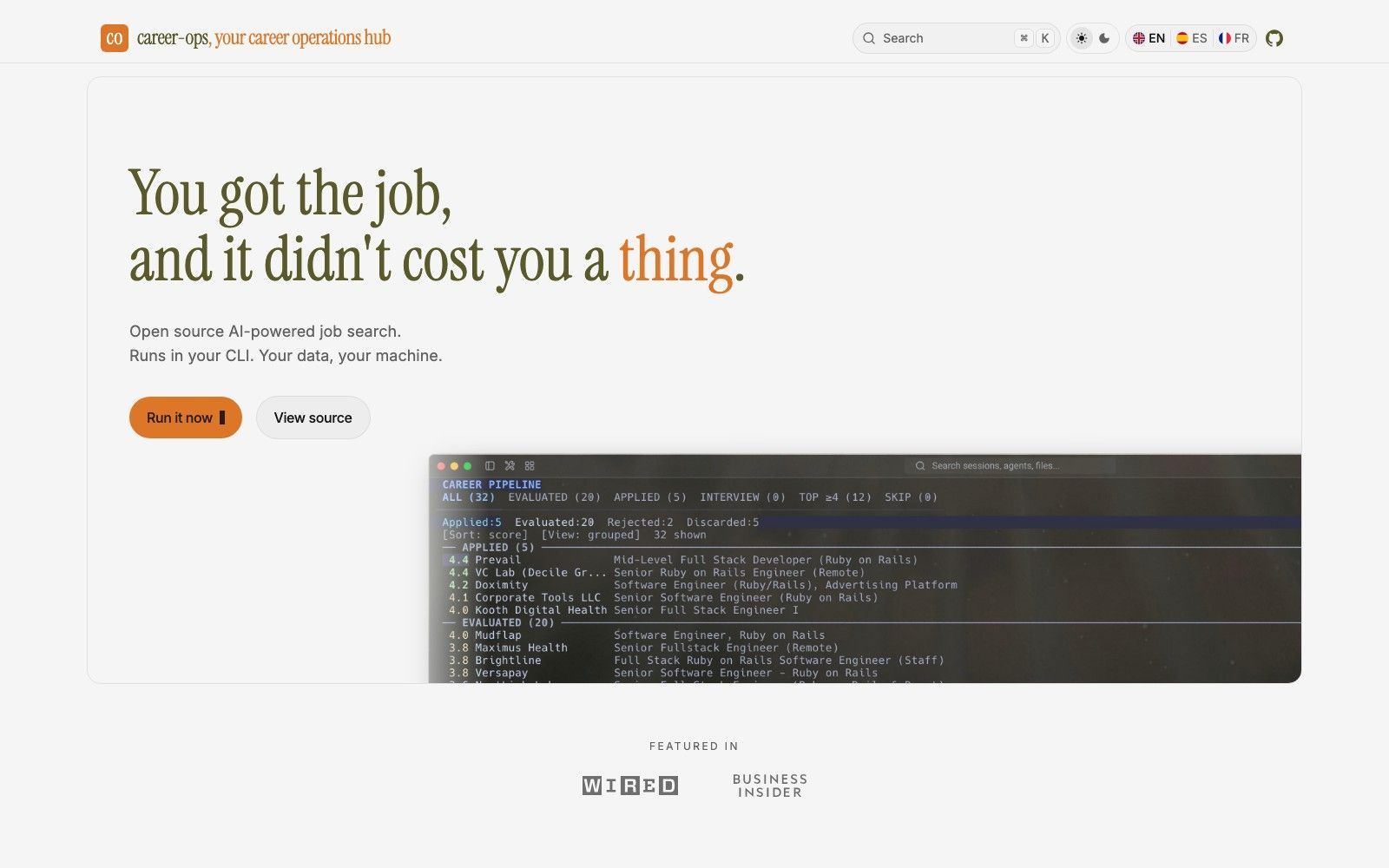
It is also honest about the cold start. The documentation says plainly that your first evaluations will not be good, because the system does not know you yet, and asks for your CV, your career story and your preferences before you judge the output. That is why a fifteen-minute trial tells you very little.
One command installs it. Setup is a different question.
npx @santifer/career-ops init clones whatever the career-ops GitHub releases page published last and installs dependencies. The package is current: version 1.27.0 on npm, published 2026-08-18, nineteen versions behind it, Node 18 or newer. You then open your CLI in that directory, and the project walks you through your CV and target roles conversationally, with nothing to edit by hand.
The requirement hiding in that sentence is the CLI. This is a job-search tool whose first prerequisite is a developer command-line tool — Claude Code, Codex, Gemini or Antigravity, OpenCode, Grok, or Qwen, connected through the open Agent Skill Standard so the project is not tied to one vendor. If you have never installed one, that is the real first step, and it is larger than npx. Coming to this purely as a job seeker, budget an evening rather than a coffee break; our notes on what Claude Code costs to run for free cover the cheapest way in.
Playwright also gets installed for PDF generation, which is the piece that renders your tailored CV. That is a browser download, not a small dependency.
The 26,000-token floor nobody budgets for
Here is the number the maintainer publishes and most write-ups skip. Paste a job URL into your CLI and the agent loads AGENTS.md at 8,285 tokens, modes/_shared.md at 4,127 and modes/oferta.md at 13,601 - about 26,000 tokens of instructions per evaluation, arriving before your CV, the job description, or any page the tool fetches.
The standalone script path is lighter, roughly 20,000 tokens in and 1,000 out, which the docs price at about $0.003 per evaluation on DeepSeek V3 rates. Both are cheap in isolation, and stop being cheap the afternoon you paste thirty URLs into one interactive session, because the instruction block is re-sent every time. Batch mode reuses one worker and does not, which is why the docs recommend it the moment you have several roles in hand.
Which sets up a problem the documentation does not follow through on. The advice is sound: stop pasting URLs, run the batch. But a batch is not a faster version of the interactive path, it is a longer one — thirty portal scans through Playwright, thirty evaluations, thirty PDF renders, driven by headless workers that hold the machine for as long as it takes. The interactive path fails by costing too much. The batch path fails by needing the laptop left open and awake, which is the one thing nobody does while job hunting around other commitments. MoClaw is a hosted cloud AI computer built for that shape of job: the batch runs somewhere that is not the machine you carry around, and it is still running when you come back.
The career-ops GitHub issue tracker carries a scarier version of this. Issue #1235 records that one role evaluation could fan out into unbounded research subagents and blow through usage limits; it was opened 2026-06-26 and closed two days later. The modes now cap web research at five queries and forbid subagents for it. That cap is the difference between a fraction-of-a-cent evaluation and an exhausted five-hour quota, and worth keeping if you write your own mode.
The API key that overrides the plan you already pay for
The most useful thing on the career-ops GitHub page is not really about career-ops at all.
If you pay for Claude Pro or Max and get billed per token anyway, the cause is almost always an ANTHROPIC_API_KEY sitting in your shell profile. Most CLIs prefer an explicit key over your logged-in subscription, and nothing warns you, because both are valid credentials from the tool's side. Run echo $ANTHROPIC_API_KEY; anything it prints is money leaving per token. Remove it from your profile, restart the terminal, log back in. Inside Claude Code, /status shows an API-key row when a key is in use and /usage separates plan usage from a session dollar cost.
Batch mode is the documented exception, because headless workers do not use the interactive login. Running claude setup-token once and exporting the result keeps batch runs on your subscription instead of on credits. This applies whether or not you ever run a job search.
You do not actually need Claude
The project is CLI-agnostic in practice, not just in the README. The budget documentation is the longest file in the docs directory on the career-ops GitHub repository, which tells you where the maintainer thinks the friction is, and it lays out paths that cost nothing: free models through OpenRouter, local models through Ollama, and a standalone script running against the Gemini 2.5 Flash free tier at fifteen requests per minute with no CLI at all.
A spend_tier knob in the profile config picks the model tier without touching provider setup. The docs recommend DeepSeek V3 or Qwen 2.5 Coder on a cheap hosted endpoint over buying local hardware, since dozens of evaluations cost a few cents either way and one option skips the GPU. Model pricing moves, so check current rates rather than that table. Routing the heavy step this way takes a full cycle from roughly $0.05-$0.15 on frontier models down to a fraction of a cent, and across fifty roles that gap is the whole decision.
Where it gets sharp
Windows works but has its own page of edges: Git Bash discovery, line endings, Task Scheduler, and a symlink error that can appear when skills load during install. None are dead ends, all are documented, and all cost you time on a first run.
The legal framing deserves a read before you scan anything. The tool is local rather than hosted, so your CV and contact details go straight from your machine to whichever provider you pick and the maintainer stores nothing. In exchange, complying with the terms of service of Greenhouse, Lever, Workday, LinkedIn and anywhere else you point the scanner is explicitly your responsibility. Evaluations are recommendations rather than truth, with a direct warning that models may hallucinate skills you do not have. Read your CV before it goes out.
One licensing detail catches people. The code is MIT, confirmed in the LICENSE file rather than inferred from the badge, but the "career-ops" name sits under a separate trademark policy: permissive for community use, reserved for commercial product naming. Fork it freely; do not ship a product called career-ops.
Is it worth your afternoon?
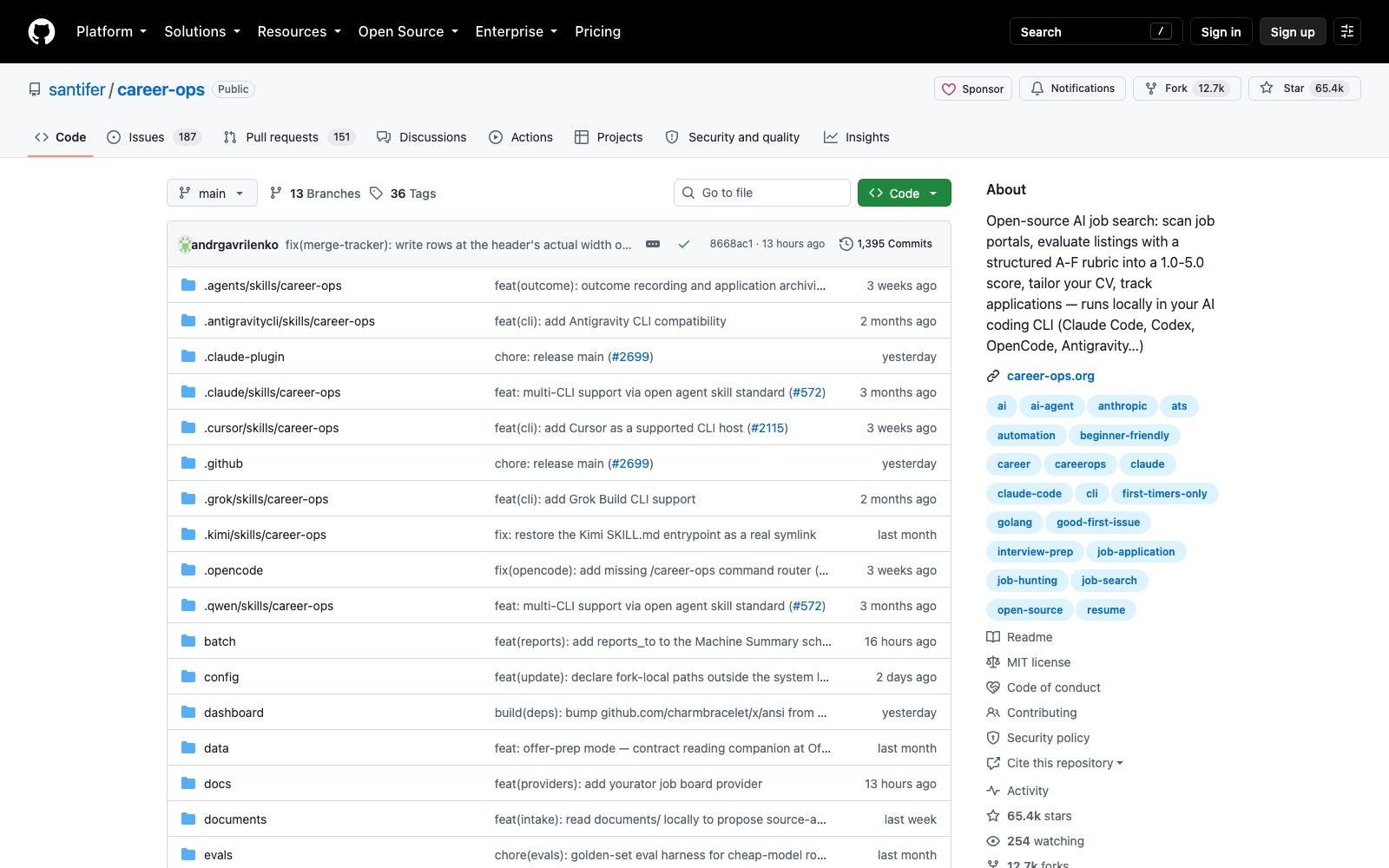
The project itself is in good health, and that is measurable rather than a vibe. 65,390 stars against 12,705 forks is a five-to-one ratio, which is what genuine use looks like rather than a star campaign. The career-ops GitHub page shows 254 watchers, 187 open issues alongside 151 open pull requests, and releases shipped on 2026-08-18, with four contributors beyond the maintainer logging more than sixty commits each. The author, Santiago Fernández de Valderrama Aparicio, carries a Wikidata entry and so does the project. He says he built it for his own search and landed a Head of Applied AI role after evaluating 740-plus offers, which is his own account rather than anything verifiable from outside.
Who it suits: anyone already living in an AI CLI, running a real search across dozens of roles, who wants a filter rather than a cannon. The structured evaluation and the ghost-job detection are worth more than the CV generation, which plenty of tools do.
Who should skip it: anyone applying to three carefully chosen roles, because the setup, the cold start and the token floor do not amortise across a small search. Anyone hoping to press a button and have applications go out should also look elsewhere, since that is precisely what this project decided not to build. Our roundup of the best Claude skills covers the wider category, and running agent workflows in Codex covers the same pipeline on a different CLI.
FAQ
Is career-ops free?
The software is MIT licensed and free to install from the career-ops GitHub repository or via npm. Running it costs tokens against whichever provider you connect: zero on OpenRouter free models, Ollama or the Gemini free tier, or a few cents per evaluation on a cheap hosted endpoint.
Does career-ops apply to jobs automatically?
No. It evaluates, ranks, and drafts, then stops. The documentation states it never submits, sends, or clicks anything, and the human-in-the-loop design is deliberate rather than a limitation waiting to be removed.
Which AI CLI does career-ops need?
Any major one. Claude Code, Codex, Gemini or Antigravity, OpenCode, Grok and Qwen are all supported through the Agent Skill Standard. There is also a standalone script path that needs no CLI at all, only a Gemini API key.
Why is career-ops billing me per token when I pay for a subscription?
An API key in your environment takes precedence over your logged-in plan on most CLIs. Check with echo $ANTHROPIC_API_KEY, remove it from your shell profile, restart the terminal, and log in again. For batch mode, generate a long-lived token with claude setup-token instead.
How much does one evaluation cost?
The standalone path sends about 20,000 tokens in and 1,000 out, priced in the project docs at roughly $0.003 per evaluation on DeepSeek V3 rates. The interactive path loads about 26,000 tokens of instructions per role first, so it costs meaningfully more than batch mode.
Continue Reading
More Guide
Ox Alpha: What We Know So Far

Claude Code Session Manager: Wake for Mac

Grok Speaking Gibberish: What Actually Helps

How to Build Claude Skills for Agent Workflows

Claude Code AGENTS.md: What Actually Loads

Herdrm: One Mac Console for Every Coding Agent
The MoClaw editorial team writes about workflow automation, AI agents, and the tools we build. Default byline for industry overviews, listicles, and collaborative pieces.
Ready to put this into practice?
MoClaw runs browser tasks, research, and schedules automatically. Try it free.
References: https://github.com/santifer/career-ops · https://github.com/santifer/career-ops/issues/1235 · https://career-ops.org · https://www.npmjs.com/package/@santifer/career-ops · https://www.wikidata.org/wiki/Q139007988