Paw Work: Select on the Page, Get a File

Paw Work is a Chrome extension that turns a page selection into a spreadsheet, deck or site. How select-first works, what it needs, and where it stops.
Table of Contents
Most browser AI tools give you a sidebar that talks about the page. The Paw Work Chrome extension gives you a spreadsheet. You turn on Paw Mode, click the product cards or the table or the block of text you care about, describe what you want out of it in one sentence, and a file appears on a canvas beside the tab. Not a summary of the file. The file.
It arrived on GitHub on 28 August 2026 and picked up close to 600 stars in its first week, which for an eleven-commit repository with two contributors is a lot of attention. MIT licensed, Chrome MV3, no account, no server anywhere.
What "select first" actually changes
Every chat sidebar starts from the same awkward place: you have to describe the thing you're looking at. Paste the URL, copy the table, explain which of the six pricing tiers you meant. The description is the tax.
Paw Work removes it. Selection is the input. You point at images, tables, text, blocks or links on the live page, and those captures become the context; the sentence you type only has to say what the outcome should be. The README states the boundary plainly: it "is not an unattended Operator that roams the web for you, and not a terminal coding agent. It sits beside the browser world you are already logged into."
That last clause is the quiet advantage. You're signed into the SaaS dashboard, the internal wiki, the supplier catalogue. A headless scraper isn't, and getting it there is usually where the afternoon goes.
What comes out, and what builds it
Four output types, three engines, all packaged inside the extension. Spreadsheets and documents run on Univer. Posters and slides run on tldraw, with decks exporting to PPTX. Sites come out as real HTML, and when you click a node and describe a change, only that node changes.
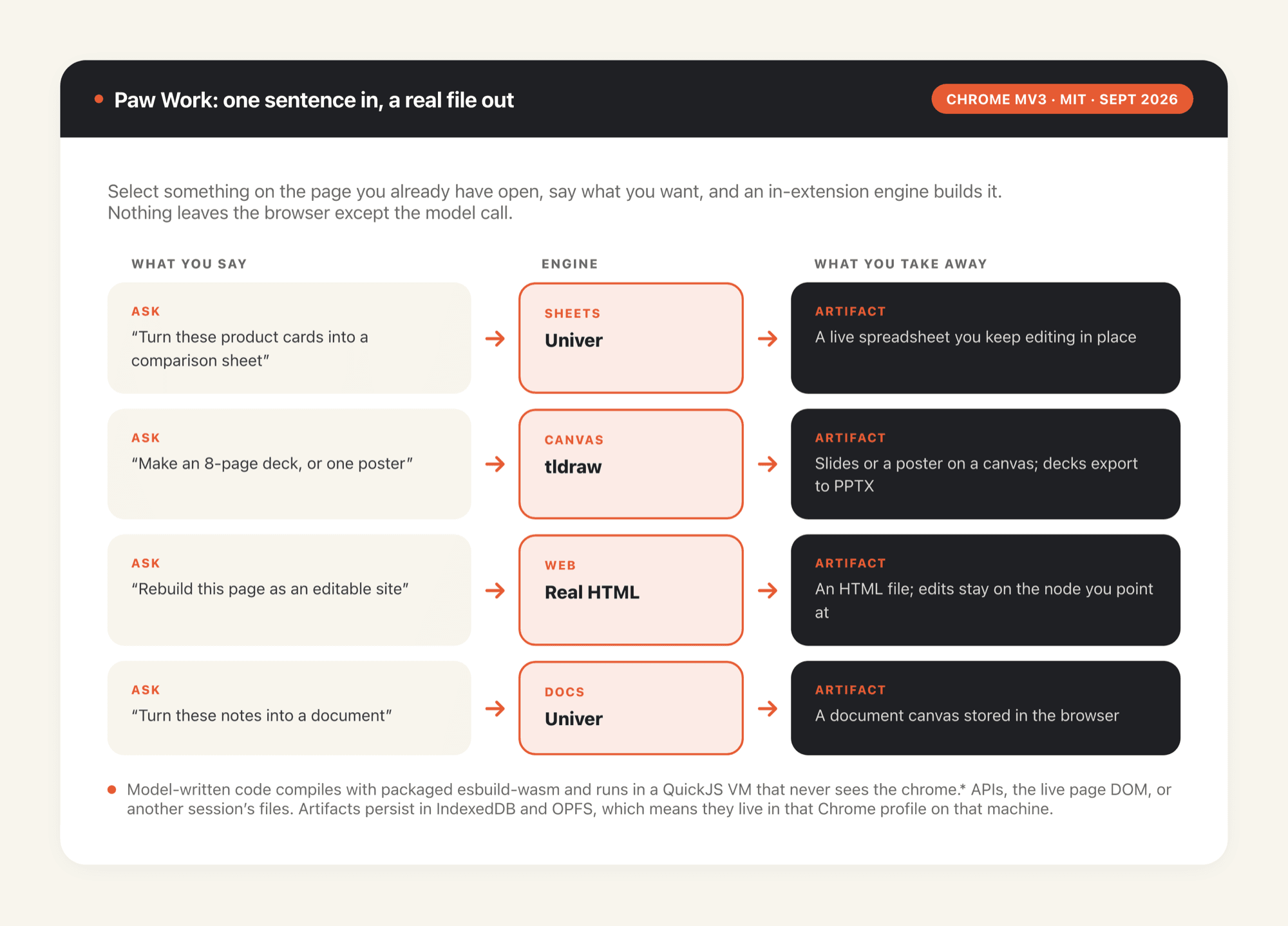
The security model deserves more attention than it will get. Model-generated code compiles with a packaged esbuild-wasm and executes inside a QuickJS VM that never touches the chrome.* APIs, the live page DOM, or another session's files. No executable code loads from a CDN. Captures are only what you pointed at; the agent inspects further on demand rather than hoovering the whole site.
For work that isn't trivial, you get a plan card before anything is written: Approve, Decline, or Required to change, where the third option lets you leave notes, watch the plan get revised, and keep the old card for comparison. Explicit refusal to silently expand past the selection is written into the README as a rule, not a preference.
Installing it is the hard part
There's no Chrome Web Store listing yet, and the README is blunt about that being a stopgap. So the install runs through GitHub, and the project has clearly watched people get it wrong.
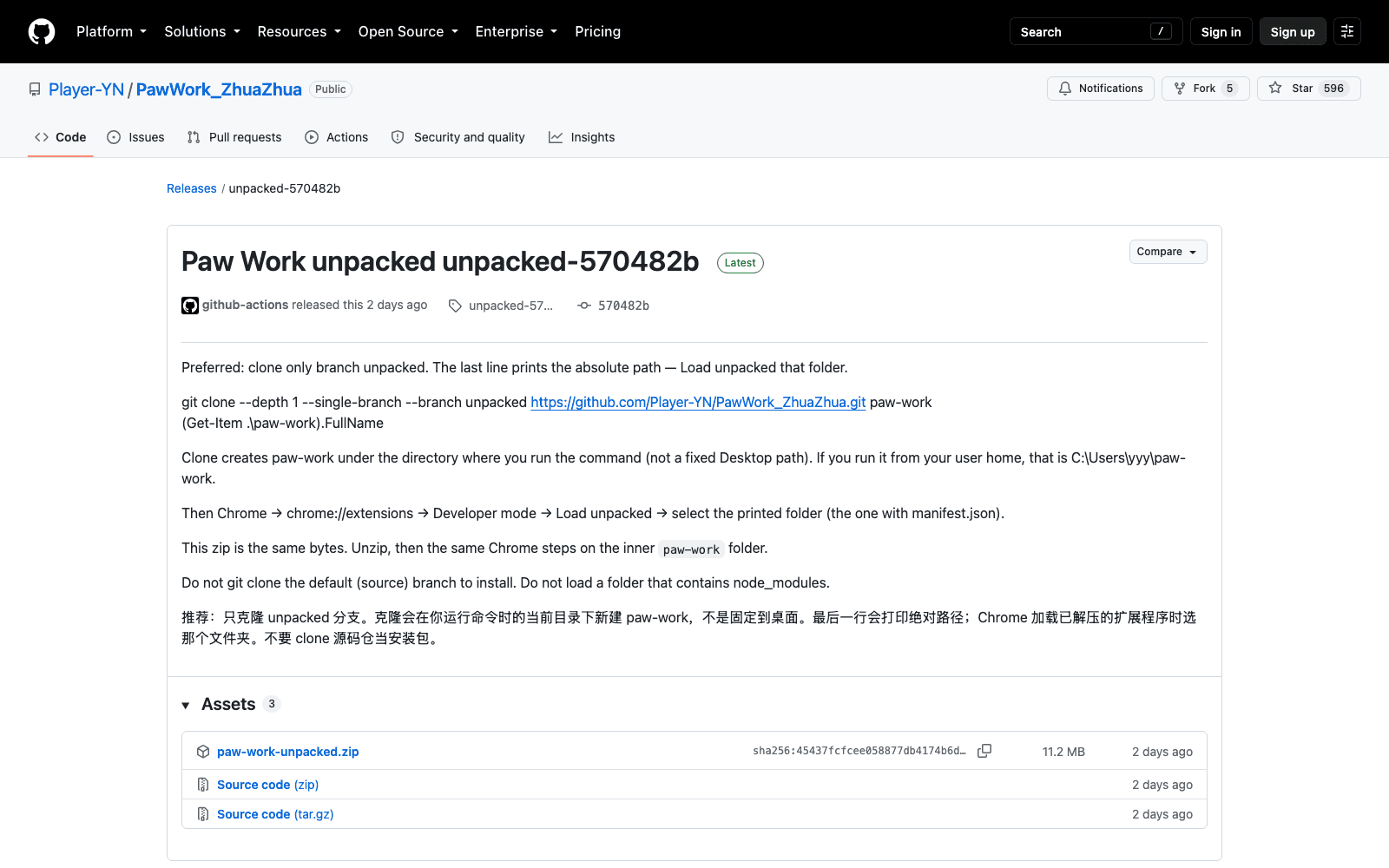
Do not clone the repository. That's the source tree, and after npm install it runs to hundreds of megabytes of node_modules that Chrome cannot load. What you want is the unpacked branch, which is the extension: manifest.json sits at its root, and the branch README opens with the line "this folder is the Chrome extension" in case you arrived from the wrong direction. Same bytes are published as paw-work-unpacked.zip on the releases page, 11.2 MB, if you'd rather not touch git at all.
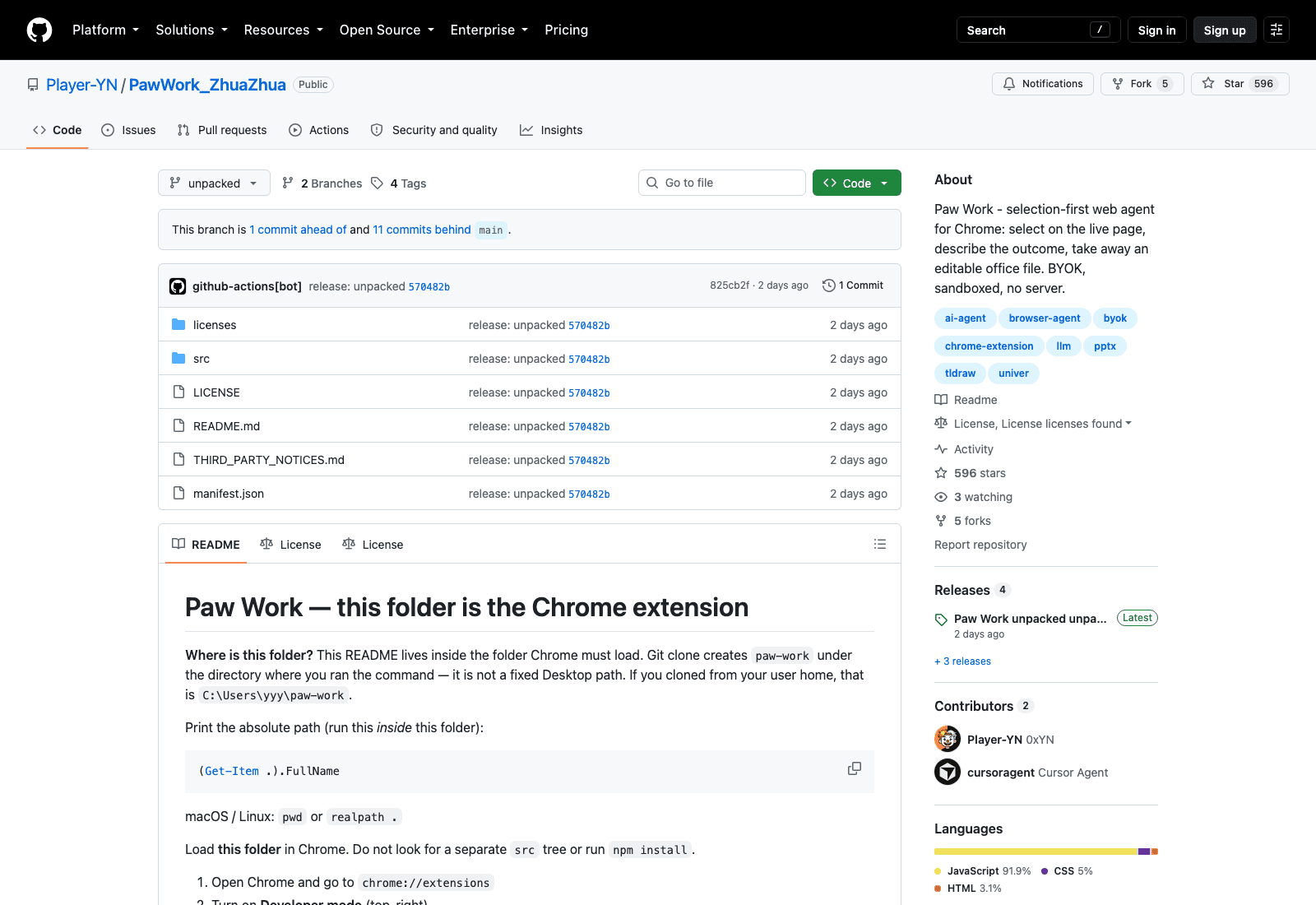
Then it's the standard sideload dance: chrome://extensions, turn on Developer mode, Load unpacked, pick the folder. One detail worth knowing before you commit to this as a team tool: on the day I looked, the unpacked branch sat one commit ahead of and eleven commits behind main. The shipped artifact lags the source, which is normal for a release branch and worth checking against the tag date rather than assuming you have the latest fixes.
Nothing runs without your own keys
Here's the part that decides whether the Paw Work Chrome extension is right for you. There is no hosted service and no bundled model quota. Chat needs any OpenAI-compatible HTTPS endpoint, meaning a base URL, a key, and a model name typed into the sidepanel settings. Image generation takes its own trio, or inherits the chat one if you leave the fields empty. Web search and fetch want separate keys again, though fetch degrades to an anonymous GET without them.
Keys live in Chrome extension storage on your machine and go only to the endpoints you set. For a developer with an OpenRouter account, that's twenty seconds of setup. For the analyst this tool would genuinely help, it's a wall, and it's the honest reason a Chrome Web Store listing wouldn't fix adoption on its own.
The other side of "no server" is that your work has nowhere else to be. Artifacts persist in IndexedDB and OPFS, which means they live in that Chrome profile on that machine. Close the browser mid-run and the run stops; switch to your laptop and yesterday's spreadsheet isn't there. MoClaw answers that differently, giving the agent a hosted machine of its own so the job survives a closed lid and the output is waiting on whatever device you open next.
Who's actually building this
Worth a look before you depend on it. The repository lists two contributors: Player-YN, the maintainer, and cursoragent, labelled Cursor Agent. An AI coding agent appearing in the contributor list is now common enough that nobody flags it, though it does tell you something about the pace: eleven commits on main, four tagged releases, and roughly 600 stars inside a week.
Five forks and three watchers against 600 stars is the other number to sit with. Plenty of people found the Paw Work Chrome extension interesting; very few have started building on it. That gap is normal for week one and it's also exactly what you'd expect from a project that can't be installed from a store yet.
The codebase is 92% JavaScript with a bit of CSS and HTML, no build step required for users, and the runtime contracts covering isolation, writes and tools are documented in docs/SESSION_WORKSPACE_RUNTIME.md rather than left implicit. For a project this young that's an unusually adult amount of documentation, and it's the main reason I'd take the security claims at face value pending someone actually auditing them.
Where it fits, and where it doesn't
The README's own comparison table is more useful than most vendor positioning. Good fit: people already working in the browser who need to compare, extract, export, or turn a page into a sheet, deck, poster, site or long document. Poor fit: unattended RPA that crosses sites, checks out and pays; and coding agents that want Docker, a local shell and a million-file repository.
There's a practical read on that table. The work Paw Work is built for is the kind nobody schedules: you're three tabs into a supplier catalogue, you need those nine SKUs in a sheet with the prices lined up, and the alternative is forty minutes of copy-paste or an hour writing a scraper you'll use once. That job is common, unglamorous, and badly served by both chat assistants and RPA platforms, which is a reasonable niche to aim at.
Two limitations to price in. Without a production tldraw licence, Design and Slides output carries the official watermark, and the project explicitly refuses to support hiding it with CSS. And capture is intent rather than complete truth, so the agent may ask once when the outcome type is genuinely ambiguous.
Also worth knowing: the repository is bilingual, with an English README as the default and a Chinese one alongside it, and the sidepanel ships a full English translation table. The screenshots in the docs happen to be of a Chinese retail page, which is cosmetic rather than a language barrier in the tool itself.
For a wider view of this category, our guide to AI browser automation in 2026 covers the unattended end that Paw Work deliberately avoids, and the Kimi WebBridge write-up looks at another take on the browser-resident agent.
Is it worth installing?
If you spend your day comparing things across tabs and rebuilding them by hand in a spreadsheet, yes, with the caveat that you'll need a model key and twenty minutes of patience with Developer mode. The selection-first interaction is the genuinely new idea here and it's implemented with more discipline than the star count would suggest: the sandbox story is specific, the plan card is real, and the README documents its own weak points rather than burying them.
If you need work that continues after you close the tab, the Paw Work Chrome extension isn't that tool and doesn't claim to be. That's the line where a hosted machine takes over: MoClaw runs the browser on its own computer, which is the difference between a helper that sits beside your session and a worker that keeps going once you've logged off for the day.
Accurate as of September 2026. On a repository this young the install path is the thing most likely to change, so read the branch README before you follow anyone's steps, including these.
FAQ
Is Paw Work free?
The extension is MIT licensed and costs nothing. You pay whichever model provider you point it at, since it ships with no bundled quota. A production tldraw licence, only needed to remove the watermark on Design and Slides output, is a separate paid thing from tldraw.
Which browsers does it support?
Chromium browsers running Manifest V3, with Chrome 120 or newer named for building from source. There's no Firefox or Safari build and no hosted web version.
Does it run locally?
The extension does. Everything except the model call stays in the browser: the workspace is in-extension, generated code runs in a local WASM sandbox, and files persist in IndexedDB and OPFS. There's no Paw Work server and no account.
Do I need to install it from the Chrome Web Store?
You can't yet; there's no listing. Install by loading the unpacked branch, or the identical release zip, through Developer mode at chrome://extensions.
What can it actually produce?
Spreadsheets and documents through Univer, posters and slide decks through tldraw with PPTX export, and editable HTML sites. Images and web lookups are available too, each needing their own key configured in the sidepanel.
Continue Reading
More Guide
MiniMax M3 Free Ended: What to Use Instead

MarkItDown: When Your Markdown Comes Back Thin

Lightpanda Is Fast Because of What It Skips

OpenAI Deprecated Its Codex Skills Repo

Open Science: The AI Workbench for Researchers

How to Use GPT-6 Astra: What It Really Costs
The MoClaw editorial team writes about workflow automation, AI agents, and the tools we build. Default byline for industry overviews, listicles, and collaborative pieces.
Ready to put this into practice?
MoClaw runs browser tasks, research, and schedules automatically. Try it free.
References: Player-YN/PawWork_ZhuaZhua (GitHub) · Paw Work unpacked release · Univer · tldraw · QuickJS