Personal AI Agents Explained for Real Work

What separates a personal AI agent from a chat assistant: task state, tools, browsers, files, schedules, and outputs you can actually review.
Table of Contents
Personal AI agents are AI systems built to carry work across steps, tools, files, schedules, and reviewable outputs. A chat assistant answers. A personal AI agent maintains task state, uses approved tools, and prepares work for you to inspect.
Key Takeaways:
- A personal AI agent needs task state, not only chat history
- Tools, browser access, files, and schedules are what move it from answering to doing
- Reviewable outputs matter because agents can still miss context, act on stale data, or choose the wrong next step
- The safest starting point is one narrow recurring task with clear logs, limited permissions, and human review before expansion
I'm Vera. I started separating agents from chat assistants after building the same weekly research packet three times in a row. In plain chat, I kept re-explaining the sources, the format, the naming rule, and where the file should go. The model was useful, but the work did not survive the session.
That gap is now a mainstream problem. In McKinsey's global survey on the state of AI — fielded 25 June to 29 July 2025 and published that November — 88 percent of respondents said their organizations regularly use AI in at least one business function, up from 78 percent a year earlier. On agents specifically, 23 percent said they were scaling an agentic system somewhere in the enterprise and another 39 percent had begun experimenting, which is where the widely quoted 62 percent figure comes from.
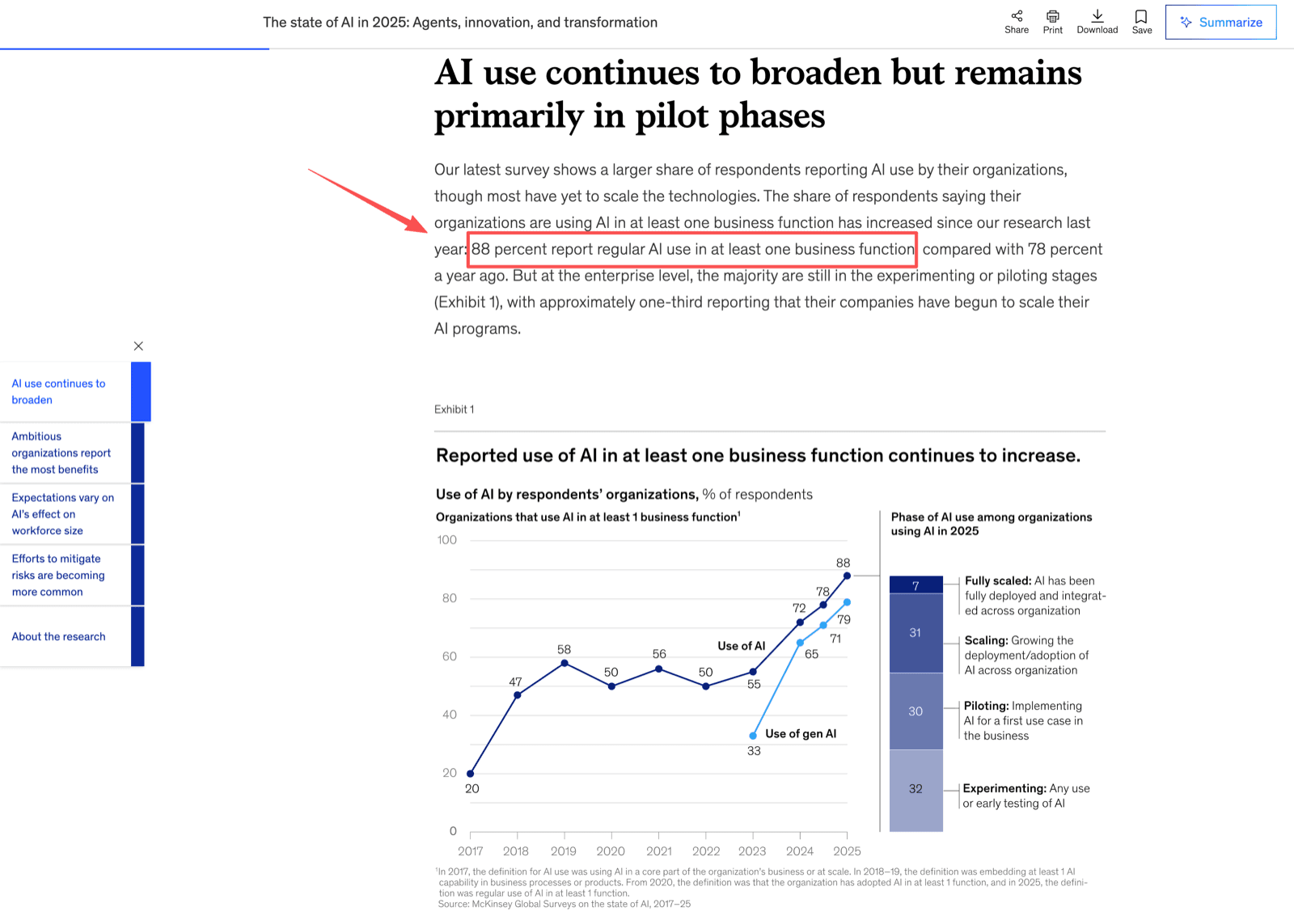
Read that split carefully before you buy anything. Experimenting is not scaling, and most of the 62 percent are in the first bucket.
What Personal AI Agents Mean Now
Personal AI agents are workflow systems for one person or a small working context. They take a goal, follow a process, use tools, keep context, and return an artifact or update that can be reviewed.
For an individual user, a personal AI agent might monitor a market, draft a morning brief, organize receipts, update a spreadsheet, research a vendor, or prepare a follow-up email. The key is not autonomy. It is carrying a task through state, tools, and handoff.
What Makes Them Different From Chat Assistants
A chat assistant is strongest when the task fits inside one conversation. A personal AI agent is stronger when the work has a start point, intermediate state, external tools, and a recurring output. OpenAI's trigger, process, and tools-or-systems breakdown is a useful plain-language filter for personal use too.
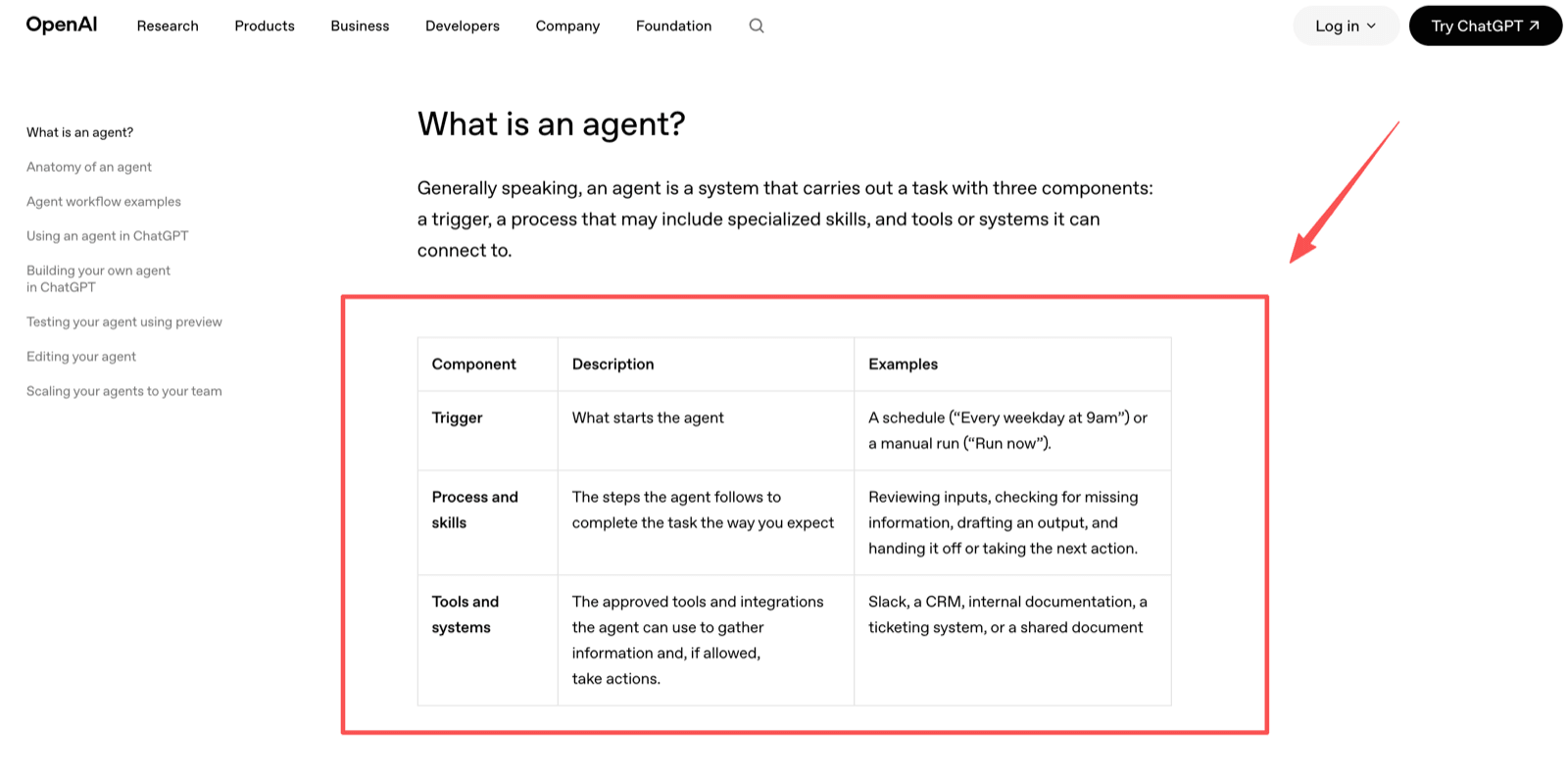
If there is no trigger, no state, and no external work surface, you probably have a chat assistant. If the system remembers the task, checks sources, writes files, uses a browser, and runs on a schedule, you are closer to an agent.
Goals and task state
A personal AI agent needs a goal it can pursue across steps. "Summarize this article" is a prompt. "Every Friday, collect these sources, compare changes, and save a short brief in the same format" is agent-shaped work.
Task state is the practical difference. The agent should know what it checked, what is missing, which file it created, and what the next review step is. Our guide to agent memory vs chat history goes deeper here, because memory is not just a transcript. For recurring work, memory should reduce cold starts while leaving a way to review, reset, or correct it.
Tools, browsers, and files
Personal agents need tools because real work rarely lives in one text box. A useful agent may need to open a website, search a file, run a script, read a PDF, update a sheet, or capture a screenshot.
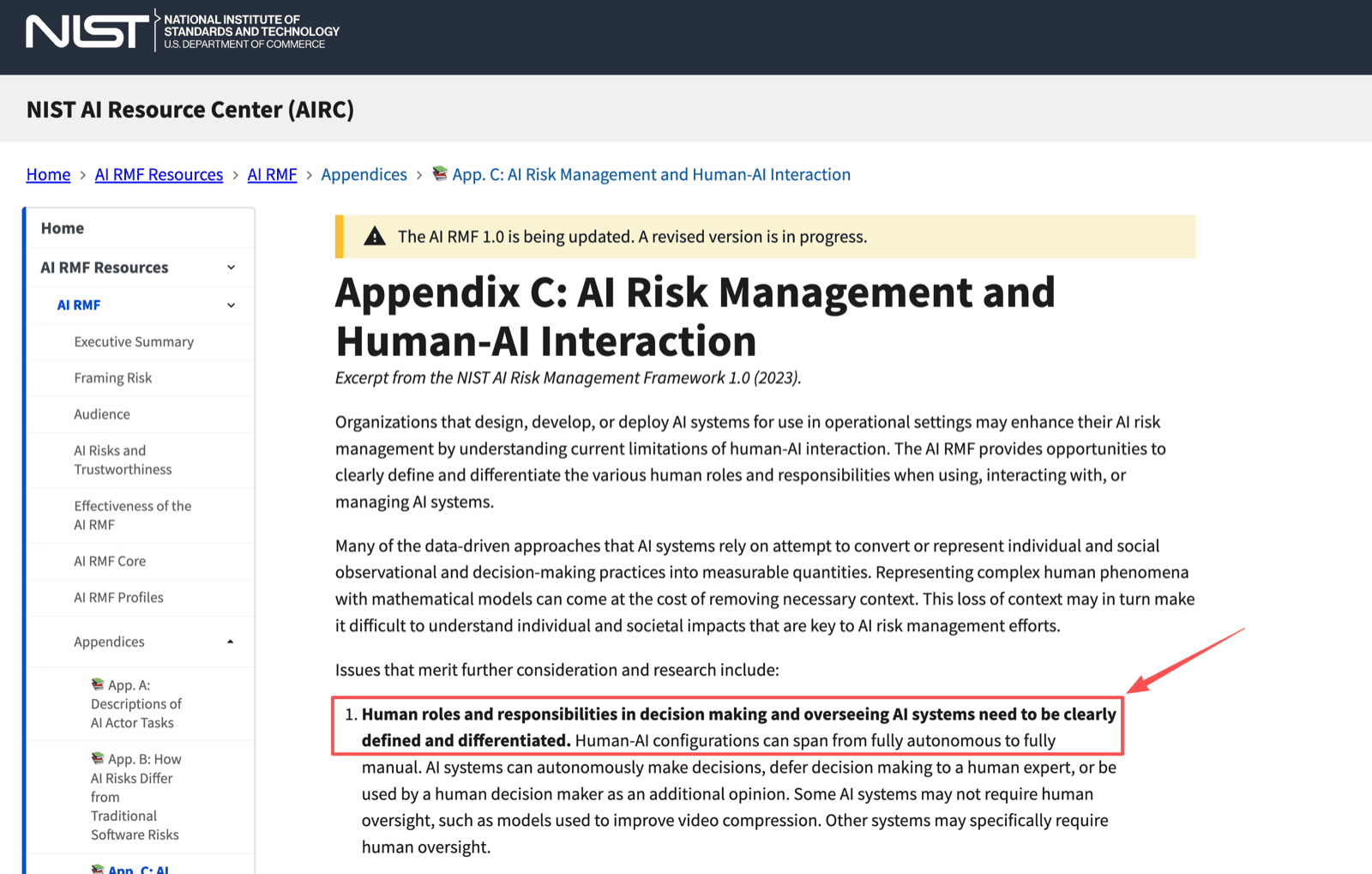
This is also where risk begins. Giving an agent browser access or private files is different from asking it to draft an answer. Before connecting sensitive accounts, define what it can read, what it can change, what needs approval, and where outputs will be saved. NIST's AI Risk Management Framework makes the same point in its human-AI interaction appendix: roles and responsibilities for decisions and oversight need to be clearly defined and differentiated, across a spectrum that runs from full automation to full human control.
Scheduled or recurring work
Schedules make agents feel less like a tab you open and more like an assistant. A scheduled agent can run a morning digest, check a product page, monitor a forum, or prepare a report while you are offline.
In one small recurring-task test, I ran the same Monday research brief for four weeks. The useful part was not that the agent wrote better prose. It was that the repeated setup dropped: the source list, output sections, filename pattern, and review checklist stayed consistent. I still made edits in three of the four drafts, but the edits moved from "what should this task do?" to "is this source interpretation right?"
That does not make it a fully autonomous assistant. Recurring work still needs logs, timestamps, source links, failure messages, and approval paths for money, accounts, publishing, or private communication. If you want the operational version of that checklist, scheduled AI tasks covers the delegation side in more detail.
Where Personal Agents Help Most
Personal agents help most when work is repetitive, cross-tool, and reviewable. Strong examples include research digests, inbox triage, spreadsheet updates, web monitoring, PDF extraction, schedule prep, and report drafting. These tasks often waste time because they require the same setup every run.
Take a competitor check as an example. You ask an agent to review five approved pages before Monday planning, save screenshots, and draft a short change note. In a run like that you should expect a mixed result: it catches the visible page changes, misses a pricing note hidden behind a tab, and saves at least one screenshot with a filename you cannot interpret a week later.
That is still useful, and it is the right role for a personal agent. It prepares the work, collects evidence, and makes the next step easier to inspect. A person still decides what to send, publish, or approve.
Limits Users Should Expect
Expect agents to be useful but imperfect. A personal AI agent can misunderstand instructions, follow a stale link, over-trust a page, miss a hidden condition, or complete the wrong version of a task. More tools increase usefulness and blast radius at the same time.
The best protection is smaller permissions, named test tasks, visible logs, clear output formats, and human review before external action. Do not connect private email, calendars, payment accounts, or publishing tools until you have tested with safe data.
How MoClaw Fits the Category
Last checked 13 August 2026. MoClaw runs a personal AI assistant on its own cloud computer. The AI cloud computer is a private Linux machine with a filesystem, shell, browser, and persistent state. Current pages also cover browser control, schedules, files, memory, and chat access through the web, Telegram, and Slack.
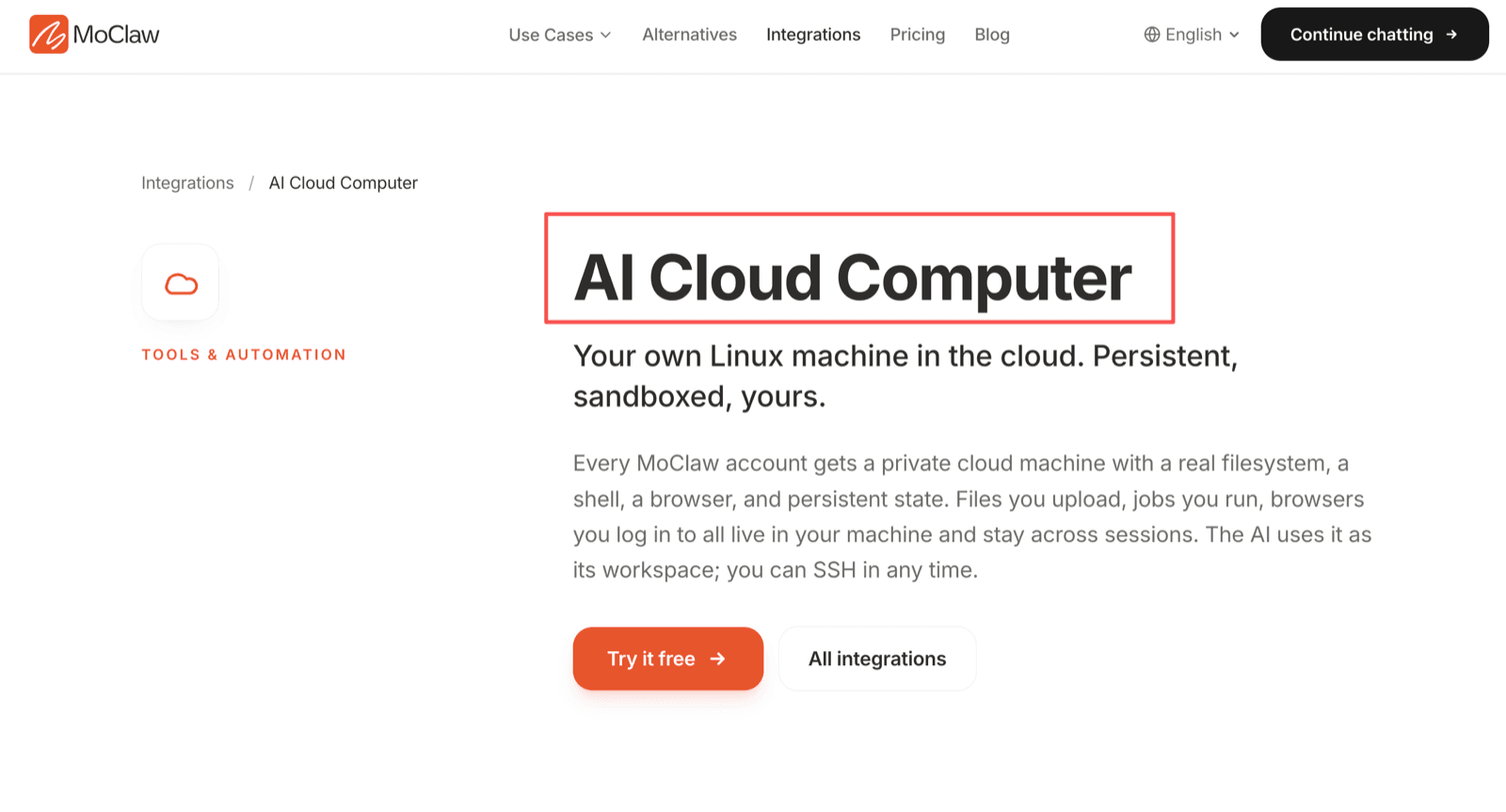
That makes MoClaw closer to a managed agent workspace than a plain chat assistant. The fit is work that needs files, browser sessions, scheduled runs, and reviewable artifacts. Pricing is a separate decision, so check the pricing page before daily use.
The boundary matters. MoClaw can run agent workflows, but you still need to review outputs, manage connected accounts, protect private data, and approve sensitive actions.
FAQ
Can a personal agent share work with another user?
Yes, but sharing should happen through a controlled workspace, exported file, or approved channel. Avoid sharing raw memory or private task history unless both users should see the same context.
What should I test before letting an agent near private email?
Test with sample messages first. Check whether the agent can label urgency, identify missing information, draft without sending, and avoid exposing private details.
How should I name test tasks for later review?
Use names with workflow, date, and risk level, such as weekly_vendor_check_2026_08_13_low_risk. Clear names make logs easier to compare.
How do I compare trial notes across two agents?
Use the same input, success criteria, output format, and review checklist. Compare logs, source handling, errors, file outputs, and clarification behavior.
Can shared devices create privacy problems?
Yes. If a shared laptop, browser profile, or messaging account is used, the agent may see context meant for someone else. Use separate accounts, browser sessions, and sign-out habits before testing.
Personal AI Agents Need Reviewable Work
Personal AI agents are useful when they move beyond chat into task state, tools, files, schedules, and inspectable outputs. Start with one recurring workflow, keep the permissions narrow, and review the results before expanding. The right personal AI agent is not the one that sounds most autonomous. It is the one that makes real work easier to track, correct, and trust.
Fact check: written for MoClaw after reviewing MoClaw product pages, the McKinsey Global Survey on the state of AI (fielded June–July 2025), OpenAI's workspace agents material, and the NIST AI RMF human-AI interaction appendix on 13 August 2026. Product features, integrations, and channel availability can change after publication. This article explains workflow categories and does not promise autonomous success, time savings, privacy guarantees, or specific task outcomes.
Continue Reading
More Guide
Autonomous AI Assistant: A 2026 Reality Check

MoClaw Pricing: Is $20 a Month Worth It?

What to Use Instead of Manus in 2026

Is DeepSeek Harness Enough for Always-On?

DeepSeek Harness for Non-Developers
What Is DeepSeek Harness (DSH)?
The MoClaw editorial team writes about workflow automation, AI agents, and the tools we build. Default byline for industry overviews, listicles, and collaborative pieces.
Ready to put this into practice?
MoClaw runs browser tasks, research, and schedules automatically. Try it free.
References: McKinsey, The state of AI in 2025 · OpenAI Academy, Workspace agents · NIST AI RMF, Human-AI interaction appendix