Is Skywork AI Free? The 120-Credit Daily Cap
Is Skywork AI free? The 120 credits per day login bonus is listed on paid plans, and Skywork hides pricing behind a login. Here are the real numbers.
Table of Contents
Skywork AI gives 120 credits per day as a login bonus, and that line appears as a listed feature on all three paid plans rather than as a standalone free tier. There is no public pricing page you can read without signing in, which is why most articles about Skywork pricing quote numbers without showing where they came from.
The figures below were read directly from the Skywork in-product upgrade screen on August 11, 2026. We are stating that provenance up front because it matters: skywork.ai resolves straight into the product workspace, and skywork.ai/pricing does not render a public plan comparison for a signed-out visitor.
Key Takeaways:
- Skywork's daily allowance is 120 credits per day, described as a login bonus, and it is printed on the Basic, Plus and Ultra cards alike.
- Paid tiers as shown on August 11, 2026: Basic $12.50/month with 10,000 credits, Plus $33.32/month with 28,000 credits, Ultra $158.32/month with 150,000 credits.
- Every tier was displaying a promotional rate against a higher struck-through list price: $19.99, $49.99 and $249.99 respectively.
- The "Exclusive Cloud PC" feature starts at the Plus tier. It is not part of Basic and not part of free usage.
- Skywork lists SOC 2 Type I, ISO 27001 and ISO 27701 on the same screen, which is unusually strong compliance signalling for a consumer-priced product.
Is Skywork AI Free? What 120 Credits a Day Buys
The phrase on the Skywork upgrade screen is "120 credits/day, login bonus," and it carries a tooltip marker on every one of the three paid cards.
That placement is the answer to the question. Skywork is not presenting 120 daily credits as a free plan. It is presenting it as a retention mechanic that paying customers also receive. Whether a signed-out or unpaid account receives the same daily bonus is not stated anywhere we could read without an account.
For comparison, 120 credits per day is 3,600 per month if you log in every single day without missing one. Against the Basic tier's 10,000 monthly credits, the login bonus is roughly a third again on top. Against Ultra's 150,000, it is noise.
That ratio tells you what the bonus is for. It is meaningful to a light user and irrelevant to a heavy one, which is exactly how a daily login incentive is designed to work.
Skywork Pricing: Basic, Plus and Ultra Numbers in Full
Read from the in-product upgrade screen on August 11, 2026:
| Plan | Monthly (as shown) | List price | Annual | Credits / month | Signup bonus credits |
|---|---|---|---|---|---|
| Basic | $12.50 | $19.99 | $149.99/yr (was $239.88) | 10,000 | Extra 20,000 |
| Plus | $33.32 | $49.99 | $399.90/yr (was $599.88) | 28,000 | Extra 56,000 |
| Ultra | $158.32 | $249.99 | $1,899.90/yr (was $2,999.88) | 150,000 | Extra 300,000 |
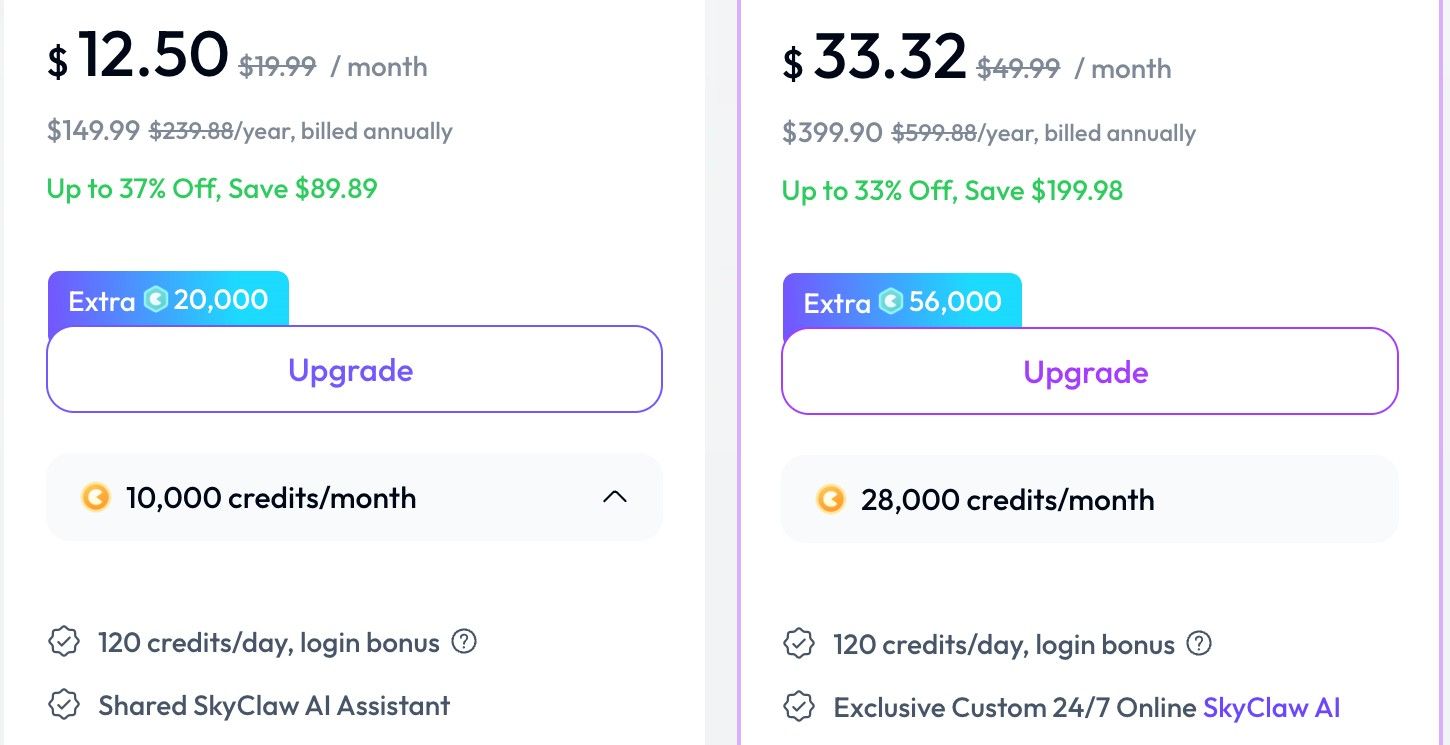
The discount labels read "Up to 37% Off, Save $89.89" on Basic, "Up to 33% Off, Save $199.98" on Plus, and "Up to 37% Off, Save $1,099.98" on Ultra. A "Use promo code for instant discounts" link sits below the cards.
Feature separation across the three, as listed:
- Basic: Shared SkyClaw AI Assistant, 3 devices online simultaneously, 50GB knowledge base capacity. Core AI features include enhanced AI search with real-time web search, AI editing across docs, PPT, images, webpages and videos, AI deep thinking, task deployment via IM mobile channels, and support for scheduled tasks.
- Plus adds: exclusive custom 24/7 online SkyClaw AI assistant, priority access to top AI models via a priority queue, model choice across Claude, ChatGPT, Gemini, DeepSeek and Kimi, early beta access, 4 devices, and 1T knowledge base capacity. Core AI features add dynamic workflow with parallel multi-agent processing, exclusive Cloud PC, enhanced multimodal reasoning with image understanding and code execution, and a long-context super agent.
- Ultra adds: unlimited-speed access to top AI models through an exclusive channel, first access to all beta features, 8 devices, and 3T knowledge base capacity.
Because these were read from a live account, treat them as one observation rather than a published rate card. Promotional pricing frequently varies by account age, region and campaign.
Why You Cannot See Skywork Pricing Without Logging In
Visit skywork.ai and you land in the workspace: a prompt box, a project sidebar, and capability chips for Slides, Documents, Images, Sheets, AI Developer, Videos and All Skills. There is no marketing homepage in front of it.
Visit skywork.ai/pricing and the page does not resolve to a public comparison table.
This is a deliberate product decision and it has a predictable side effect. When a vendor withholds pricing, the search results for "is Skywork free" fill with third-party roundups, directory listings and a company LinkedIn post, none of which can show you where their numbers came from. That is exactly what the current results page looks like.
It also makes evaluation slower. You cannot compare Skywork against Genspark, which publishes its free tier as roughly one Deep Research per day, or against Manus, which publishes $20, $40 and $200 tiers openly, without first creating an account.
The Struck-Through Prices: What Skywork Actually Lists At
Every tier displayed a promotional price against a higher struck-through figure. Basic showed $12.50 against $19.99. Plus showed $33.32 against $49.99. Ultra showed $158.32 against $249.99.
The honest reading is that $19.99, $49.99 and $249.99 are the list prices, and the lower numbers are a live campaign. Anyone budgeting for a renewal should assume the higher figure unless the promotion is contractually locked for the term.
The annual figures behave the same way: $149.99 against $239.88, $399.90 against $599.88, $1,899.90 against $2,999.88. Note that the annual list prices are exactly twelve times the monthly list prices, so the "annual discount" and the "promotional discount" are the same discount presented twice.
That is worth catching. A 37% saving is real against list, but it is not 37% on top of an annual commitment discount. There is only one discount here.
Skywork Credits per Dollar Across the Three Tiers
Divide credits by the shown price and the ladder becomes legible:
| Plan | Credits / month | Shown price | Credits per dollar |
|---|---|---|---|
| Basic | 10,000 | $12.50 | 800 |
| Plus | 28,000 | $33.32 | 840 |
| Ultra | 150,000 | $158.32 | 947 |
So Skywork does give a genuine volume discount, roughly 18% more credits per dollar at Ultra than at Basic. That is different from a flat per-credit ladder, and it means heavy users are not penalised for scaling.
The signup bonus credits skew this further at the point of purchase. Basic grants an extra 20,000, which is two months of the plan's own allowance handed over once. Plus grants 56,000, Ultra grants 300,000. Those are one-time, so exclude them from any ongoing budget.
What none of this tells you is how many credits a real task consumes, and Skywork does not publish a per-task rate. Same gap as every other credit-metered agent.
The Cloud PC Is a Plus Feature, Not a Free One
One line deserves separating out. "Exclusive Cloud PC" appears under Core AI Features on Plus and Ultra. It is absent from Basic.
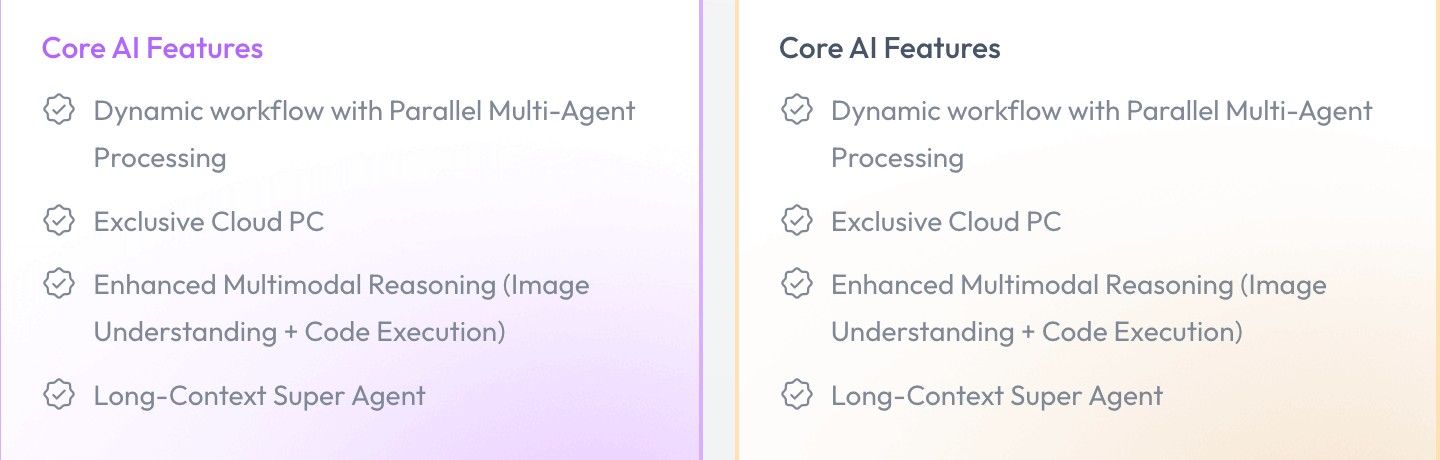
If what you want from Skywork is a persistent cloud machine that keeps working while your laptop is closed, the entry price for that is the Plus tier, $33.32 as shown or $49.99 at list. The $12.50 Basic tier does not include it.
This is the single most common misreading of agent pricing. People compare the cheapest tier of one product against the cheapest tier of another, when the capability they actually need sits two tiers up on one of them. Check which tier carries the feature before comparing headline prices.
MoClaw is a hosted cloud AI computer sold on a flat monthly subscription rather than a credit meter, so the relevant comparison for that specific capability is against Skywork Plus rather than Skywork Basic. We are not claiming a price advantage here without knowing your credit burn. We are saying compare the right rows.
What Skywork Free Access Rules Out
Assume the 120 daily credits are available on an unpaid account, which is the most generous reading. That is 120 credits toward tasks whose costs Skywork does not publish.
The practical consequence is that you cannot plan. You do not know whether 120 credits is four tasks or a third of one, and there is no published table to convert it. The only way to find out is to run your own work and watch the balance, which requires an account, which is the thing the login gate was already asking for.
So Skywork's free access is best understood as a sampling mechanism rather than a usable tier. It exists so you can try the product, not so you can run something on it.
If your work is a scheduled job that runs whether or not you log in, note that the daily bonus is explicitly tied to logging in. An automation that runs unattended does not collect a login bonus.
We cover the wider metered-versus-flat decision in Manus AI alternatives and the cost-side version in a cheaper alternative to Manus AI.

FAQ
Is Skywork AI free?
Skywork lists "120 credits/day, login bonus" on all three paid tiers. It does not publish a standalone free plan on any page reachable without an account. Verified August 11, 2026.
How much does Skywork cost?
As displayed on the in-product upgrade screen on August 11, 2026: Basic $12.50/month, Plus $33.32/month, Ultra $158.32/month, against list prices of $19.99, $49.99 and $249.99.
How many credits does each Skywork plan include?
10,000 per month on Basic, 28,000 on Plus, 150,000 on Ultra, plus one-time signup bonuses of 20,000, 56,000 and 300,000 respectively.
Why can't I find Skywork's pricing page?
skywork.ai resolves into the product workspace and the pricing route does not render a public comparison for signed-out visitors. Pricing is visible from the upgrade screen inside an account.
Does Skywork include a cloud PC?
"Exclusive Cloud PC" is listed under Core AI Features on the Plus and Ultra tiers. It does not appear on Basic.
Is Skywork secure enough for business use?
The upgrade screen displays SOC 2 Type I, ISO 27001 and ISO 27701 badges alongside a Trust Center link. Verify current certificate scope directly with the vendor before relying on it.
Choosing Between a Daily Login Bonus and a Flat Subscription
Skywork's free access is a taste, not a tier. 120 credits a day, tied to logging in, against task costs the company does not publish, is enough to see whether you like the product and not enough to run anything on.
That is a defensible design. The problem is that you cannot tell whether the paid tiers fit either, because credits per task remain unpublished at every level. The credits-per-dollar table above is the closest thing to a comparison you can build from the outside, and it still stops one step short of cost per outcome.
Before committing, run your three most typical tasks and record the credit cost of each. That converts every table in this article into something you can actually decide with. If those tasks are going to run on a schedule rather than when you are sitting there, weigh a flat monthly agent against the meter, because a login bonus is worth nothing to a job that runs at 6am without you.
All Skywork figures here were read from a live account on August 11, 2026. Skywork does not publish these publicly, promotional rates vary, and this article should be treated as a dated observation rather than a rate card.
Continue Reading
More Guide
Orca ADE: Parallel AI Agent Fleet Explained
Is ChatGPT Agent Free? It Starts at Plus $20
Is Manus AI Free? What You Actually Get

Is Genspark Free? The Free Tier Is 1 a Day
Paperclip AI: An Org Chart for Your Agents

AI Optimization Travel Under Human Review
The MoClaw editorial team writes about workflow automation, AI agents, and the tools we build. Default byline for industry overviews, listicles, and collaborative pieces.
Ready to put this into practice?
MoClaw runs browser tasks, research, and schedules automatically. Try it free.
References: Skywork (product workspace) · Genspark Pricing (published free-tier comparison point) · Manus Pricing Plans (published tier comparison point) · ISO/IEC 27001 information security management standard · Claude