Orca ADE: Parallel AI Agent Fleet Explained
Orca ADE is a desktop app that runs a fleet of coding agents in parallel, each in its own git worktree. What it does, which agents, what it costs.
Table of Contents
Orca ADE is a desktop app from Stably AI that drives several coding agents at once, each pinned to its own git branch, inside one window you can actually watch. The label it uses for itself is ADE, short for agent development environment, which reads like positioning until you run it and notice what it displaces: not your editor, but the six terminal tabs, the branch you forgot to check out, and the note somewhere reminding you which agent was doing what. As of August 2026 the repository sits at 42,896 stars, five months after its first commit on 2026-03-17.
The growth curve is what put it on our radar, but the reason it repays attention is narrower than the star count: Orca isn't another AI editor competing with Cursor for your keystrokes. It's a control room for agents that already work, and its decisions about isolation, review, and where the work physically runs say something useful about this whole category. We've mapped the surrounding tooling in our agent harness explainer if you want the wider frame first.
Key Takeaways:
- Orca ADE is an MIT-licensed desktop app running many coding agents at once, each isolated in its own git worktree.
- Roughly 29 named agents are supported, including Claude Code, Codex, Cursor and Copilot, plus any CLI agent.
- It's free; the Enterprise page publishes no pricing, only an email address.
- The repo hit 42,896 stars in five months and shipped three stable releases in two days.
- Every worktree, session and quota reading lives on one machine, which is the constraint to plan around.
What an ADE is, and why Orca uses that label
An IDE assumes one person typing into one buffer, with everything from the cursor to the single integrated terminal presuming serial work by a human. An agent development environment inverts that: several workers are typing, none of them is you, and your job shifts to dispatch and review. The repo description puts it plainly, calling Orca the ADE for working with a fleet of parallel agents, runnable on desktop, mobile, and a VPS.
Orca hasn't fully settled on its own vocabulary, which is itself a signal. The GitHub topics carry both ade and agent-ide; the README calls it "The AI Orchestrator for 100x builders," while the homepage headline as of August 2026 reads "Ship 100x With The Agent IDE." The docs, meanwhile, use "Orca ADE" in page titles. Category naming is still in flux across this whole space, so treat the acronym as a claim about who the tool is for rather than a settled technical term.
What's actually in the window
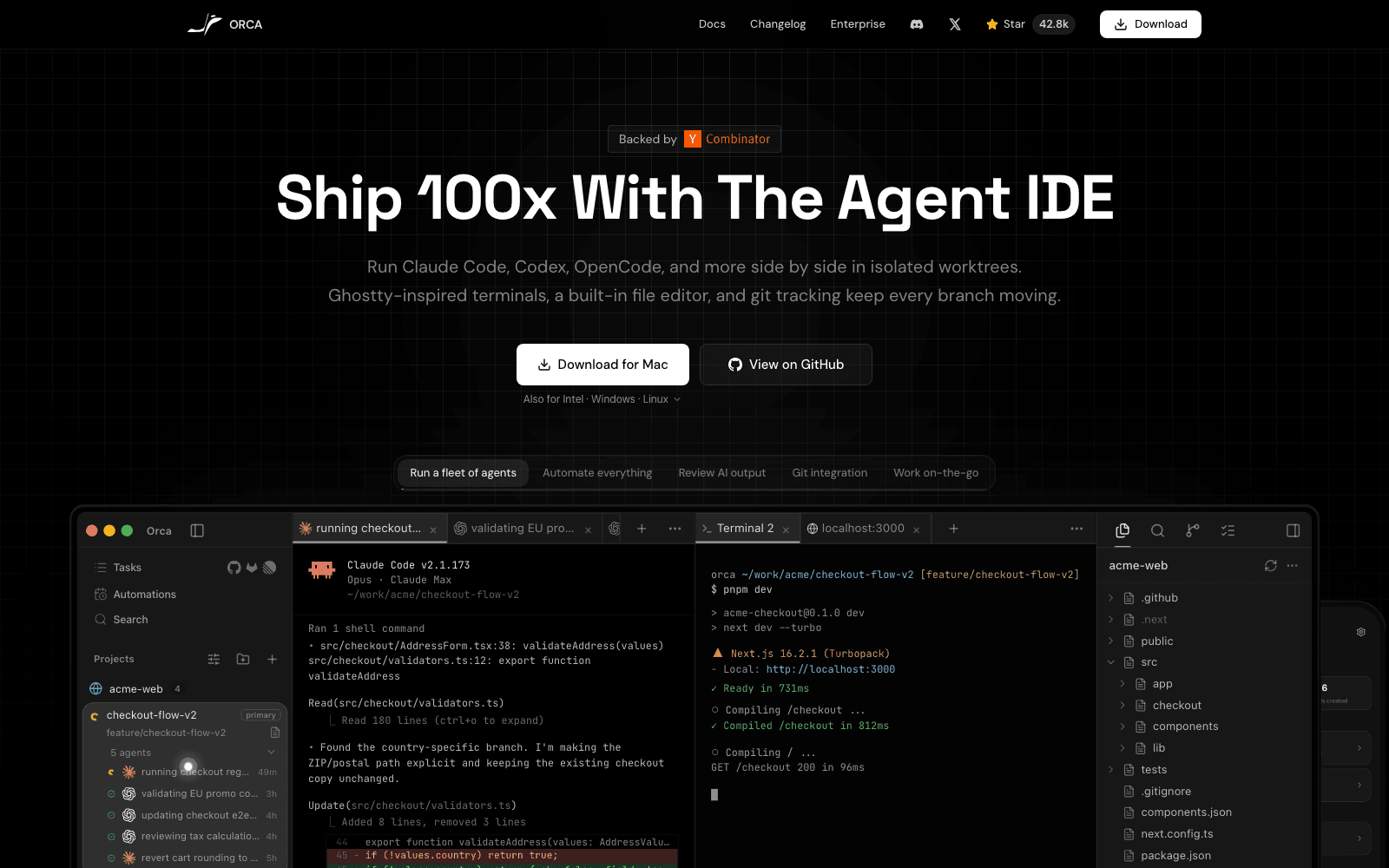
The homepage screenshot isn't a mockup of an aspiration; it maps onto the README's feature list. Down the left is a task rail holding five agents against one project, each with its elapsed time attached: a checkout regression at 49 minutes, EU promo code validation at three hours, then an e2e update, a tax calculation review, and a cart rounding revert at five hours. That elapsed-time column is the point of the layout, because when five agents are mid-flight the question you keep asking isn't what they're doing, it's which one has been stuck.
Across the top, each agent gets a tab, and next to those sit a terminal and an embedded browser tab pointed at localhost:3000. The README lists Ghostty-inspired terminals with splits, a Monaco editor with autosave, a rich markdown editor, native GitHub and Linear integration, drag-and-drop of files into an agent's context, and a Design Mode that lets you click a live UI element to push its HTML, CSS, and a screenshot into the agent's prompt. There's also an Orca CLI, and inline annotation on AI-generated diffs so a review comment lands on the specific line rather than in a chat message.
That embedded preview deserves a second look, because localhost:3000 is an address that exists on exactly one computer. Design Mode, the browser tab, and the screenshot pushed into an agent's context all assume the dev server runs on the same box as the Orca ADE window. It works beautifully until whoever needs to see the preview is a colleague, or you on another device. Running the fleet on a hosted machine such as MoClaw gives that preview an address other people can open, rather than one stuck behind your home router.
Which coding agents it runs
This was the claim I most wanted to check, because "works with any agent" usually means "works with three." The answer sits in between. The README's Supported Agents section names roughly 29, among them Claude Code, Codex, Grok, Cursor, GitHub Copilot, OpenCode, Amp, Pi, Devin, Goose, Cline, Continue, Droid, Kimi, Kiro, Qwen Code, and Rovo Dev. Then it adds an escape hatch: works with any CLI agent, and if it runs in a terminal, it runs in Orca.
So the honest version is a curated set with first-class handling plus a generic path for anything terminal-shaped, and the curated part earns its keep. Orca reads the usage state each agent already keeps on disk, under ~/.claude, ~/.codex, and the Gemini and OpenCode equivalents, then surfaces remaining quota and reset windows in the status bar so you learn about a rate limit before an agent stalls on it. The docs are candid about the limitation: there are no API calls and no extra auth involved, so the readout is only as fresh as the agent's own bookkeeping, updating when the agent writes rather than in real time.
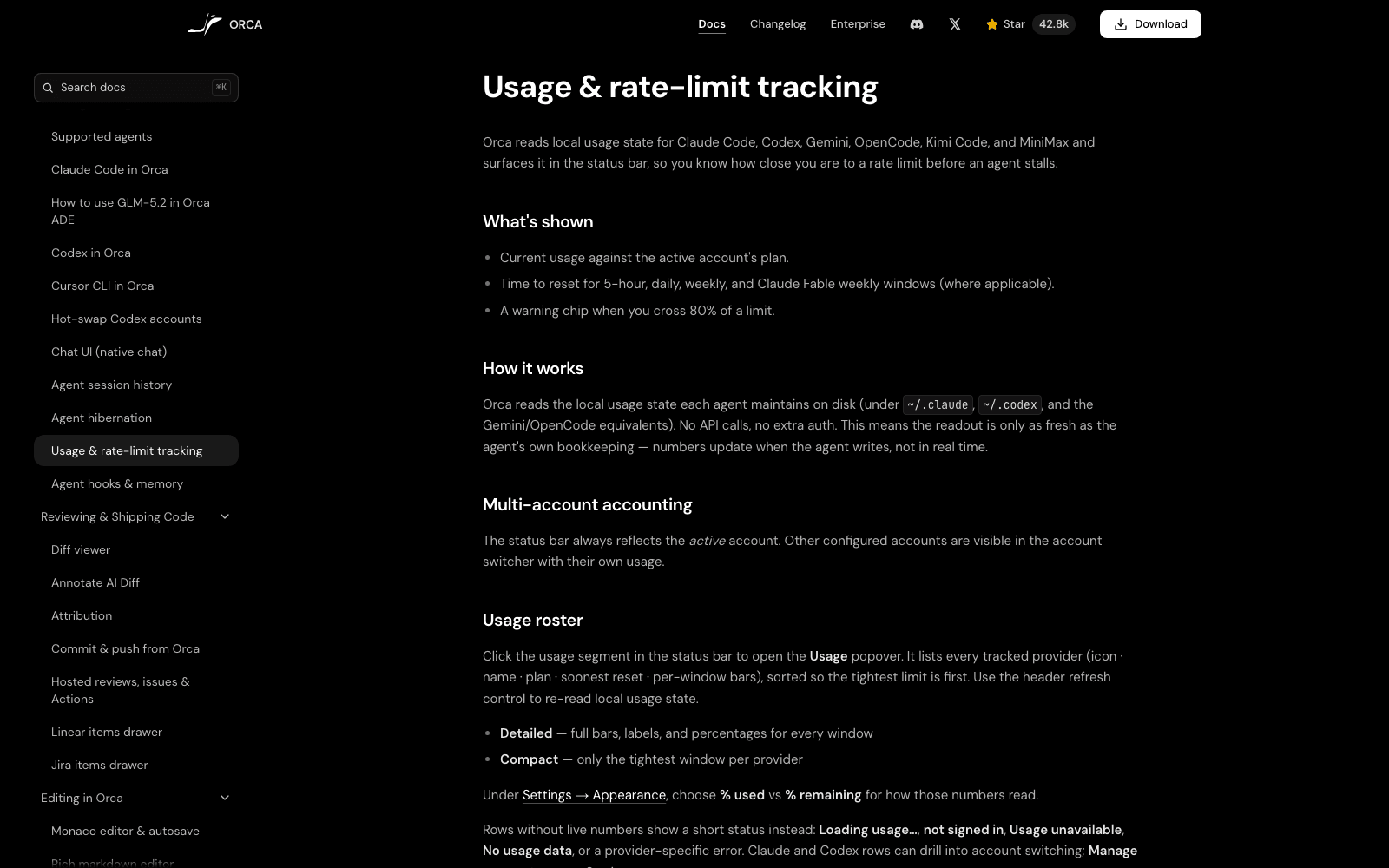
Notice what that implies. Every piece of state Orca reasons about, from quota to session history to the worktrees themselves, lives on one computer's disk. Reasonable for a local-first desktop app, and the constraint shaping everything below.
Worktrees, and the part that stays awkward
Orca's isolation model is git worktrees: each agent gets a real checkout of its own branch, so two agents editing the same file can't overwrite each other, because they aren't looking at the same file on disk. Fanning one task to several agents and merging whichever result wins follows naturally. We've written up the mechanics of that pattern in more depth in running Claude Code agents in parallel, so I won't repeat the git plumbing here.
The interesting feature is SSH worktrees, which run the checkout and the agent on a remote machine instead of your laptop. Sitting next to it in the docs is Agent hibernation. Both exist for the same underlying reason: a long agent run and a personal computer have incompatible availability requirements. You close the lid, walk to a meeting, and the fleet either dies or has to be parked and resumed. Orca's answer is to let you point the work somewhere else and to make suspension survivable, which is a good answer to the wrong-shaped problem. The gap MoClaw fills is the somewhere else: a hosted cloud AI computer that's already awake, so the remote target exists without you maintaining a VPS for it, and it runs alongside your local install rather than in place of it.
Orca ADE versus a single-agent CLI or an AI IDE
Against an AI IDE the comparison is almost a category error. Cursor and its neighbours optimise the loop where you write a line, the model completes it, and you keep typing; the unit of work is a buffer. Orca ADE assumes the unit is a branch, and that you'll read the result rather than watch it appear. If you spend your day in an editor with an agent helping, Orca isn't a replacement; if you spend it dispatching work and reviewing diffs, it is.
Against a bare CLI agent, the gap is bookkeeping rather than capability. Claude Code in a terminal does everything Orca's agents do, one at a time, and nothing stops you opening five terminals and managing five worktrees by hand. People do, then stop, because the manual version has no shared status view: "which of these is blocked on a question" becomes a tab-by-tab audit whose cost scales with the number of agents. For a broader map of that problem space, our guide to AI agent orchestration covers the patterns beyond coding agents specifically.
There's a second cost to the local version that Orca inherits rather than solves. Five agents each running a dev server, a test suite, and an embedded Chromium tab compete for RAM and CPU on the machine you're also trying to use. The fan tells you before the status bar does. Running that fleet on a hosted machine like MoClaw moves the contention off the laptop you're reviewing on, which matters more as the fleet grows past two or three.
Release pace, and how much to trust it
Orca ADE ships fast enough that any version number in this article will be stale by the time you read it. The latest release as of August 2026 is v1.4.180, published 2026-08-11; v1.4.178 and v1.4.179 both landed the day before, alongside release candidates tagged rc.0 through rc.2. Pull request numbers cited in those notes run past #13,700, and the repo carries roughly 1.7k open issues, 1.8k open pull requests, and 3k forks.
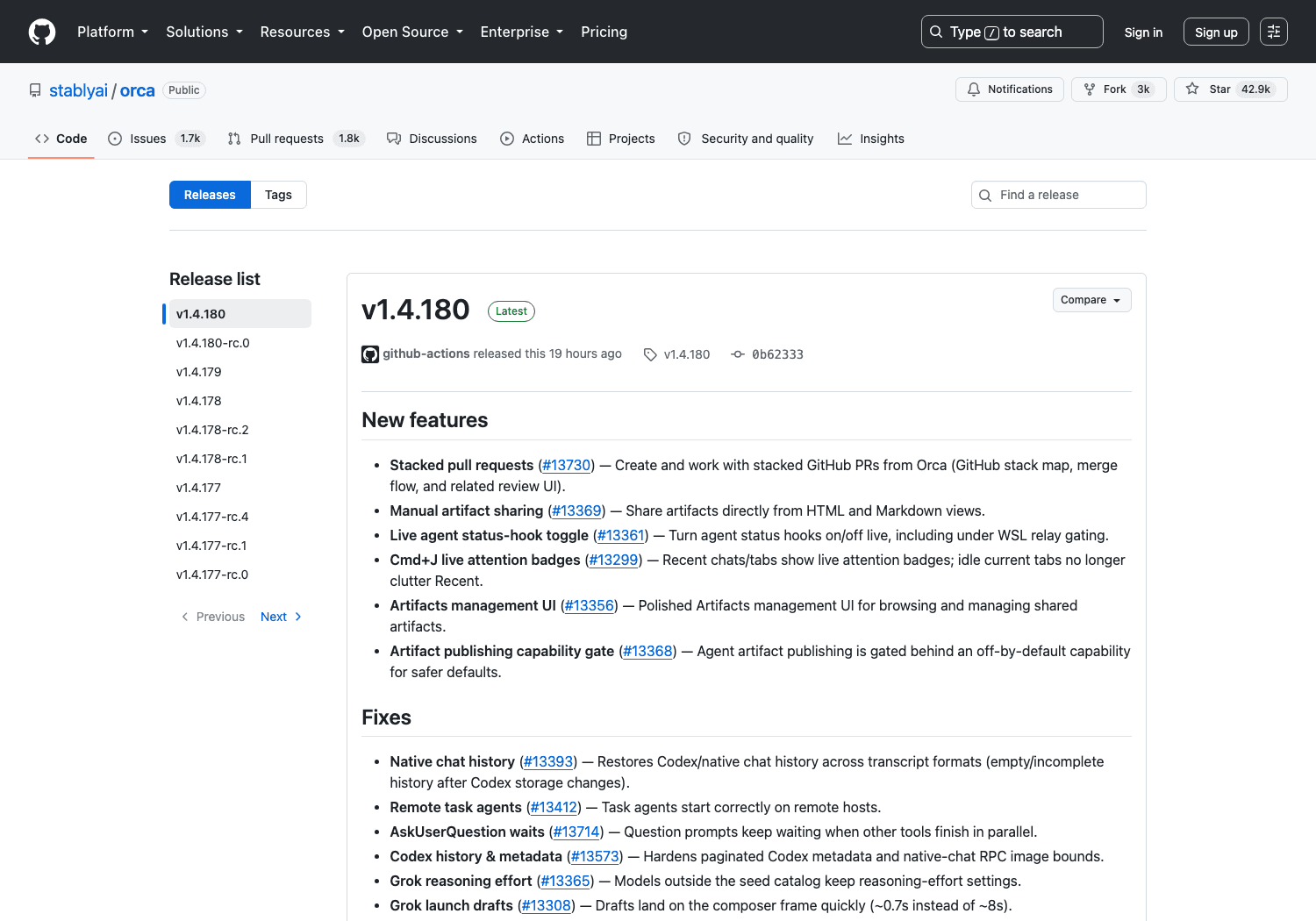
Read that in both directions. A daily cadence on a five-month-old project means a bug you report has a real chance of being fixed this week, and that the surface you're building habits on keeps moving. The v1.4.180 notes sample the churn: stacked pull requests, a live toggle for agent status hooks, and a capability gate leaving artifact publishing off by default.
Cost, licence, and getting it installed
Orca is MIT licensed, and the LICENSE file in the repo carries a detail the marketing doesn't: the copyright line reads Lovecast Inc. rather than Stably. The download is free, with no per-seat price published anywhere I could find. There is an Enterprise page, but it lists no pricing at all, only an email address and a note that Orca is open source and self-hostable so a team can run it inside its own security and deployment requirements. If you need commercial terms, you're contacting a human, not reading a table.
Installation covers macOS on Apple Silicon and Intel, Windows, and Linux, shipped as DMGs, a Windows installer signed through SignPath Foundation, and an AppImage, with Homebrew and an Arch AUR package for package-manager people. There's also a mobile companion for iOS and Android, and precision matters about what it does: monitoring a fleet and answering an agent's question from your phone, not doing the work there, because the worktrees sit on the desktop machine.
That distinction is what I'd think hardest about before committing a team to this shape. Orca is excellent at turning one workstation into a control room, and it is still one workstation: every machine you work from needs its own install, its own clone, and its own agent logins, and session history on the laptop is invisible from the desktop. A hosted cloud AI computer inverts the relationship, since the machine becomes the thing you reach rather than the thing you sit at, which is why MoClaw opens from a phone or a borrowed laptop with no checkout on either. Which model fits depends on whether your bottleneck is dispatching agents or being physically present at the right computer, and for most people it's both, at different hours.
FAQ
Is Orca ADE open source?
Yes. The repository is MIT licensed, with the LICENSE file crediting Lovecast Inc. as copyright holder in 2026. The Enterprise page also describes the product as open source and self-hostable.
Does Orca work with Claude Code and Codex?
Both are first-class. The docs carry dedicated pages for each, plus account hot-swapping for Codex, and Orca reads their on-disk usage state to show rate-limit headroom in the status bar.
Is Orca free to use?
The Orca ADE app is free to download and MIT licensed. No subscription or per-seat price is published. The Enterprise page routes to email rather than a price list, so assume commercial terms are negotiated rather than posted.
Does Orca run on Windows and Linux, or only macOS?
All three. The releases include a Windows installer and a Linux AppImage alongside macOS builds for Apple Silicon and Intel, and the README states macOS, Windows, and Linux support directly.
Can Orca run agents on a machine other than my laptop?
Yes, through SSH worktrees, which put the checkout and the agent on a remote host. You supply that host. Agent hibernation covers the related case where the local machine goes away mid-run.
Is Orca ADE just another AI IDE like Cursor?
No, and the difference is the unit of work. An AI IDE optimises a human editing a file with model assistance. Orca ADE assumes several agents each own a branch and that your time goes into dispatch and review instead of typing.
Facts in this article were checked against the stablyai/orca repository, its releases, and onorca.dev on 2026-08-12. Star counts and version numbers move daily.
Continue Reading
More Guide
Is ChatGPT Agent Free? It Starts at Plus $20

Is Manus AI Free? What You Actually Get

Is Genspark Free? The Free Tier Is 1 a Day

Is Skywork AI Free? The 120-Credit Daily Cap

Paperclip AI: An Org Chart for Your Agents

AI Optimization Travel Under Human Review
The MoClaw editorial team writes about workflow automation, AI agents, and the tools we build. Default byline for industry overviews, listicles, and collaborative pieces.
Ready to put this into practice?
MoClaw runs browser tasks, research, and schedules automatically. Try it free.
References: stablyai/orca on GitHub · Orca official site · Orca releases · Orca usage & rate-limit tracking docs · Orca LICENSE (MIT) · Orca Enterprise