How to Access Claude Opus 5: Every Path

How to access Claude Opus 5 across the Claude apps, the API (model id claude-opus-5), Claude Code, GitHub Copilot, Bedrock, and Vertex AI. Plans and setup.
Table of Contents
You can access Claude Opus 5 six ways: the Claude apps (Pro and Max), the Anthropic API with the model id claude-opus-5, Claude Code, GitHub Copilot, Amazon Bedrock, and Google Vertex AI. It launched on July 24, 2026, priced at $5 per million input tokens and $25 per million output tokens, the same price as Opus 4.8, and it is now the default model on Claude Max and the strongest model available on Claude Pro.
Key Takeaways:
- The API model id is
claude-opus-5. It supports a 1M token context window and up to 128k output tokens. - The free Claude tier does not include Opus 5. You need Pro, Max, or API billing.
- Effort defaults to
highon Opus 5, in both Claude Code and the Messages API. That is a real cost lever, not a footnote. - GitHub Copilot access reaches Pro+, Max, Business, and Enterprise, but Business and Enterprise admins have to flip a policy first.
- Bedrock and Vertex give you the same model behind your existing cloud contract and data boundary.
The Claude Apps: Pro and Max
The fastest path is the one most people already have. Open claude.ai or the desktop app, and Opus 5 shows up in the model picker if your plan includes it. On Claude Max it is the new default, so you may already be talking to it without changing anything. On Claude Pro it is the strongest model you can select, sitting above the Sonnet and Haiku tiers in the dropdown.
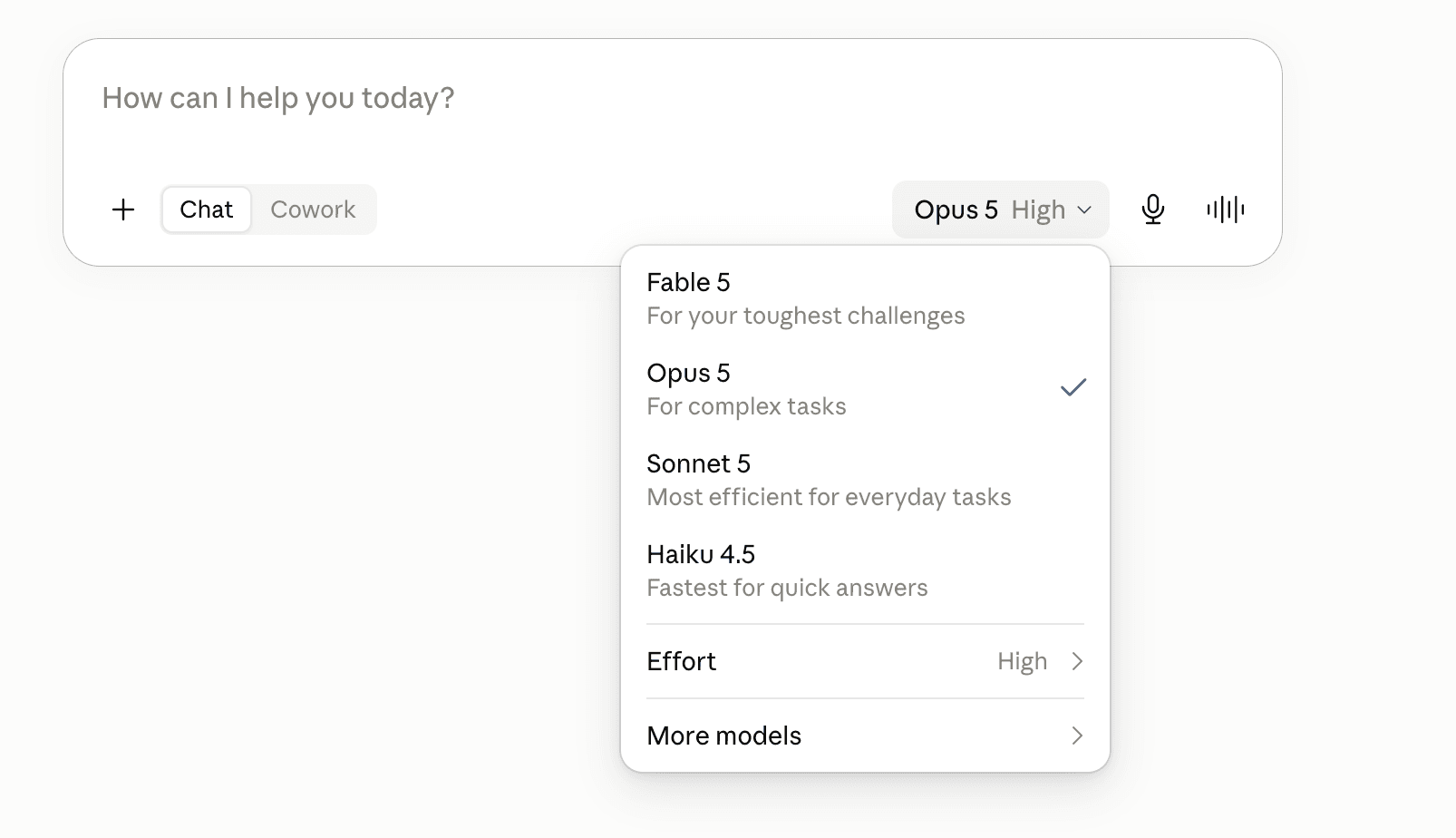
The free tier is the common trip-up. Opus 5 is not in it. If you signed in, opened the picker, and saw only Sonnet and Haiku, you are on Free, and no setting will surface Opus 5 until you upgrade. We break the plan-by-plan split down in is Claude Opus 5 free, including the cheaper ways to get near-Opus-5 quality without the top tier.
One behavior worth knowing before you start: on the apps and everywhere else, Opus 5 runs at high effort by default. For chat that is fine. It matters more when you move to the API.
If you already pay for Pro or Max, this gets you talking to Opus 5 in under a minute. What it won't give you is programmatic access, model pinning, or effort control; for those, keep reading to the API.
The Claude API and the claude-opus-5 Model ID
For anything programmatic, the model id is claude-opus-5. Drop that string into a Messages API call and you are on Opus 5. Per the model selection docs, it supports a 1M token context window by default and up to 128k output tokens, at $5 per million input and $25 per million output.
Priya, a backend engineer migrating a summarization service off Opus 4.8, expected a one-line change: swap the model id, ship it. The swap was one line. What surprised her was the bill trending up on day one, because Opus 5 defaults to high effort and her old calls had never set the parameter. Dropping effort to medium on the batch jobs, where she did not need maximum reasoning, pulled the cost back down. The string is one line; the effort parameter is the part you actually tune.
Opus 5 also supports fast mode, a research preview that delivers up to 2.5x higher output speed at premium pricing. Reach for it in interactive loops where latency is the bottleneck, not in batch work where throughput is not on the critical path.
This is the path for production integrations, where effort control and pinning an exact version actually matter. The catch is that it's raw API: the app, the retries, and the rate-limit handling are all still yours to build.
Claude Code: Switching to Opus 5
If you live in the terminal, Claude Code exposes Opus 5 two ways. Inside a session, run /model and pick Opus 5 from the list. To pin it from launch, start with --model claude-opus-5. Same effort default applies here: high out of the box.
There is a migration wrinkle worth flagging before you switch a working setup. Opus 5 is much stronger at verifying its own work, so verification instructions you carried over from older models ("add a final verification step", "use a subagent to check") can push it into over-verifying. We cover the full before-you-switch checklist in migrating from Opus 4.8 to Opus 5. If you are switching a repo you rely on daily, read that first.
Great for agentic coding in an environment you already trust, with one asterisk: your old prompt scaffolding may now be working against you. Access is the easy part here. The migration is the real work.
GitHub Copilot: Plans and the Admin Policy
Opus 5 is available in GitHub Copilot to Pro+, Max, Business, and Enterprise users. If you are on individual Pro+ or Max, it appears in the model picker as the rollout reaches you. GitHub has said the rollout is gradual, so an empty picker today is not a bug, it is a queue.
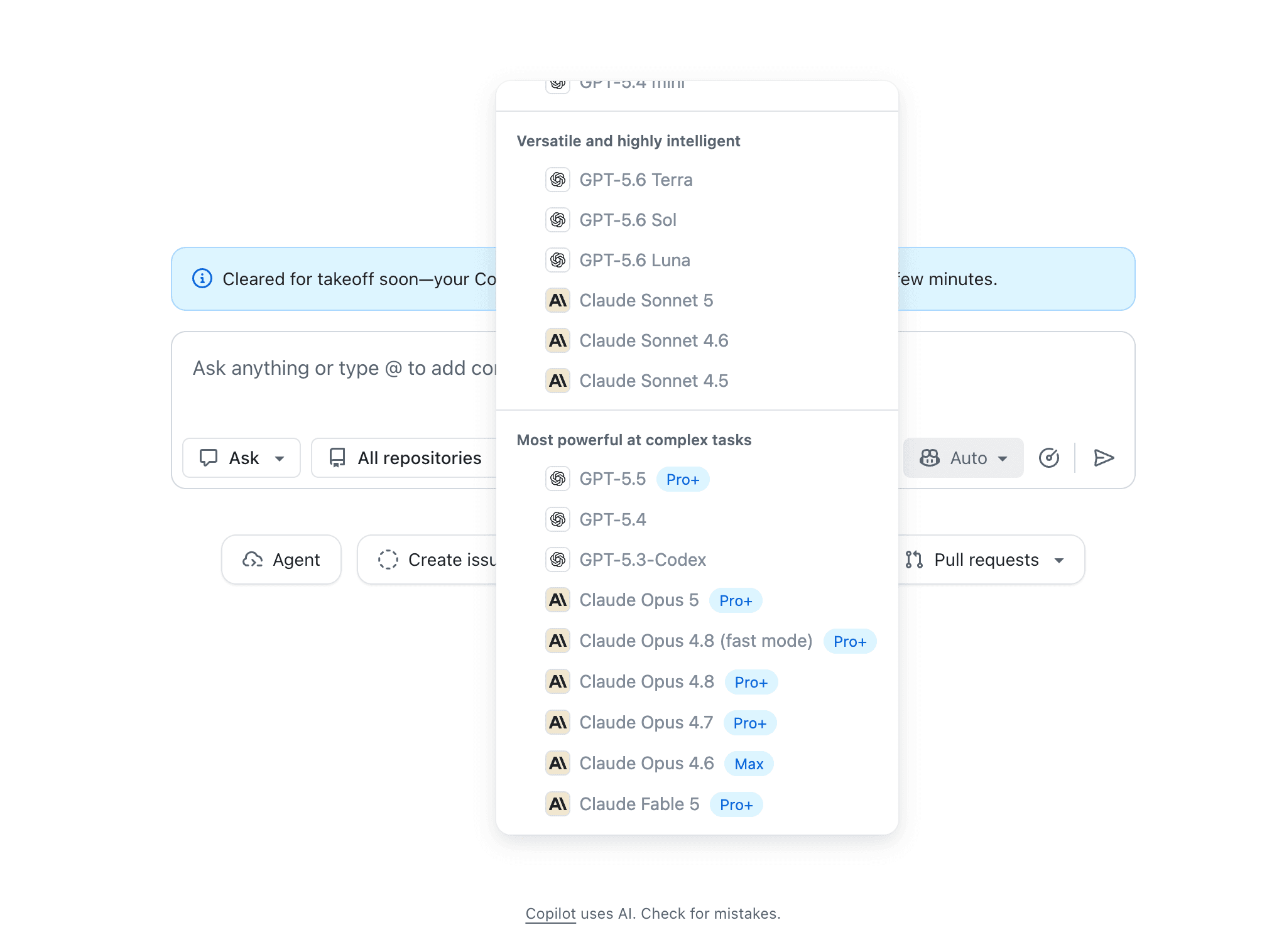
The part that stops teams cold is org-level. On Copilot Business and Enterprise, an individual developer cannot just pick Opus 5. An admin must enable the Claude Opus 5 policy in Copilot settings first. Marcus, a platform lead at a 400-seat engineering org, spent a morning fielding "why can't I see Opus 5" messages before realizing the answer was one toggle in his own admin console, not a per-seat problem. If your whole team is blocked at once, check the policy before you check anything else.
For teams already standardized on Copilot, this keeps Opus 5 inside the IDE you use all day. The wrinkle is organizational: on Business and Enterprise, an admin action gates access, so the timeline isn't fully in a developer's hands.
Amazon Bedrock and Google Vertex AI
For teams with data-residency or procurement constraints, the cloud marketplaces keep Opus 5 inside a boundary you already govern. On Amazon Bedrock and Google Vertex AI, you call the same model through your existing account, billing relationship, and network controls, rather than routing traffic to a separate vendor.
The tradeoff is timing and region coverage. Models land on the Anthropic API first and reach every Bedrock and Vertex region on a lag, and the identifier is namespaced per platform, not the bare claude-opus-5 string. Check your provider's model catalog for the current id and regions before wiring it in.
This is the enterprise answer when the model has to live inside an existing cloud contract and compliance perimeter. The tradeoff you accept: that cloud's region and rollout schedule, which can trail the direct API by a bit.
Running Opus 5 Through MoClaw
If you want Opus 5 doing real work rather than just answering prompts, MoClaw runs it as the engine behind a managed, always-on AI agent, with skills, persistent memory, and multi-channel messaging, and no key management or infrastructure to stand up yourself. In the MoClaw chat model picker, Ultra is the highest-capability tier — and Ultra defaults to Claude Opus 5 — so you pick Ultra, send a task, and Opus 5 does the agent work. You get the model's reasoning inside a system that can actually take scheduled action, instead of a raw endpoint you have to build an application around. Setup and the supported configuration live on the MoClaw Opus 5 integration page.
Pick this when you want Opus 5 inside a running workflow and don't want to wire the API, retries, and scheduling yourself. Being a managed layer, it asks you to trade some low-level control for not operating the plumbing. Fair trade for most teams; a dealbreaker for a few.
FAQ
What is the Claude Opus 5 model id?
The API model id is claude-opus-5. Use that exact string in a Messages API call. On Bedrock and Vertex the identifier is namespaced differently, so check each provider's model catalog.
Is Claude Opus 5 available on the free plan?
No. Opus 5 requires Claude Pro, Claude Max, or API billing. The free tier only exposes lower-tier models. See is Claude Opus 5 free for the full plan breakdown.
How do I use Opus 5 in Claude Code?
Run /model inside a session and select Opus 5, or launch with --model claude-opus-5 to pin it from the start. Effort defaults to high.
Why don't I see Opus 5 in GitHub Copilot yet?
Either the gradual rollout has not reached your account, or, on Business and Enterprise, an admin has not enabled the Opus 5 policy in Copilot settings. Check the admin policy first if your whole team is blocked.
How much does Opus 5 cost through the API?
$5 per million input tokens and $25 per million output tokens, the same as Opus 4.8. Fast mode is priced at a premium for roughly 2.5x higher output speed.
Which Access Path Fits Your Workflow
Pick by the job, not by what is fastest to click. To just try Opus 5, the Claude apps get you there in a minute on Pro or Max. To ship a product, the API and the claude-opus-5 model id give you effort control and version pinning. In the terminal, Claude Code is a /model away, but read the migration notes before switching a working repo. For teams on Copilot or a governed cloud, Copilot, Bedrock, and Vertex keep the model inside contracts you already have. The access is easy. Matching the path to the job is what saves you money.
Continue Reading
More Guide
PILOT AI Review: What to Verify First

What Is Hermes Bot Mode? Bots and Routines
Gemini Spark Review for Inbox Monitoring

Turn a YouTube Video to Notes: course2md

How to Opt Out of Mistral AI Training

What Is M3E Canvas? Sketch UIs, Get AI Prompts
The Zentor editorial team writes about workflow automation, AI agents, and the tools we build. Default byline for industry overviews, listicles, and collaborative pieces.
Ready to put this into practice?
MoClaw runs browser tasks, research, and schedules automatically. Try it free.
References: Anthropic: Introducing Claude Opus 5 · Anthropic Docs: Choosing the Right Model · Anthropic Docs: Effort Parameter · GitHub Changelog: Claude Opus 5 in GitHub Copilot · Amazon Bedrock: Anthropic Claude Models · Google Vertex AI: Use Claude Models