Turn a YouTube Video to Notes: course2md

course2md turns a YouTube video to notes locally: a Rust CLI that transcribes on your own machine and writes slide-illustrated Markdown. Tested Sept 2026.
Table of Contents
Every tool that turns a YouTube video to notes wants you to paste a URL into its website, and most of them are quietly uploading the audio to a server you've never heard of. course2md does the opposite: it's a Rust command-line program that pulls the video, transcribes it on your own machine, samples the slides out of the frames, and writes a Markdown file to a folder you can open. No account, no browser tab, no upload.
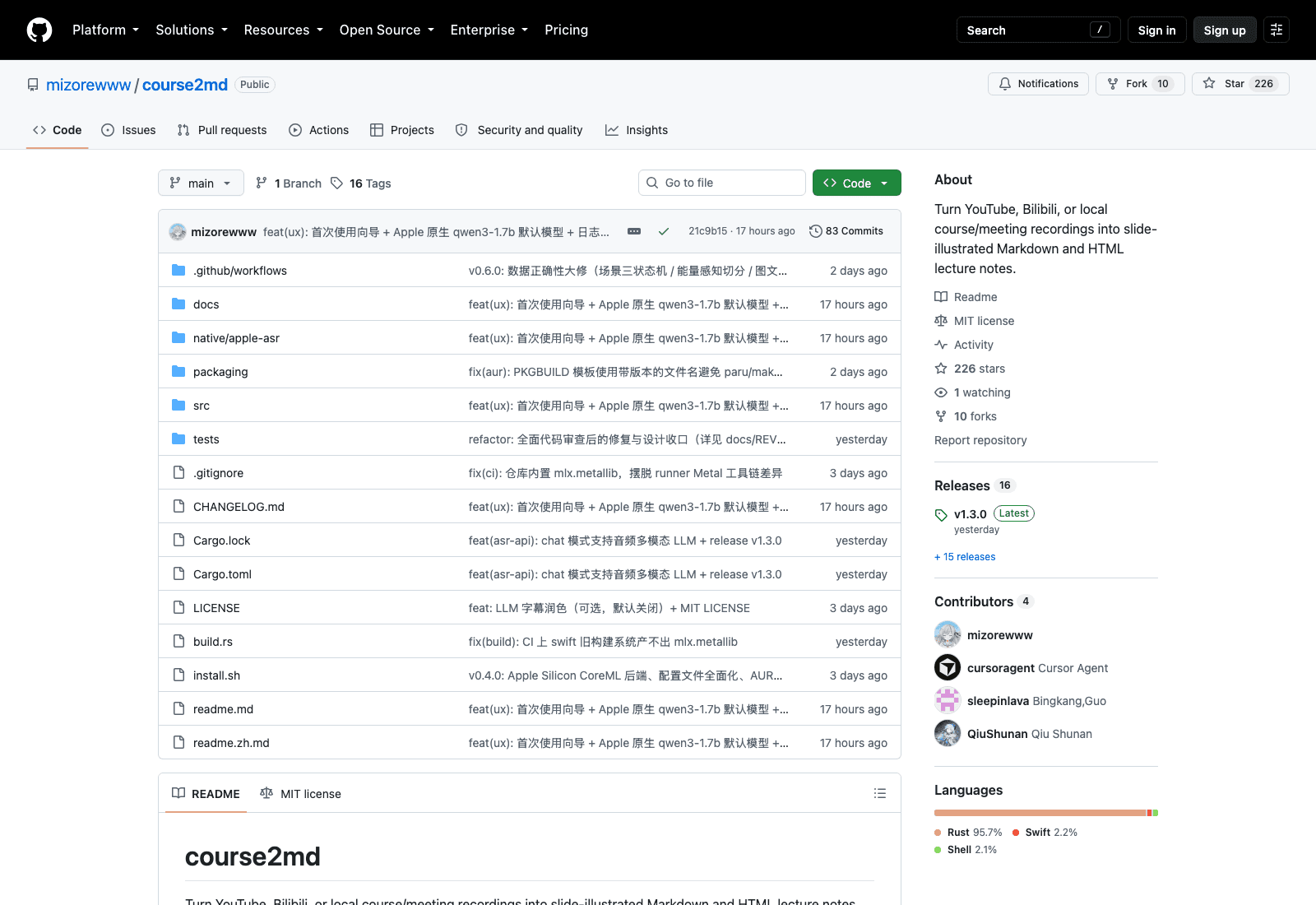
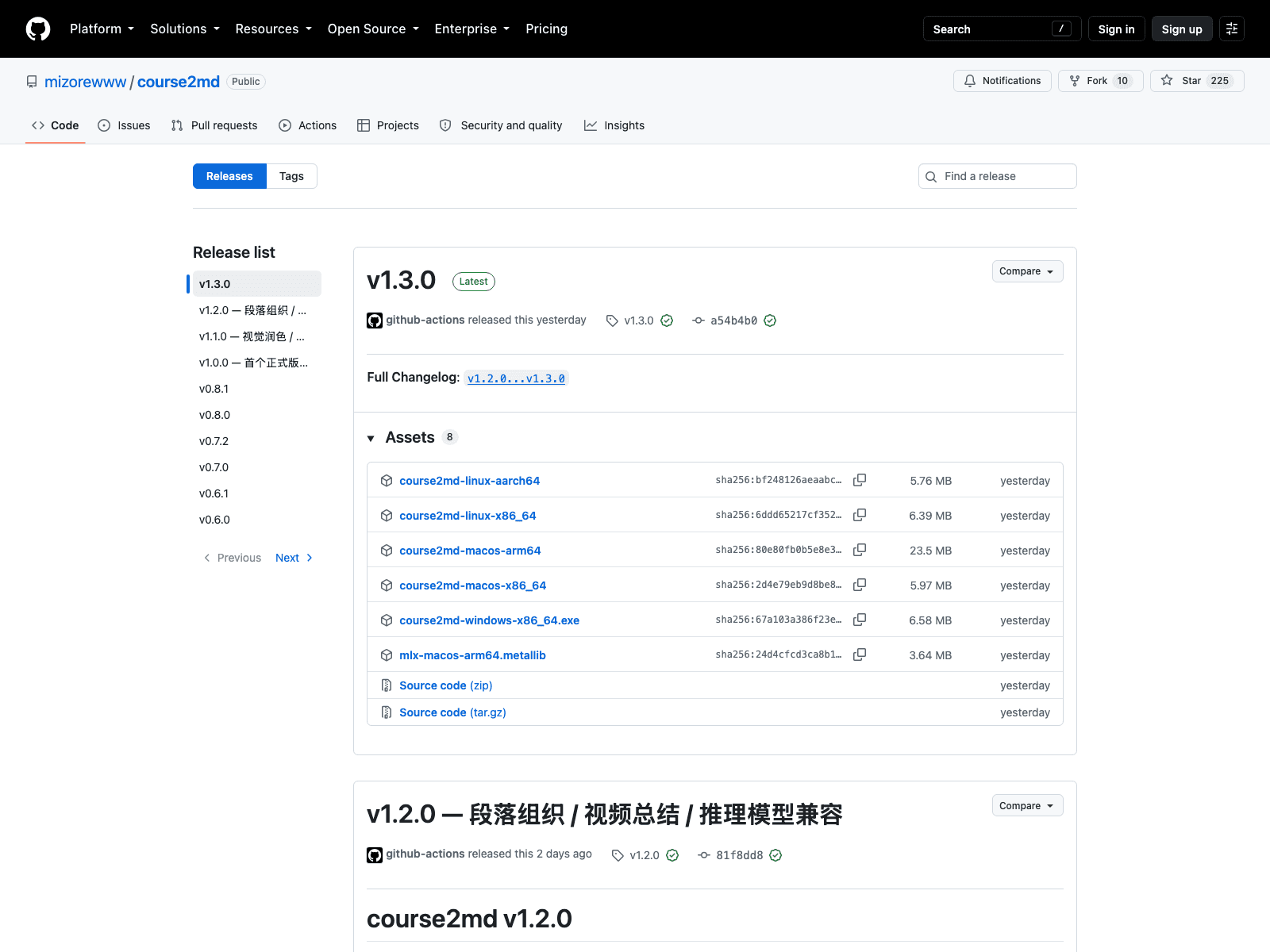
The repository went public on 31 August 2026. Three days later it has 226 stars, 83 commits, 16 tagged releases and an MIT licence, with v1.3.0 shipping on 2 September. Four accounts show up in the contributor list and one of them is cursoragent, so a chunk of those 83 commits were written by a coding agent rather than a person. That release cadence tells you as much about the project's stage as the star count does.
What it actually produces
Point it at something and wait:
course2md https://youtu.be/dQw4w9WgXcQ
course2md https://www.bilibili.com/video/BV1pb8o6yE8f
course2md ./lecture.mp4
Out the other end, under ./out/<platform>/<title>/<id>/, you get course.md and course.html. The Markdown is the point: it's a file, on your disk, that you can grep, commit, paste into Obsidian, or feed to something else. Turning a YouTube video to notes normally leaves you inside somebody's web app; this leaves you with a document.
The slide extraction is what separates it from a transcript dump. It samples frames and pairs the images with the speech around them, so a lecture where the interesting content lives on the slides survives the conversion. Recent work on that path shows up in the changelog as a scene-detection state machine and energy-aware segmentation, which is a fairly specific set of problems to be solving three days in.
The install is where it gets real
brew install mizorewww/tap/course2md on macOS, or the AUR package course2md-bin on Arch. There's an install.sh for everyone else.
Then the dependencies, which are not optional: ffmpeg and ffprobe for audio extraction and frame sampling, yt-dlp for anything online, and llama-server from llama.cpp if you want the GPU or CPU speech backends. Homebrew handles the first two. The third is your problem.
First run drops you into a wizard that asks a question worth thinking about: local recognition, or a cloud API? Local means an offline, free, private transcript and a model download somewhere between 1 GB and 2.4 GB depending on which backend you pick. Cloud means no download, an OpenAI-compatible endpoint (it defaults to OpenRouter), and your audio going over the wire. The choice lands in ~/.config/course2md/config.toml and --provider overrides it later.
Pick local and there are four backends, and the wizard puts the one that suits your hardware first: coreml on Apple Silicon, gpu when llama-server is present, npu on machines with an Intel NPU, and cpu as the fallback that always works and never impresses. Non-interactive environments skip the wizard entirely and take the platform default, which matters if you plan to run this from a script or a cron job.
The benchmark table is unusually honest
Most projects at this age post no numbers at all. This one publishes a reproducible benchmark script and a table of measured results on a 3-minute 1080p lecture clip:
gpuvia llama.cpp Metal with Qwen3-ASR 1.7B Q8: 13 seconds end to end, 11.2 seconds of that in speech recognition, with GPU power at 16.0 W and a 3.3 GB model sitting in a child process.coremlwith qwen3-0.6B on the Apple Neural Engine: 47 seconds, but only about 3.5 W sustained on the ANE and 1.41 GB of memory in-process. The battery option.cpuwith the same llama.cpp model: 26 seconds at 21.2 W, which is the worst of both worlds unless you have no GPU.apicloud recognition: roughly 10 seconds, network-dependent, with a footnote the project didn't have to write. "Audio leaves the machine."
That last line is why I'd trust this project's documentation. It would have been easy to present the cloud path as simply the fastest option and leave the implication alone.
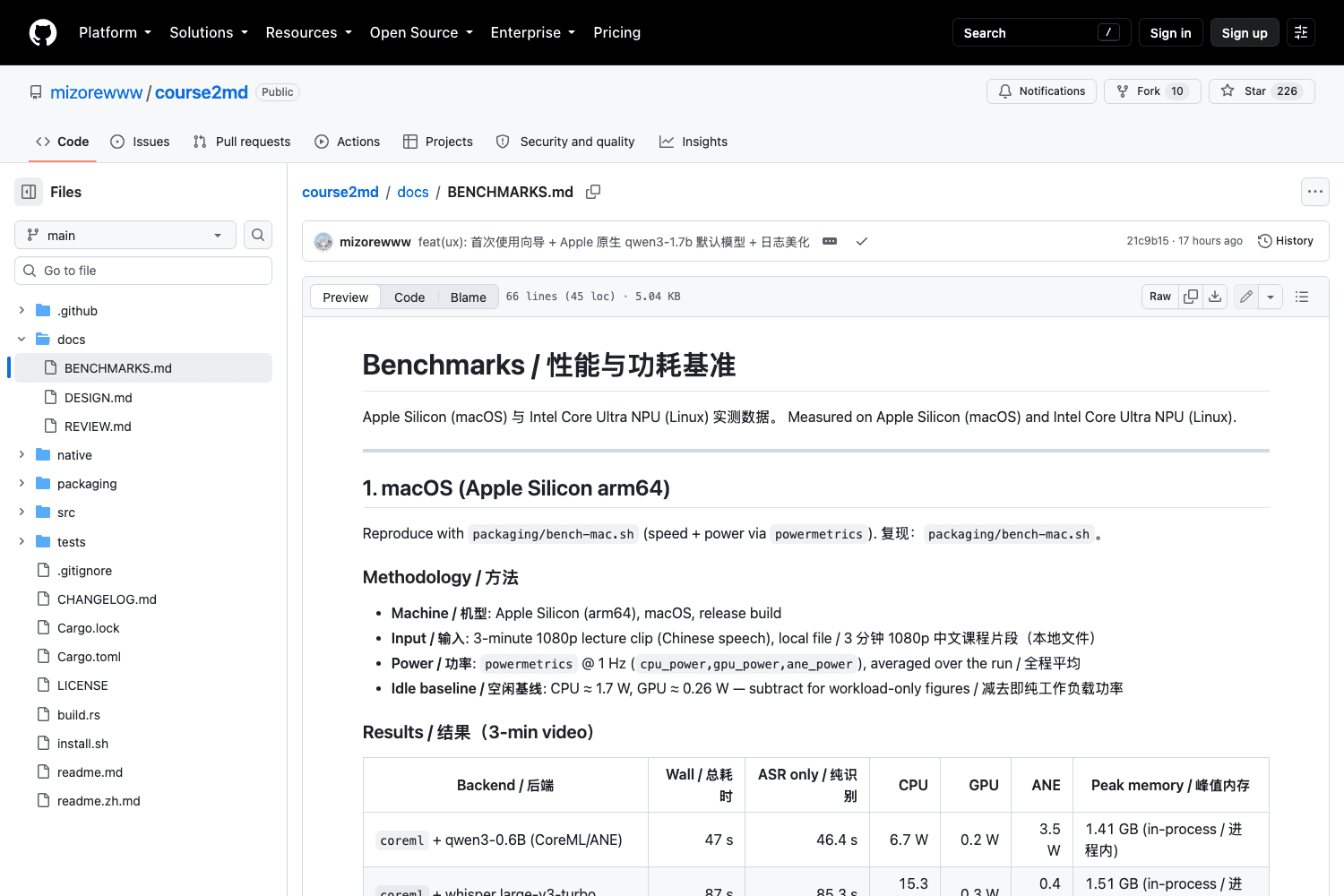
The default model changed recently to Qwen3-ASR 1.7B MLX 8-bit, which the maintainers say is more accurate and faster per upstream numbers (1.52% word error rate against 3.02%) at the cost of dropping the low-power Neural Engine path and using 2.7 GB of memory instead of 1.4 GB. If you're on battery, --asr-model qwen3-0.6b gets the efficient path back.
Where it will annoy you
macOS 15 or later on Apple Silicon for the CoreML backend, because it depends on the ANE runtime that shipped with macOS 15. Intel Macs fall back to the GPU or CPU backends, which on Intel means CPU, which means slow.
Sixteen releases in three days means the thing you install today is not the thing someone else installed yesterday. Version churn at this rate is a sign of health and a reason not to script anything load-bearing on top of it yet.
Development is Chinese-first. The commit log and half the documentation are in Chinese, and there's a readme.zh.md next to the English one. That doesn't affect the output at all, since a YouTube video to notes conversion produces notes in whatever language the speaker used, but the benchmark methodology was measured on a Chinese lecture clip, and the maintainers note that Qwen3 beat Whisper turbo noticeably on that sample. English results may sit differently.
There's also a hint in the docs for anyone behind a slow or filtered connection: set HF_ENDPOINT=https://hf-mirror.com before the first model pull. Useful, and a reminder that model downloads are the fragile step.
The docs/ folder is worth a look before you commit to it. Alongside the benchmarks there's a DESIGN.md and a REVIEW.md, the latter being the write-up of a full code review the maintainer ran and then acted on, which is an unusual thing to publish. A recent release added optional LLM polishing of the subtitle text, defaulting to off, and v1.3.0 brought a chat mode backed by a multimodal audio model. Those are the seams where turning a YouTube video to notes stops being pure transcription and starts making editorial choices, so the default-off flag is the right call.
Whole courses, not single videos
The name is course2md, not video2md, and the difference matters for how you'd use it.
A single 3-minute clip takes 13 seconds on the fast path. A 40-hour lecture series does not scale linearly in the way that makes you feel good, and it means the machine running it is busy for a long stretch with ffmpeg, a llama-server child process holding 3.3 GB, and a download of every video first. Doing that on the laptop you're also using for work is how you end up with a fan at full speed during a call.
This is the seam where MoClaw fits next to a local install: a hosted cloud AI computer stays up whether or not your machine does, so a queue of lectures started on Thursday evening is finished Friday morning, and the toolchain (ffmpeg, yt-dlp, a couple of gigabytes of model weights, a cache directory that grows every run) lives somewhere other than your working machine.
The same argument applies to meeting recordings, which the tool handles as local files. Weekly recordings pile up, nobody wants to babysit a transcription job, and the useful version of this workflow is one that runs on a schedule on a machine that's awake. That's a second, different reason MoClaw belongs in the picture. Not the transcription itself; the boring loop around it that has to keep running.
Who should actually install this
Anyone comfortable in a terminal who watches lectures or conference talks seriously, and wants a searchable file rather than a browser bookmark. Students working through a recorded course. Anyone with meeting recordings that contain decisions nobody wrote down.
The competition for the YouTube video to notes job is almost entirely web apps with a paste box, a free tier and a login. They're easier. They also hold your material, cap you on length, and give you a page rather than a file. course2md asks for a terminal and a couple of gigabytes of disk in exchange for owning the output outright, and that trade suits some people and not others.
Anyone who wants the audio to stay on their own hardware, which rules out most of the web tools competing for the same job.
Not for you if you want a browser extension, if you're on an Intel Mac, or if you need something stable enough to build a product on this quarter. For the wider category, our notes on AI agent video editors cover the tools that go the other direction, and content research automation covers what to do with the notes once you have a pile of them.
If you're already running agents against your media, note the shape of the output: plain Markdown and HTML in a predictable directory tree, which is exactly what a downstream agent wants to read. Running MoClaw as the always-on machine for that chain means the notes land somewhere reachable rather than in a folder on a laptop that's currently in a bag.
FAQ
How do you convert a YouTube course into notes?
With course2md, you install it via Homebrew or the AUR, install ffmpeg and yt-dlp alongside it, and run course2md <url>. It downloads the video, transcribes the audio locally, samples slide frames, and writes course.md and course.html into ./out/. The whole path runs offline once the speech model is downloaded.
Can you turn a video into markdown with screenshots?
That's the main thing course2md does differently from a transcript tool. It samples frames from the video and pairs the slide images with the surrounding speech, so the output is illustrated rather than a wall of text. The changelog describes scene detection and energy-aware segmentation driving where those frames get taken.
Is course2md free?
Yes, MIT licensed, confirmed on the repository on 3 September 2026. Local speech recognition costs nothing beyond a 1–2.4 GB model download. If you choose the cloud API backend instead you pay whichever provider you point it at, with OpenRouter as the default.
Does it work on Windows and Linux?
Both, plus macOS. The CoreML fast path needs macOS 15 or later on Apple Silicon; Linux users get an AUR package on Arch and an install script elsewhere, and the project publishes benchmarks for an Intel Core Ultra NPU backend on Linux as well.
Does the audio get uploaded anywhere?
Not on the local backends, which is the default and the reason to use it. Choose the api provider and the audio does leave your machine, which the project's own benchmark table says in a footnote rather than hiding.
Continue Reading
More Guide
MiniMax M3 Free Ended: What to Use Instead

MarkItDown: When Your Markdown Comes Back Thin

Lightpanda Is Fast Because of What It Skips

OpenAI Deprecated Its Codex Skills Repo

Open Science: The AI Workbench for Researchers

How to Use GPT-6 Astra: What It Really Costs
The MoClaw editorial team writes about workflow automation, AI agents, and the tools we build. Default byline for industry overviews, listicles, and collaborative pieces.
Ready to put this into practice?
MoClaw runs browser tasks, research, and schedules automatically. Try it free.
References: https://github.com/mizorewww/course2md · https://github.com/mizorewww/course2md/blob/main/docs/BENCHMARKS.md · https://github.com/mizorewww/course2md/releases · https://github.com/mizorewww/course2md/blob/main/CHANGELOG.md · https://aur.archlinux.org/packages/course2md-bin