How to Opt Out of Mistral AI Training

Mistral Vibe trains on your chats by default. The Mistral opt out of training path, both toggles, and the feedback button catch. As of 2026-09-03.
Table of Contents
Mistral corrected its help center this week, and the wording now live says something a lot of Vibe users had not assumed: "Input and output data are used by default to train our artificial intelligence models." So if you want to opt out of Mistral training, nobody does it for you. The Mistral opt out of training path sits three clicks deep in a settings panel most people have never opened, and there are two separate switches, not one.
The Hacker News thread that pushed this to the front page on September 2 has 382 points and 168 comments, and it is mostly people arguing about what "opt-in by default" was even supposed to mean.
Key Takeaways:
- Standard Vibe accounts are not opted out of training by default; Vibe Enterprise is, with the toggle held at admin level (help.mistral.ai, as of 2026-09-03)
- Vibe and the Studio/API side are separate toggles. Turning one off leaves the other on
- Documents you attach inside Vibe count as input data, so the opt-out covers uploads too
- Hitting thumbs up or thumbs down authorizes Mistral to use that exchange regardless of which plan you are on and regardless of your toggle
- Mistral Studio Free mode may use your data by default; pay-as-you-go customers are described as having the right to opt out, which is not the same sentence as "opted out by default"
Who Mistral Trains On By Default
Two live help articles carry the current policy, and they agree with each other now, which was not true a few days ago.
On the Vibe side, the article titled "Do you use my user data to train your Artificial Intelligence models?" splits it by plan. Standard Vibe: "Input and output data are used by default to train our artificial intelligence models, unless you opt out of training at any time." Vibe Enterprise: "Enterprise customers are opted out of training by default. The opt-in toggle is managed at the admin level."
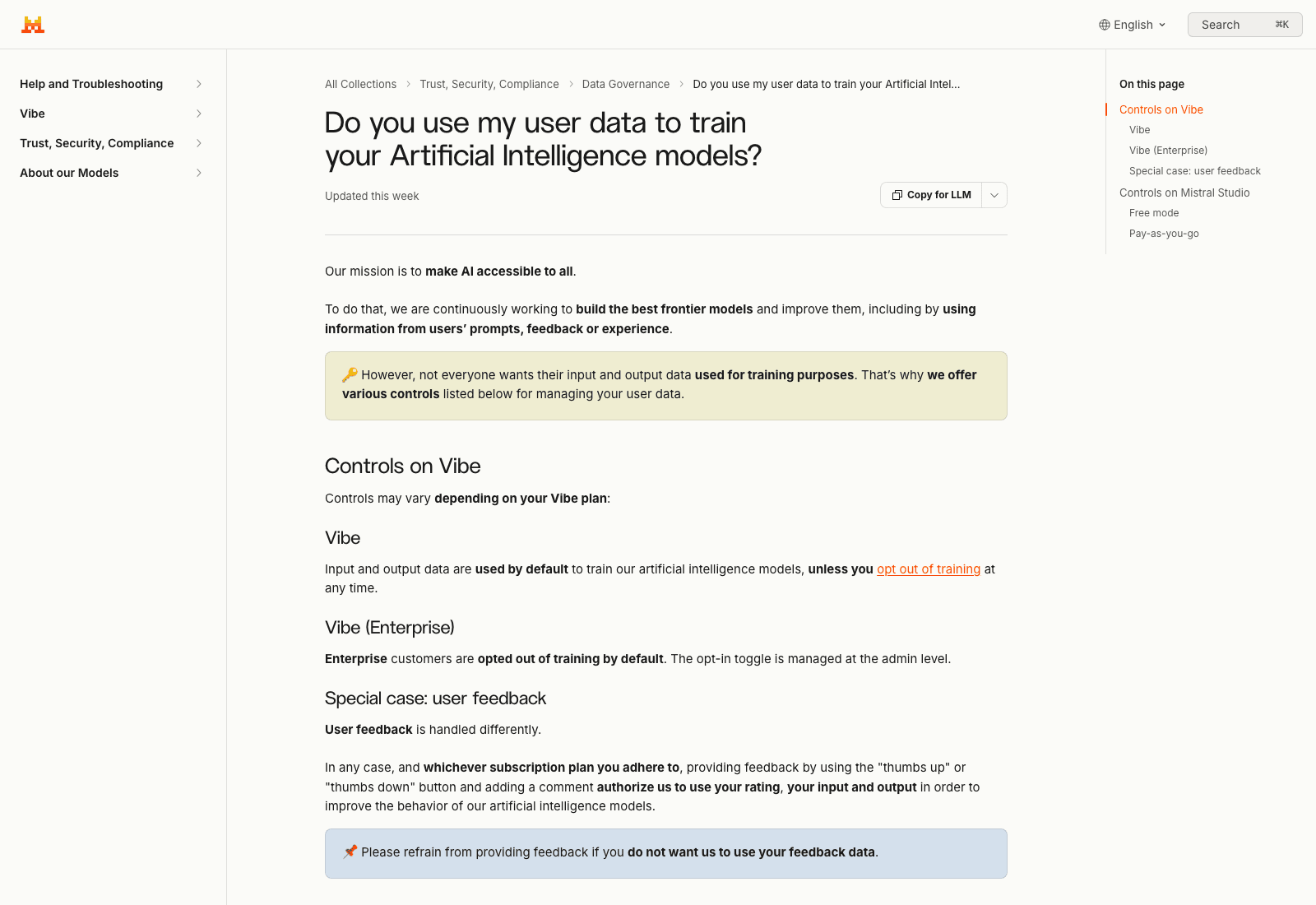
Then Mistral Studio, which is the API and console side. Free mode: "we may use your data (input and output) to train our artificial intelligence models," with an opt-out available. Pay-as-you-go gets one line: "Customers retain full control over this processing and have the right to opt out at any time."
Read that last one twice. It says you have the right to opt out. It does not say you arrive opted out. Several summaries circulating on September 2 rendered it as "pay-as-you-go customers are opted out by default," and the page does not say that. If you are on pay-as-you-go and you care, go look at your own toggle rather than trusting the paraphrase.
How To Opt Out Of Mistral Training In Vibe
The desktop route runs through the Admin panel at admin.mistral.ai. Mistral's own procedure, quoted from the opt-out help article as of 2026-09-03:
- Select
Vibeunder theManagesection. - Under the
Privacysection, disable the toggle labelledAllow your interactions to be used to train our models.
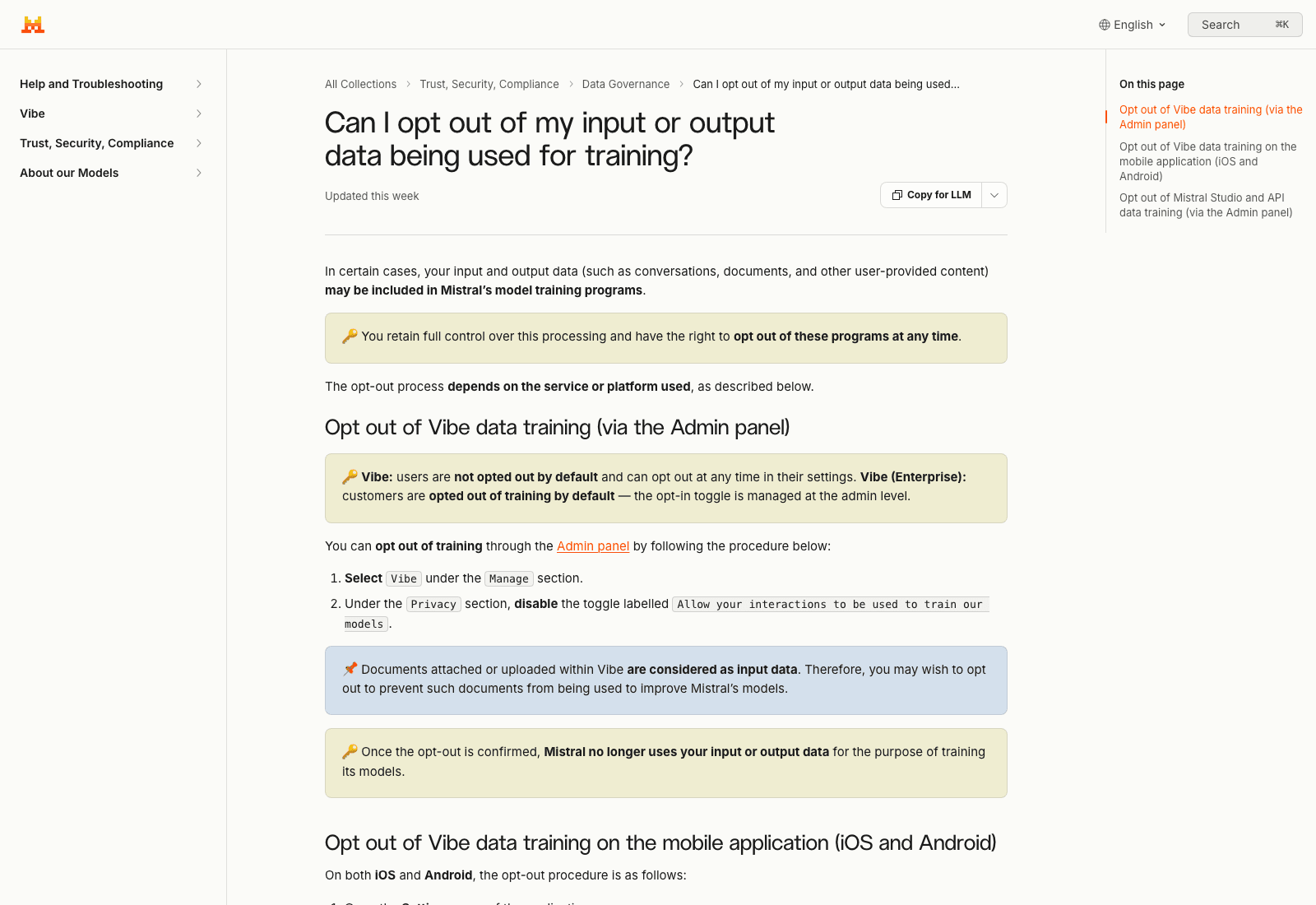
That exact string, Allow your interactions to be used to train our models, is what you are hunting for on screen. Memorize it, because the mobile app uses completely different wording for the same thing.
The page adds a line that matters more than it looks: "Documents attached or uploaded within Vibe are considered as input data." Every PDF, every contract, every half-finished deck you dragged into a chat window to ask a quick question about. Those are inputs. The toggle covers them; leaving the toggle on covers them too, in the other direction.
That upload habit is the part to change regardless of which vendor you use. Files that live on a hosted cloud computer stay in one place and get worked on where they already are, which is a different arrangement from re-uploading the same document into three chat apps and re-consenting to three different training policies each time. That is the shape MoClaw is built around: the agent, the files, and the run all sit in the same hosted environment, next to whatever tools you already use rather than replacing them.
The Mobile Toggle Is A Different Screen With A Different Name
If you use Vibe on a phone, the desktop opt-out is not where you go. Mistral's documented path for iOS and Android:
Open Settings, select Data & Account Controls under the Account section, then deselect the Enable data sharing checkbox.
Same outcome, different label. Enable data sharing on mobile, Allow your interactions to be used to train our models on desktop. If you searched the mobile app for the desktop wording you would conclude the setting does not exist there.
Vibe And The API Are Two Separate Switches
Here is the line people are missing. Straight from the help article: "Vibe and API opt-out toggles are separate. Opting out of one does not opt you out of the other — you must configure each toggle individually."
The Studio and API opt-out lives somewhere else again: Admin panel, then the Privacy menu in the left nav, then disable the toggle under Anonymous improvement data. Three different labels for what a normal person would describe as one preference.
Three panels is the actual failure mode here, not any single default. A preference that has to be re-set on a desktop admin page, a phone settings screen and an API console will drift, because nobody checks all three on the same afternoon. MoClaw collapses that to one hosted surface: the agent, its tools and its memory live in a single cloud account, so there is one settings page to audit instead of one per device you happened to sign in from.
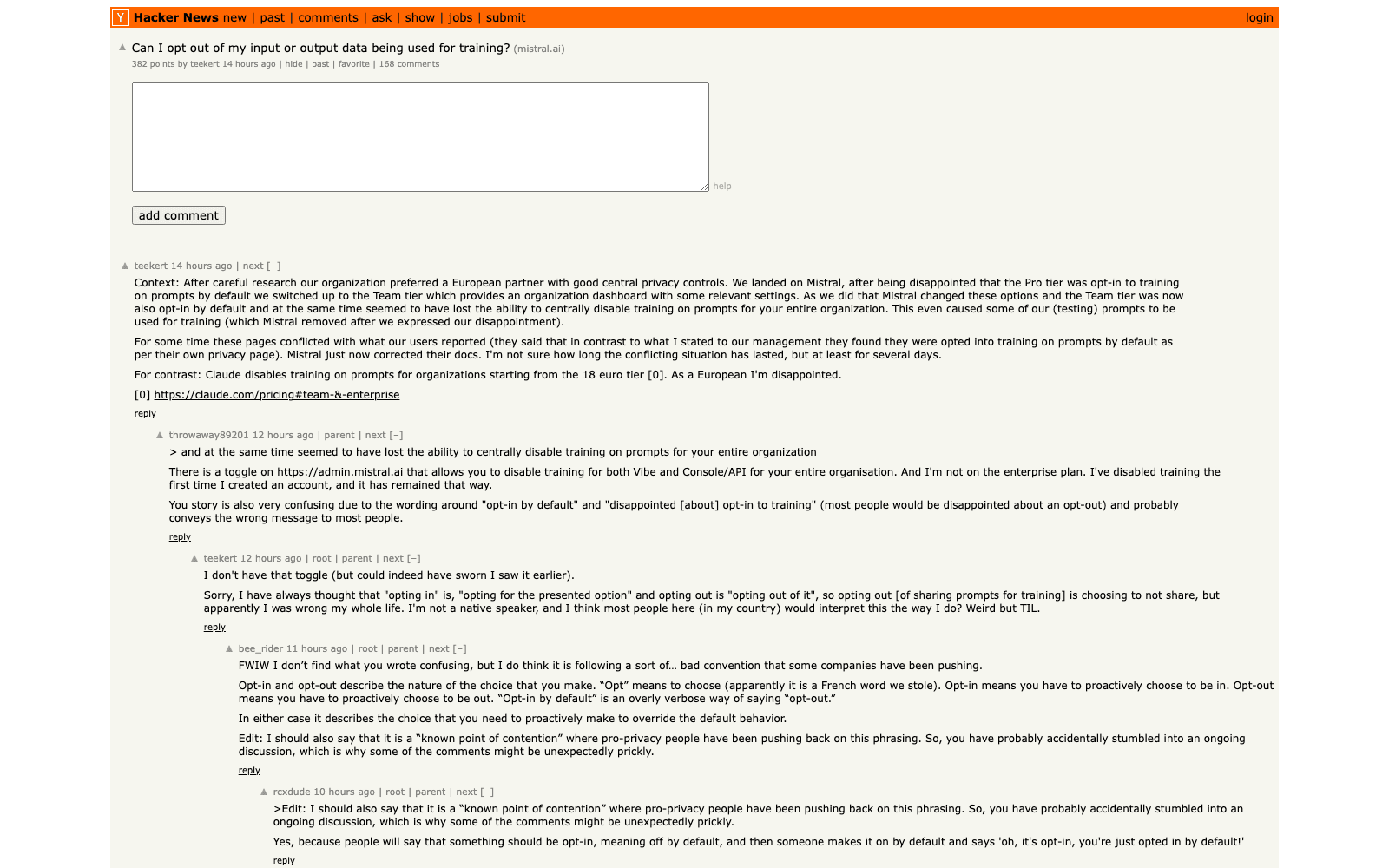
One commenter in the Hacker News thread, posting as throwaway89201, reports that the admin.mistral.ai toggle disabled training for both Vibe and Console/API across their whole organisation and that they are not on an enterprise plan. The thread's original poster, teekert, says they do not have that toggle. Both can be true if the control depends on plan or org shape, and neither of them is the documentation, which is roughly the state of things right now.
The Thumbs-Up Button Beats Your Opt-Out
This is the part almost nobody covered, and it is sitting in plain text on Mistral's own page.
"In any case, and whichever subscription plan you adhere to, providing feedback by using the 'thumbs up' or 'thumbs down' button and adding a comment authorize us to use your rating, your input and output in order to improve the behavior of our artificial intelligence models."
Whichever subscription plan you adhere to. That includes Enterprise, which is opted out by default. Mistral follows it with a blunt instruction: "Please refrain from providing feedback if you do not want us to use your feedback data."
So the honest version of the Mistral opt out of training is: turn off two toggles, then stop rating responses. A rating button that overrides an account-level privacy setting is an unusual design, and if you run a team on Vibe, tell people, because the reflex to hit thumbs-down on a bad answer is not one anyone associates with a data decision.
What Actually Changed This Week
Mistral's help pages carry the label "Updated this week" and no exact date, which is the honest limit of what can be verified from outside.
What the record does show: the Hacker News submitter describes conflicting pages, where users reported being opted into training by default while the documentation said otherwise, and writes that Mistral "just now corrected their docs" after the situation had run "at least for several days." The same commenter says some of their organisation's test prompts were used for training and that Mistral removed them after the org complained. That is one person's account of their own support thread, not a company statement, and Mistral has not published a changelog entry for this.
Worth being precise about what did not happen: there is no announcement that Mistral started training on user data. The policy language and the plan boundaries got rewritten while the product was renamed from Le Chat to Vibe. Whether the underlying behaviour changed or only the description of it did, an outside reader cannot tell, and pretending otherwise would be inventing a story that the pages do not support.
The practical consequence is duller than the outrage but more useful. Vendor training defaults are a setting that changes without a release note, on a page you have no reason to revisit. Anthropic, Google, OpenAI and Mistral each split it differently by tier, and each moves the boundary occasionally. Somebody on your side has to own re-checking it, the way somebody owns rotating credentials.
Recurring checks are the kind of thing that gets skipped because they depend on a person remembering. MoClaw is a hosted cloud AI computer, so a job like "open these four vendor policy pages on the first Monday of the month and tell me what changed" runs on a schedule from the cloud rather than from whichever laptop happens to be open. The free trial is three days and 1,000 credits, and the $20 plan carries 1,000 credits a month, which is enough to find out whether the scheduled version of a habit survives longer than the manual one.
FAQ
Does Mistral train on my data by default?
On a standard Vibe plan, yes. Mistral's help center states input and output data are used by default to train its models unless you opt out. Vibe Enterprise is opted out by default with the toggle managed at admin level. On Mistral Studio, Free mode may use your data by default; pay-as-you-go is described as having the right to opt out rather than as opted out.
Is Mistral API data used for training?
The Studio and API side has its own control, under Anonymous improvement data in the Admin panel Privacy menu. It is separate from the Vibe toggle, and Mistral states explicitly that turning one off does not turn off the other.
How do I stop Mistral from using my chats?
The Mistral opt out of training lives in two places. In the Admin panel, select Vibe under Manage and disable Allow your interactions to be used to train our models. On iOS or Android, open Settings, then Data & Account Controls, then uncheck Enable data sharing. Then stop using the thumbs up and thumbs down buttons, which authorize use of that exchange on any plan.
Do uploaded documents count?
Yes. Mistral states that documents attached or uploaded within Vibe are considered input data, which puts them inside the same training programs as your typed messages.
Does opting out delete what was already collected?
The page says only that once the opt-out is confirmed, Mistral no longer uses your input or output data for training. It does not describe removal of data already ingested. For deletion you are looking at a different set of controls, and vendor-side deletion has its own gaps, which we went through in our piece on Manus AI's forced data deletion.
Set Both Toggles, Then Put A Date In The Calendar
Clicking through the Mistral opt out of training takes five minutes, and that is the easy half. Two toggles in two different panels with three different labels, plus a habit change around the rating buttons, and you are done for today.
The harder half is that none of this stays true. Mistral rewrote these pages this week without a changelog; the tier boundaries moved once already during the Le Chat to Vibe rename. Whatever you set today is a snapshot, so screenshot your own settings screen after you change it, note the date, and check again in a quarter. Storing that check somewhere that runs without you is the difference between a policy and an intention. We made the same argument about where assistant memory lives in agent memory versus chat history, and about the privacy controls worth auditing before you commit a team to a tool in our look at Inkling's safety and privacy posture.
Continue Reading
More Guide
MiniMax M3 Free Ended: What to Use Instead

MarkItDown: When Your Markdown Comes Back Thin

Lightpanda Is Fast Because of What It Skips

OpenAI Deprecated Its Codex Skills Repo

Open Science: The AI Workbench for Researchers

How to Use GPT-6 Astra: What It Really Costs
The MoClaw editorial team writes about workflow automation, AI agents, and the tools we build. Default byline for industry overviews, listicles, and collaborative pieces.
Ready to put this into practice?
MoClaw runs browser tasks, research, and schedules automatically. Try it free.
References: Can I opt out of my input or output data being used for training? Mistral Help Center · Do you use my user data to train your Artificial Intelligence models? Mistral Help Center · Mistral now trains on user input by default, except on enterprise tier, Hacker News · Mistral Help Center, Trust Security Compliance collection · Mistral Vibe (formerly Le Chat) product page