Open-Source CapCut Alternative: Concat

Concat is a free, open-source CapCut alternative: cross-platform, offline-first, no watermark or account. What it does at alpha, and what bites.
Table of Contents
Somebody on GitHub shipped eleven alpha builds in a single week, and by the time you read this the counter has probably moved again. The project is called Concat, it went public on 25 August 2026, and it had collected around 930 stars by the end of its first seven days. It bills itself as a free, open source CapCut alternative: the same job, minus the account, the watermark and the subscription.
That sentence does a lot of work, and most of it survives contact with the actual download. Some of it needs qualifying, and one part of it will confuse you before you've even opened the app. What follows is what installs, what it does as of September 2026, and where it bites.
Key Takeaways:
- Concat is a genuinely free, MPL-2.0 desktop video editor with no account, no watermark and no export paywall.
- It went public on 25 August 2026 and reached roughly 930 stars in a week, but two people maintain it and every build is flagged pre-release.
- Auto-captions and text-to-speech run locally through whisper.cpp and Kokoro, which is the strongest reason to pick it over CapCut.
- Windows, macOS and Linux all get installers; the macOS builds are unsigned and need a
xattrcommand before they'll open. - The project was renamed from WolfCut days ago, so your downloads and its internal crates still carry the old name.
What Concat actually is
It's a desktop application, not a browser tab and not a command-line tool. You grab an installer from the releases page, run it, and start cutting; there's no sign-up screen and no second download that fetches the real program once you've handed over an email address.
The editing model is the conventional non-linear one that anyone coming from CapCut or Premiere will recognise on sight. The build I looked at puts a media bin on the left, a preview in the middle, an adjust-and-filters column on the right, and a multi-track timeline across the bottom. Projects can hold more than one timeline, which shows up as tabs rather than as separate files. Right-clicking a clip offers split at the playhead (bound to S), auto captions, move to playhead, and delete.
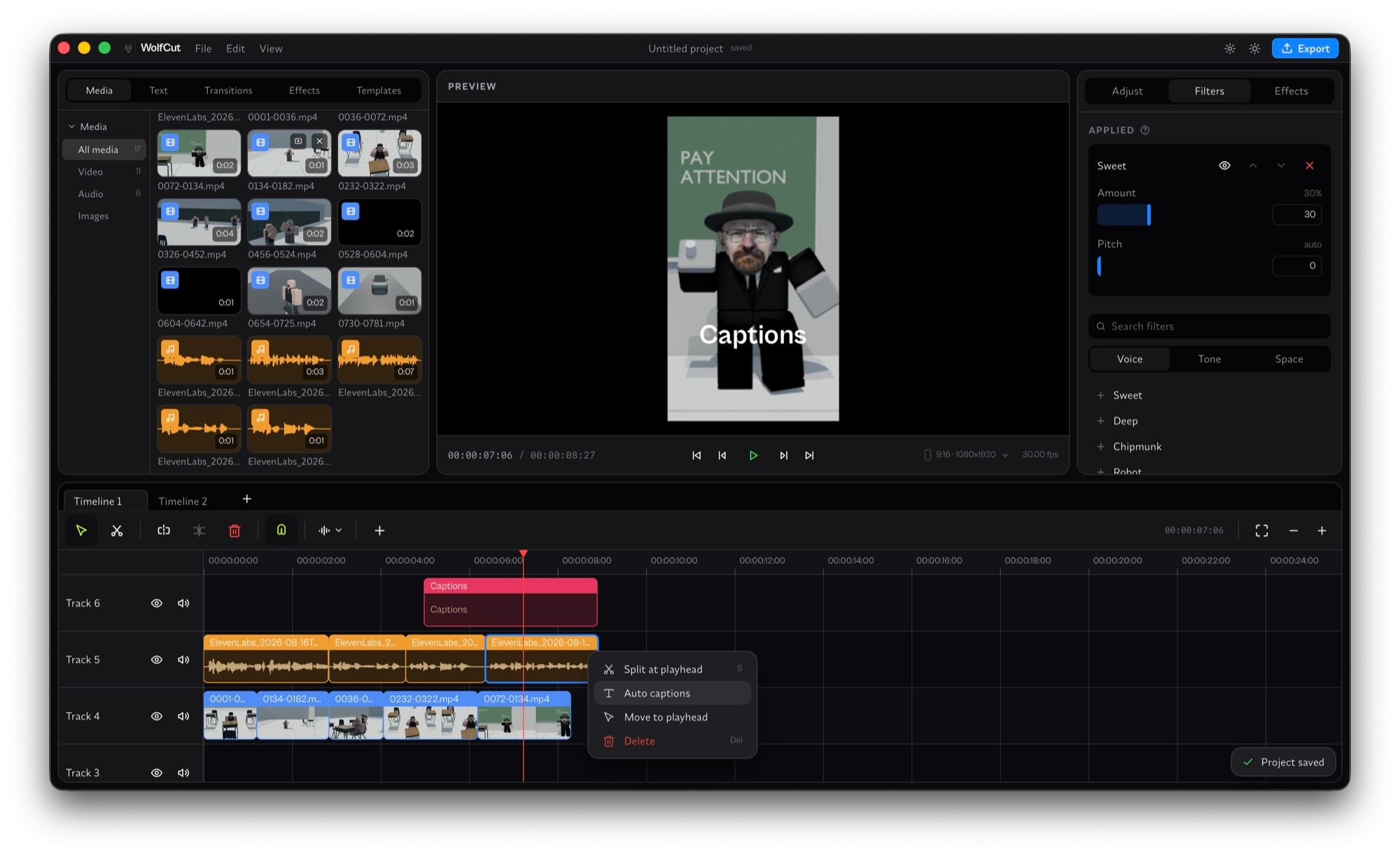
Two details there are worth pulling out. The project is set to 9:16 at 1080×1920, thirty frames a second, which tells you who the tool is aimed at. And the filter panel is a voice panel, not a colour panel: Sweet, Deep, Chipmunk, Robot, each with an amount and a pitch control. Audio got attention early here, which is unusual for a young editor.
The rename is only half finished
Concat used to be called WolfCut, and the rebrand commits landed on 31 August 2026, six days after the repo went public. The rename has not reached most of the project yet.
Go to the releases page and every entry is still titled WolfCut v0.2.0-alpha.N. The files you download are called WolfCut_0.2.0_x64-setup.exe, WolfCut_0.2.0_aarch64.dmg, WolfCut_0.2.0_amd64.deb and so on. The Rust crates that do the actual work are named wolfcut-core, wolfcut-media, wolfcut-project, wolfcut-render and wolfcut-export. Even the title bar of the app in the project's own promotional screenshot says WolfCut.
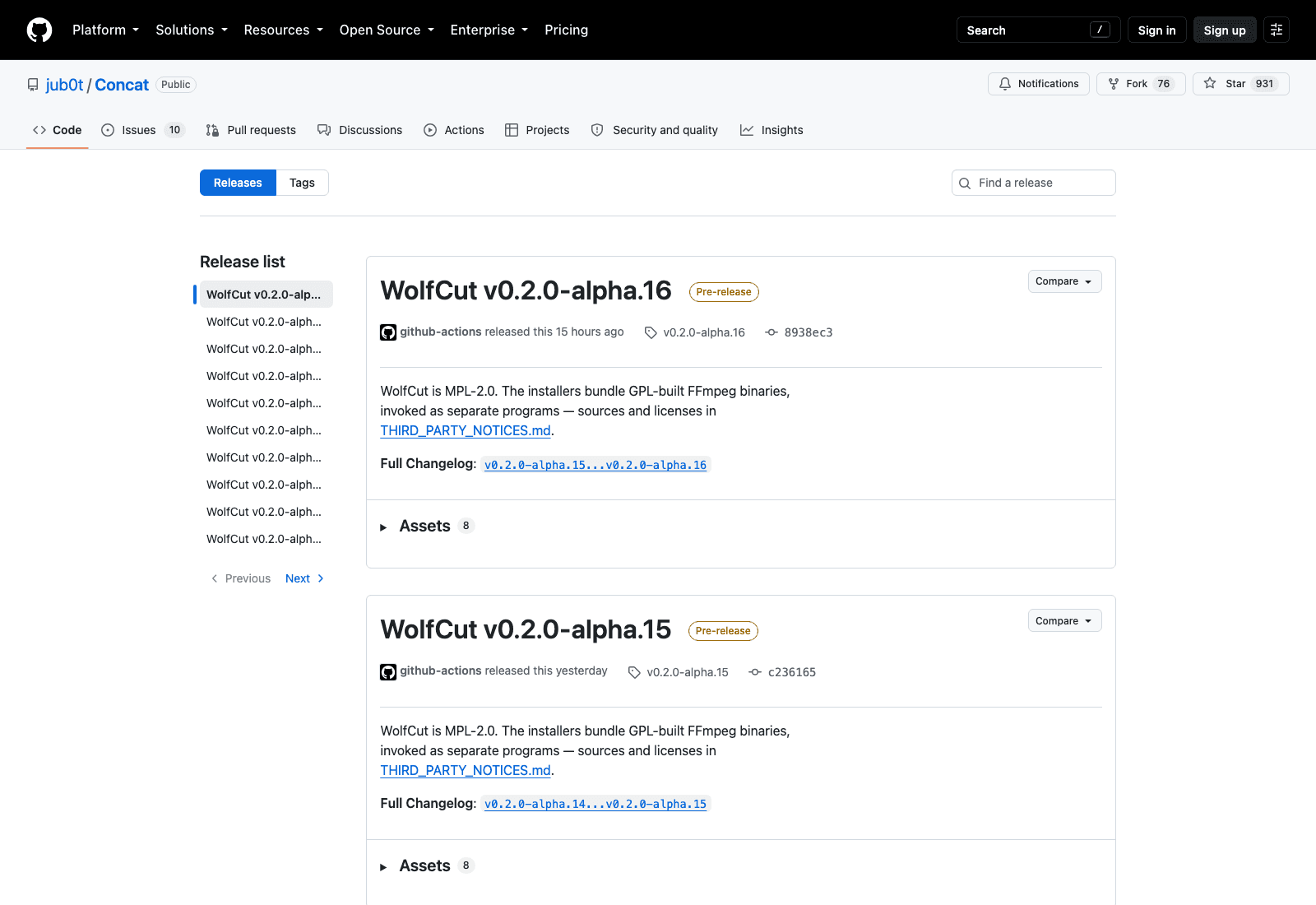
None of this is a problem, exactly, but it's the sort of thing that makes you stop and check you've grabbed the right file. If you searched for Concat and now have a folder full of WolfCut installers, you're in the right place.
The naming also matters for a duller reason. Search for "concat" and you'll get string concatenation and FFmpeg's clip-joining demuxer, because that's what the word has meant for decades. The project picked a name that describes what a video editor does and that a search engine already has strong opinions about.
How it lines up against CapCut
The pitch of any open source CapCut alternative isn't really about features. It's about the conditions attached to them.
CapCut is free to install and then charges you at the export, either in money or in a watermark, and it wants an account. Concat asks for neither. The feature list covers multi-track editing, split, trim, merge, transitions, speed control, titles and styled text, templates you can build once and reuse, voice filters, and auto-captions. There's also local text-to-speech using Kokoro voices, added a couple of days before this was written.
What you give up is everything CapCut gets from being a large product with a company behind it: the effects library, the stock assets, the mobile app, the polish, and the certainty that tomorrow's build won't lose your project. An open source CapCut alternative at version 0.2.0-alpha is not competing on breadth, and pretending otherwise would waste your afternoon.
There's one comparison that doesn't get made often enough. CapCut runs your captions and effects through servers; Concat's auto-captions run through whisper.cpp on your own CPU. That's a genuine difference in where your footage goes, and it's the strongest argument the project has. To be precise about the limit of my checking: the README says audio never leaves your machine, and the architecture document describes a React interface talking to a Tauri host talking to Rust crates that shell out to FFmpeg, with no network layer in the picture. I did not audit the source for outbound calls, so treat "fully offline" as the project's claim rather than something I verified line by line.
What free and offline actually cost you
Free is straightforward: MPL-2.0, a real open source licence, with the installers bundling GPL-built FFmpeg binaries invoked as separate programs. The project documents that arrangement in THIRD_PARTY_NOTICES.md rather than leaving you to guess, which is more care than most young projects take with licensing.
Offline is the interesting one, because offline has a price nobody puts on the box. Everything living on your machine means everything dies with your machine. Your project file, your media cache, your render queue and your only copy of the edit all sit on one laptop; there's no version on a server to open from somewhere else, and no way to hand the job to another computer halfway through.
Concat is a manual editor and makes no pretence otherwise; if you want software that assembles the cut for you, that's a different category of tool with a different set of tradeoffs. That trade is usually worth taking for the editing itself, since editing wants low latency and local disk. It's a worse trade for everything wrapped around the edit. Renders block the machine you're sitting at, transcription runs at whatever speed your CPU manages, and a batch export of twelve verticals owns your laptop until it finishes. Those jobs have no reason to be tied to the lid being open, which is the gap MoClaw fills: a hosted cloud AI computer that stays running so long jobs have somewhere to live that isn't the machine you need for something else.
Which platforms it runs on today
Windows and macOS are both marked as tested in the README, with Linux listed and supported by the build matrix. Every release ships six artefacts covering .exe and .msi for Windows, a .dmg for Apple Silicon, and .deb, .rpm and .AppImage for Linux. The repository is also a Nix flake, so nix run github:jub0t/Concat starts the editor with FFmpeg and whisper wired in.
The macOS build has a catch that will look like a broken download if you don't know about it. The binaries are unsigned, so Gatekeeper quarantines the app and refuses to open it. The README's fix is to clear the quarantine attribute yourself:
xattr -dr com.apple.quarantine /Applications/Concat.app
That's a normal state of affairs for an unfunded open source desktop app, since a Developer ID costs money every year, but it's the single most likely reason someone tries Concat once and gives up.
There's also no website. The repository's homepage field is empty and the README points at releases and a Discord server, so everything you can learn about this project, you learn from the repo.
Being pinned to one desktop is the other constraint here. Install it on the studio machine and the work is on the studio machine, which is fine until you're somewhere else with an hour to fill. Keeping a hosted machine like MoClaw in the loop for the surrounding work means the parts that aren't editing — pulling assets down, renaming a batch, pushing an export somewhere — aren't hostage to which laptop you happen to be holding.
What's doing the work underneath
The architecture document is unusually candid for a two-week-old project.
Three layers, one rule. A React interface owns layout, selection and in-flight gestures. A Tauri host exposes thirty-nine commands and holds the session. Rust crates own the project model, the undo history, the render path and the document format, and they build and version independently of the desktop app. FFmpeg and ffprobe get called as subprocesses. The stated doctrine is that anything important belongs in the engine crates and the host is plumbing.
Why that matters to someone who doesn't write Rust: an editor that keeps its document format and undo history in the engine rather than in the interface is much less likely to corrupt your project when the UI changes, and the UI is going to change a lot at this stage.
What alpha means for you this week
Every release is flagged pre-release. Version numbers sit at 0.2.0-alpha.16 as of 31 August 2026, and sixteen alphas in a fortnight tells you the pace is high and the surface is unstable.
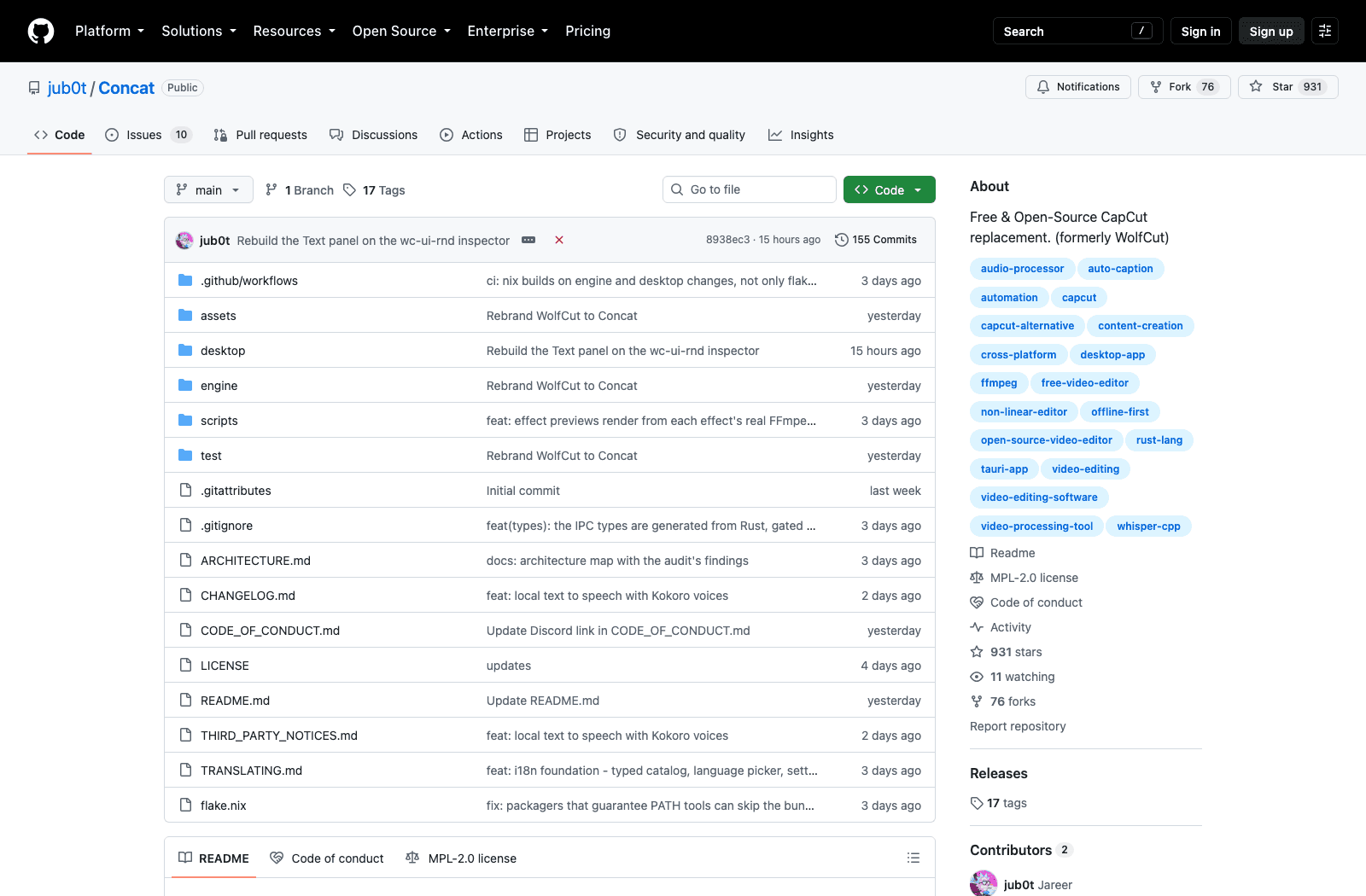
Read the sidebar rather than the star count. Nine hundred and thirty-one stars, seventy-six forks, eleven people watching, and two contributors. Ten issues are open, and the maintainer's contributing note asks mainly for people to grab a build and report where it breaks. That ratio is normal for a project that trended this week, and it's also the whole risk profile in one line: an enormous amount of attention pointed at a codebase two people maintain. Stars are a measure of interest, not of bus factor.
If you're turning out the same kind of short product video week after week, the repeatable pipeline around the edit ends up mattering more than which timeline you cut in. So use it the way you'd use any alpha. Keep your source footage somewhere else, don't put a client deadline behind it, and expect the project format to change under you at least once. If it holds up on a personal video, promote it slowly.
Let the alpha editor be an alpha editor, and keep the boring repetitive work somewhere it can't take your afternoon down with it. MoClaw sits in that second slot rather than replacing the first: a hosted cloud AI computer running beside your local install, not a substitute for the editor you cut in. The free trial runs three days and 1,000 credits, and a $20 subscription is 1,000 credits a month.
FAQ
Is Concat free to use?
Yes, and free in both senses. It's released under MPL-2.0 with source on GitHub, there's no paid tier, no account requirement, and no watermark on exports. The installers bundle FFmpeg binaries built under the GPL and invoked as separate programs, documented in the project's third-party notices.
Is Concat safe, and does it upload my videos?
The project's position is that processing is local: auto-captions run through whisper.cpp on your own hardware, and the README states your audio never leaves the machine. The architecture document describes no network layer. I did not audit the code for outbound connections, so read that as the project's claim rather than an independent verification. The macOS builds are unsigned, which means Gatekeeper will block them until you clear the quarantine flag by hand; that's a signing-cost issue rather than a sign of anything wrong.
Concat vs CapCut, which is better for creators?
CapCut is better today if you want depth, effects, stock assets and a mobile app, and you don't mind the account and the export conditions. Concat is better if the account, the watermark or sending footage to someone else's servers is the thing blocking you, and you can tolerate alpha software. As an open source CapCut alternative at 0.2.0-alpha with two maintainers, it isn't a like-for-like swap yet.
What does Concat run on?
Windows and macOS are marked tested, Linux is supported, and each release ships .exe, .msi, .dmg, .deb, .rpm and .AppImage artefacts. There's a Nix flake as well. Note that the downloaded files are still named WolfCut after the project's recent rename.
Why are the downloads called WolfCut?
Concat was renamed from WolfCut on 31 August 2026 and the rename hasn't propagated to release titles, installer filenames or the internal Rust crates. Same project, older name.
Continue Reading
More Guide
MiniMax M3 Free Ended: What to Use Instead

MarkItDown: When Your Markdown Comes Back Thin

Lightpanda Is Fast Because of What It Skips

OpenAI Deprecated Its Codex Skills Repo

Open Science: The AI Workbench for Researchers

How to Use GPT-6 Astra: What It Really Costs
The MoClaw editorial team writes about workflow automation, AI agents, and the tools we build. Default byline for industry overviews, listicles, and collaborative pieces.
Ready to put this into practice?
MoClaw runs browser tasks, research, and schedules automatically. Try it free.