pxpipe Guardrails: Text Fallbacks for Image Context

pxpipe guardrails need text fallbacks, allowlists, and review gates when image context may misread exact identifiers like paths, hashes, IDs, and commands.
Table of Contents
pxpipe guardrails are the review rules that keep compressed image context from turning file paths, hashes, IDs, and commands into unsafe guesses.
Key Takeaways:
- Image context can reduce noise, but it should not become the only source for byte-exact fields.
- Exact strings need text fallbacks, not just visual memory.
- Allowlists should define which fields can be trusted, copied, or acted on.
- Human review should stay mandatory before edits, deletions, deployments, commits, or external messages.
- Teams discussing pxpipe with Fable 5 or Claude Code subagents should separate context compression from agent safety.
I learned this lesson the annoying way. In one workflow, an agent summarized a screenshot of terminal output perfectly, except it quietly changed one character in a file path. The summary looked clean. The action was wrong. That is the whole problem with image-based context compression: it can preserve meaning while losing the exact string that the next step needs.
Why Image Context Needs Guardrails
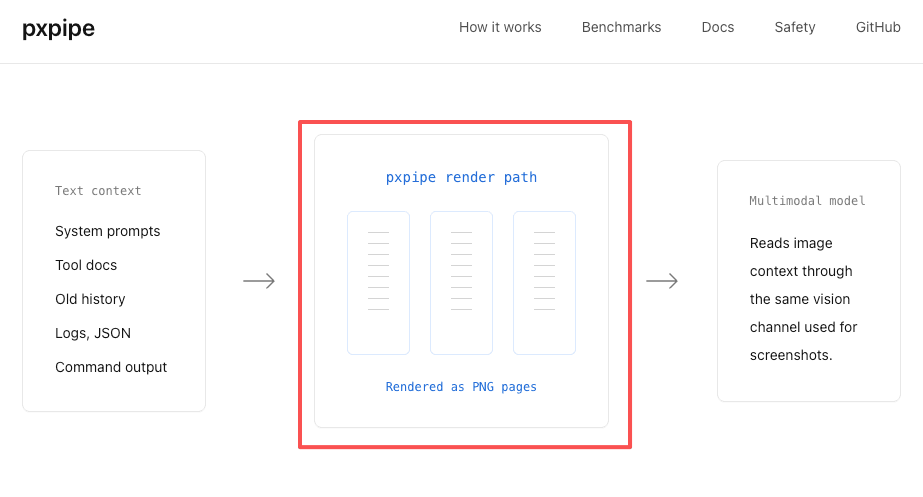
pxpipe is most directly about rendering bulky text context, such as system prompts, tool docs, history, code, JSON, or tool output, into PNG images. A pxpipe workflow can therefore be discussed as a way to compress eligible bulky text context into image context while keeping byte-exact fields in text. Broader screenshots or dashboard workflows need their own review rules.
OWASP's LLM01 prompt injection risk is relevant because multimodal systems can process hidden or confusing instructions across images and text. Even when there is no attacker, a visual context layer can still create operational mistakes if the agent treats an approximation as a command.
OCR-like errors
The first risk is an OCR-like error. A model may read user_id as users_id, 0 as O, rn as m, or miss a trailing slash. Humans make similar mistakes, but humans usually slow down when something looks like an identifier. Agents often keep moving.
For example, I once used a screenshot-heavy review flow to condense a long build log. The explanation was right, the failing test name was almost right, and the branch name was wrong by one character.
After that, I checked 10 similar log-review outputs. Seven captured the general failure correctly, but 4 had exact-string issues: 2 changed a test name slightly, 1 shortened a file path, and 1 copied a branch name with a one-character error. That small difference would not matter in a blog summary. It matters a lot when the next step is checkout, delete, move, or deploy.
Path and ID mistakes
Paths and IDs are worse than prose because they do not degrade gracefully. A sentence can survive paraphrase. A file path cannot. A commit hash cannot. A customer ID cannot. A shell command cannot.
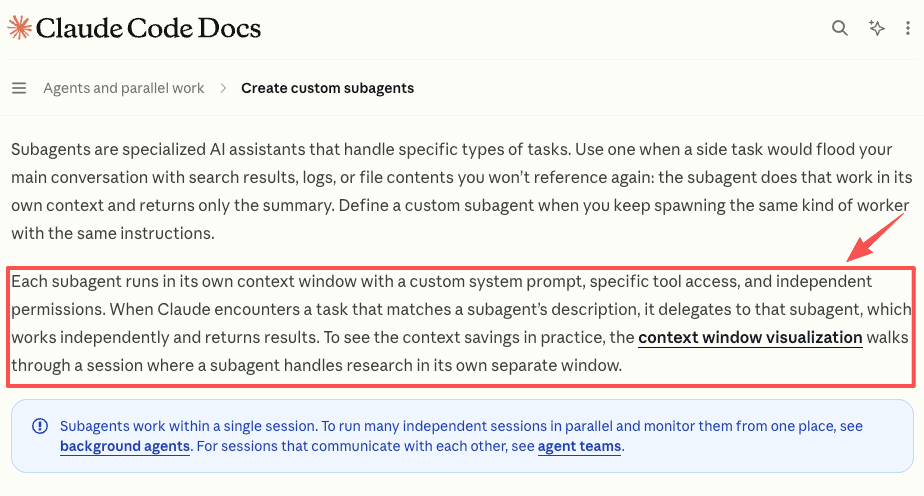
This is where context compression becomes an agent safety issue. Claude Code's custom subagents guidance describes subagents as separate contexts with their own prompts, tools, and permissions. That design helps keep noisy exploration out of the main thread, but it also makes handoff discipline more important. If a Claude Code subagent receives a compressed image summary without the exact strings, the next agent may inherit confidence without evidence.
Text Fallbacks for Exact Identifiers
A text fallback is the original exact value stored beside the compressed visual context. It does not need to include every line of history. It needs to preserve the fields where one character changes the meaning.
File paths
File paths should remain in plain text whenever the workflow might open, edit, move, delete, upload, or reference a file. A compressed screenshot can show where the path appeared, but the action should use a text field such as source_path, target_path, or reviewed_file.
This matters in recurring workflow tools as much as in coding agents. MoClaw's AI workflow automation use case, for example, involves files, logs, reports, and scheduled delivery. In that kind of workflow, a visual summary can explain what happened, but the stored path should be copied from the tool result, not inferred from an image.
Hashes
Hashes should never be reconstructed visually. That includes commit hashes, checksum values, build artifact hashes, API response signatures, and package integrity strings. A shortened hash can be fine for display, but the full value should remain available as text when the workflow needs verification.
A practical guardrail is to require two fields: display_hash for human scanning and exact_hash for any action. If the two conflict, the workflow stops.
IDs and commands
IDs and commands need the same treatment. Ticket IDs, invoice IDs, customer IDs, environment IDs, database row IDs, and shell commands should be preserved as exact strings. If a model writes "run the same command as above," that is not enough for automation. The safer pattern is to store commands as reviewed text, separate from commentary. For instance, a fact sheet can say: "The agent may summarize the command, but it may only execute the command if the exact command appears in the approved command field."
Allowlist and Fact Sheet Design
An allowlist tells the agent which fields are trusted enough to reuse. A fact sheet tells humans where those fields came from. Together, they prevent a compressed image from becoming an invisible source of authority.
NIST's AI Risk Management Framework is a helpful reference because it frames AI risk management around Govern, Map, Measure, and Manage, rather than model choice alone. For pxpipe guardrails, that means the workflow should define trusted fields before the agent acts.
Protected fields
Protected fields should include anything that can trigger action or expose private data. Common examples are file paths, hashes, IDs, credentials, account names, URLs, commands, package names, environment names, billing amounts, and customer identifiers.
Avoid making the allowlist too broad. "Terminal output" is not a protected field. exact_command, exit_code, error_line, and artifact_path are protected fields. Specific fields are easier to review and harder for an agent to improvise.
Review checkpoints
Review checkpoints should happen after compression and before action. The reviewer should see the compressed summary, the exact text fallback, and the proposed action in the same place.
A realistic case makes the boundary clearer. Say a support operations lead wants an agent to turn screenshots of failed upload jobs into a morning incident brief. The image summary can describe the pattern: three failures, same region, likely timeout. The exact text fallback should preserve job IDs, affected file names, timestamps, and any command the agent wants to rerun. Without that fallback, the brief may be readable but not safe to operate from.
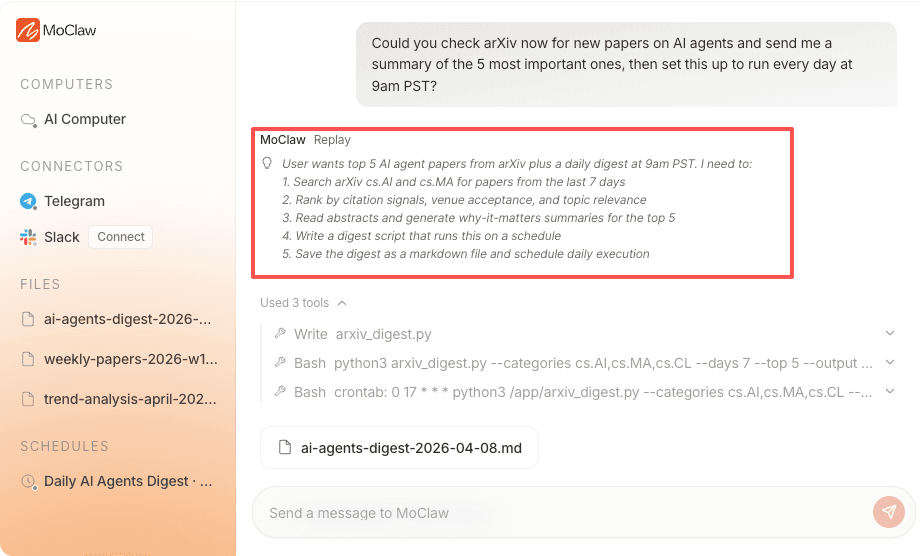
MoClaw's AI Agents Research Digest shows a related pattern for recurring research work: the summary is useful, but source tracking, saved artifacts, and repeatable review are what make the workflow dependable.
Human Review Before Actions
Human review is not needed for every compressed note. It is needed before external or irreversible actions.
The trigger list should include deleting files, overwriting files, editing production content, running commands, updating tickets, changing statuses, sending customer messages, publishing reports, deploying code, rotating secrets, or sharing compressed context outside the original workspace.
OWASP's Top 10 for Large Language Model Applications is the right security lens here because it includes excessive agency as a risk when LLM systems receive too much unchecked autonomy.
When I review agent outputs, I do not worry most about a bad paragraph. I worry about a good paragraph attached to the wrong object. A clean summary with the wrong customer ID is more dangerous than an obviously messy one, because people trust it faster.
For pxpipe guardrails, the safest review screen is boring: original source link, compressed summary, exact strings, proposed action, permission level, and rollback note. If the exact string is missing, the button should not say "approve." It should say "return for text fallback."
FAQ
Who owns exception rules across projects?
The project owner should own business exceptions, while the security or platform owner should own global exception policy. A good split is simple: project teams can say which fields matter for their work, but they should not be able to bypass exact-string rules for credentials, commands, customer identifiers, or production paths without higher approval.
When should a conflict be escalated to a person?
Escalate when the image context, text fallback, and tool result disagree. Also escalate when an identifier appears only in compressed context, when a command includes destructive flags, when a path points outside the expected workspace, or when an agent proposes action based on a screenshot that no longer matches the current system state.
How should teams document compression incidents?
Document the source image, compressed summary, missing or wrong field, affected workflow, proposed action, reviewer decision, and fix. Do not only write "OCR error." Name the exact control that failed, such as missing path fallback, stale screenshot, unreviewed command, or allowlist gap.
Can different clients use different fallback policies?
Yes, but shared infrastructure should keep a minimum baseline. A low-risk content client may accept looser image summaries for draft review. A finance, legal, security, or production engineering client should require stricter text fallbacks for IDs, paths, hashes, and commands. Different policies are fine as long as the agent can tell which policy applies before it acts.
pxpipe Guardrails Make Image Context Action-Safe
The safest pxpipe guardrails do not reject image context. They limit what image context is allowed to decide. Visual compression can help an agent workflow stay readable, especially when logs, screenshots, and tool results get too large for the main thread. But byte-exact fields need text fallbacks, protected allowlists, and review gates before anything changes. For teams using Fable 5 discussions, Claude Code subagents, or any compressed context layer, the durable rule is simple: summarize visually, verify textually, and require a person before the workflow acts on exact identifiers.
Vera note: This article is workflow guidance, not a security audit or official tool configuration guide. Before using compressed context in production, verify current pxpipe behavior, agent permissions, data-handling rules, and security requirements for your own environment.
Continue Reading
More Guide
Third-Party Agent Skills: Permissions and Review

pxpipe Workflow: Compress Context Safely

TRAE Work Guardrails: Permissions and Review

What Is GLM-5.3-Flash? Specs and Price

How Lindy AI Memory Works With Files & Skills

Kimi K2.5 Deprecated: Every Date That Matters

The MoClaw editorial team writes about workflow automation, AI agents, and the tools we build. Default byline for industry overviews, listicles, and collaborative pieces.
Ready to put this into practice?
MoClaw runs browser tasks, research, and schedules automatically. Try it free.
References: pxpipe repository (GitHub) · OWASP LLM01: Prompt Injection · Claude Code: Custom subagents · NIST AI Risk Management Framework · OWASP Top 10 for Large Language Model Applications