skilldoctor: A Quality Gate for Agent Skills

skilldoctor is an open-source linter that audits SKILL.md files for unsafe instructions and checks portability across Claude Code, Cursor and Codex.
Table of Contents
Someone drops a folder with a SKILL.md into your pull request, or you clone one off a trending list. You skim the frontmatter, glance at the body, install it, and move on, because reading 400 lines of somebody else's agent instructions is nobody's idea of a Tuesday afternoon. skilldoctor is built for exactly that moment: a command-line quality gate that validates the spec, scans the body for instructions that have no business being in it, and reports whether the skill still works once it leaves the agent it was written for.
The repo went public on 2026-08-13. Three days later it sits at 243 stars, 9 forks and 17 commits, with v0.2.4 published at 02:42 UTC this morning. Eight releases in three days is real churn, so pin a version before wiring this into anything that matters.
Key Takeaways
- skilldoctor lints and security-audits Agent Skills; it is not another installer. Vercel's
npx skillsalready owns installation, and this covers the decision that comes after. - 35 rules across four commands, each carrying a stable ID such as
audit/pipe-to-shellthat you can suppress individually. - The audit pass is the part nobody else was doing: prompt injection, credential reads, wildcard
Bash(*)grants,curlpiped into a shell. - MIT licensed, Node 18.18 or newer, ships a GitHub Action, and emits SARIF if you want findings in GitHub's security tab.
- It reads text. Nothing gets sandboxed at runtime, and that limit matters more than the rule count.
What skilldoctor actually checks
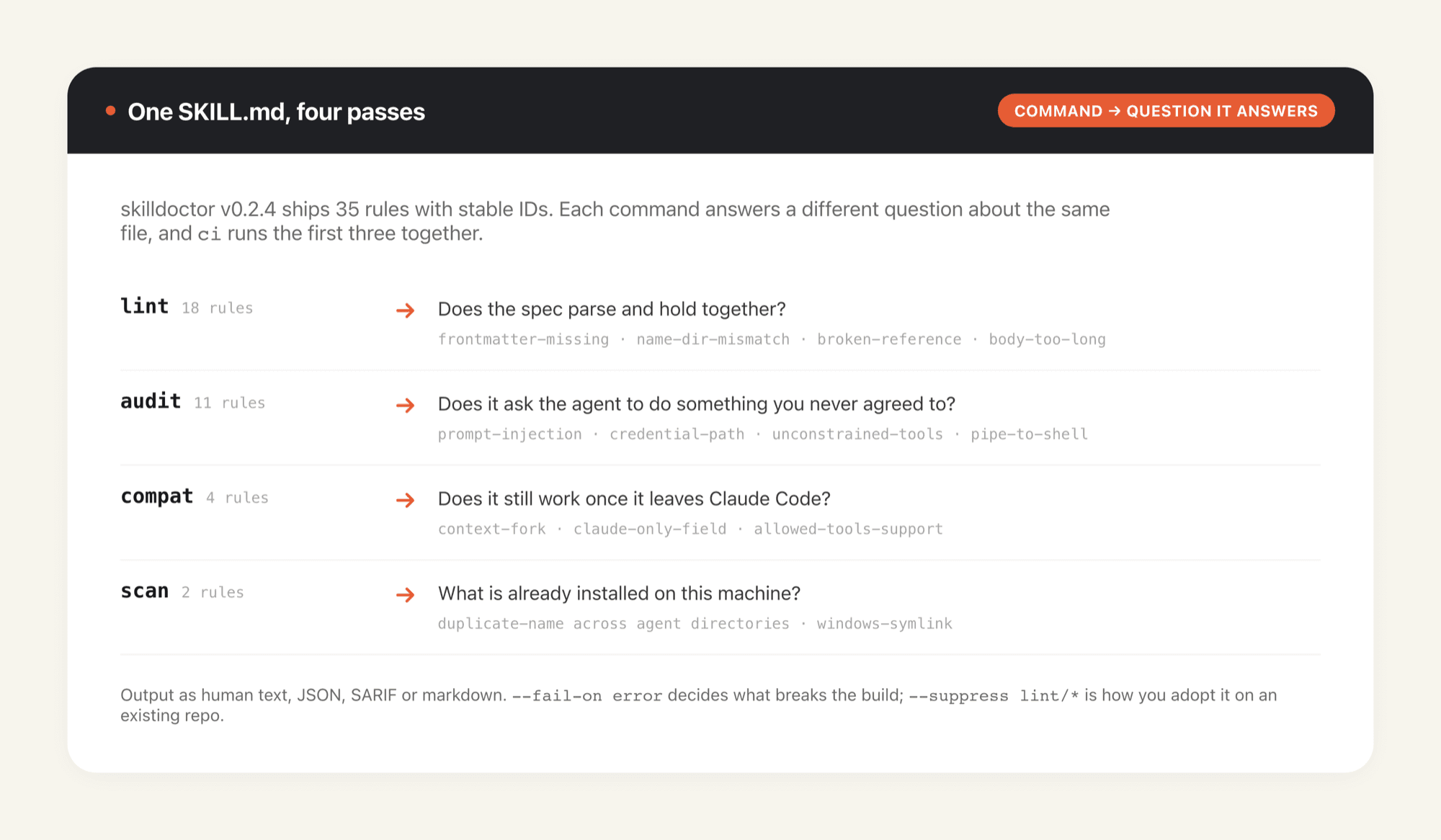
Four commands split the work along clean lines. lint reads frontmatter against the Agent Skills spec: name present and matching its parent directory, description present and not vague, metadata values that are genuinely strings, relative links into scripts/, references/ or assets/ that actually resolve. audit walks the body hunting for instructions that would do something you never agreed to. compat answers whether the frontmatter you wrote survives outside Claude Code. scan, also aliased as doctor, inspects what's already installed on your machine and flags duplicate skill names sitting in more than one agent directory.
Point it at a single skill directory or at a repository root; it walks the tree and finds every SKILL.md on the way down. Output comes as human-readable text, JSON, SARIF or markdown, and --fail-on decides whether warnings break your build or merely annoy you.
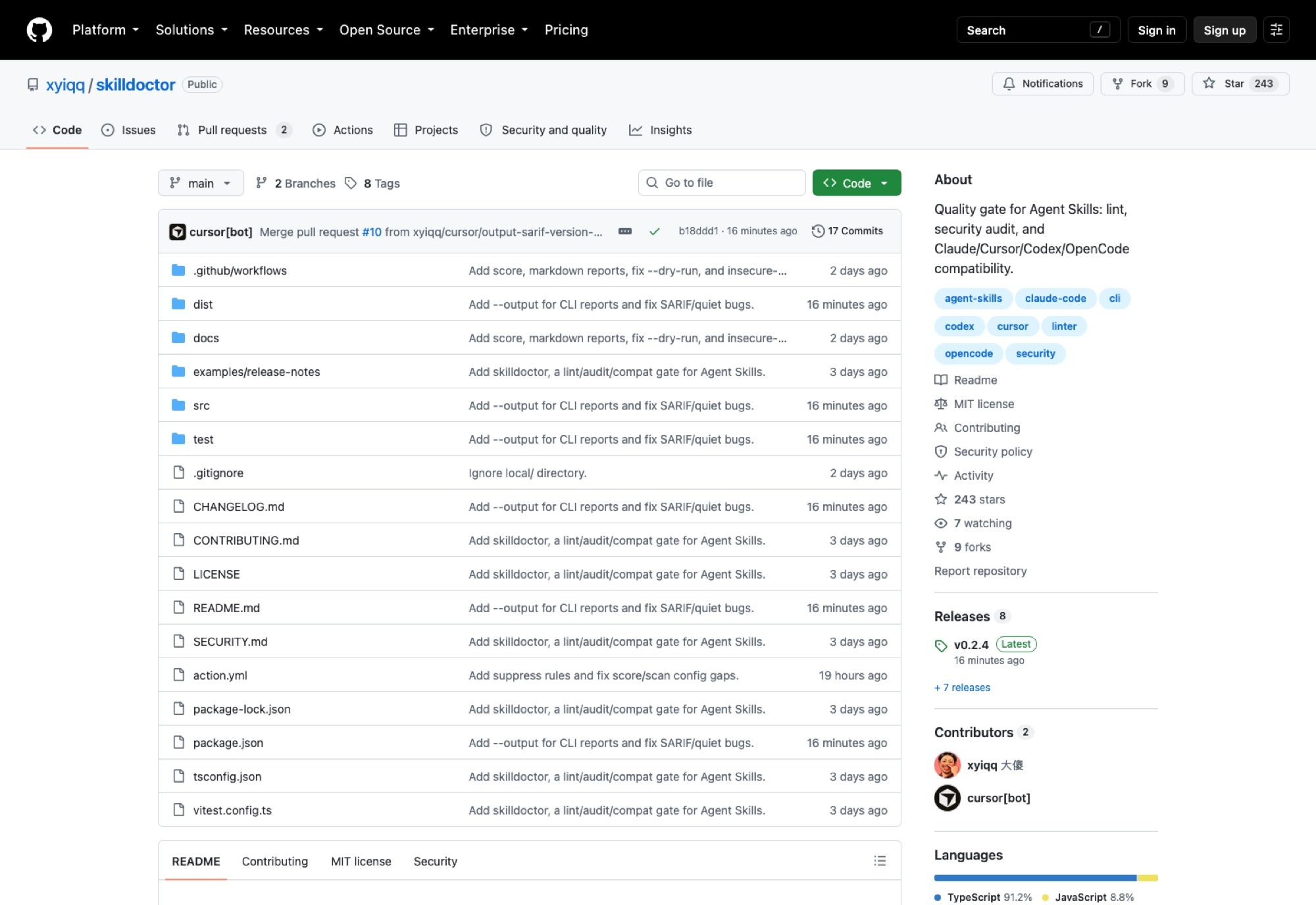
One detail on that page deserves a pause. The contributor list has two entries: xyiqq, and cursor[bot]. The most recent merge, pull request #10, came off a branch called cursor/output-sarif-version-…. So a tool whose job is checking agent-authored instruction files is itself written substantially by an agent. That isn't a criticism of the project, though it does argue rather well for having a gate at all.
A linter can only read. Every rule in the audit catalog describes something a skill says it will do, and the distance between reading an instruction and containing it is the entire problem: once the agent runs, the blast radius is whatever machine holds your SSH keys and your cloud credentials. Shrinking that radius is a different lever from auditing the file, and MoClaw is one way to pull it, being a hosted cloud AI computer that sits alongside your local setup rather than replacing it, so the box executing a stranger's skill isn't also the box holding your keychain.
The audit rules are where it earns its keep
Eleven rules make up the audit pass, and they read like a list of things people have actually tried. audit/prompt-injection catches jailbreak text and hide-this-from-the-user instructions. audit/credential-path fires when a skill reaches for SSH keys, cloud credentials, browser cookies or a .env file. audit/unconstrained-tools flags a wildcard Bash(*) grant, which is the agent-skills equivalent of handing over sudo and hoping. audit/pipe-to-shell catches curl or wget piped straight into a shell, audit/exfil-network knows a set of dump and webhook hosts, and audit/dangerous-script looks for recursive deletes and download-then-execute patterns.
Two more sit at warning rather than error, which feels like the right call. audit/self-modify triggers when a skill instructs the agent to rewrite the skill itself; audit/obfuscated-code looks for dynamic decoding or eval inside scripts/. Neither is proof of malice, and both are worth a human glance. Rounding out the set, audit/path-escape watches for sensitive system paths and audit/insecure-http notes anything installing over plain HTTP.
Read as a group, these rules encode a threat model that the skills ecosystem hadn't written down anywhere: a skill is untrusted code distributed as prose, and prose review doesn't scale. We went through the same reasoning from the permissions angle in our review of third-party skill permissions, and the conclusion lands in the same place. Nobody reads the whole file.
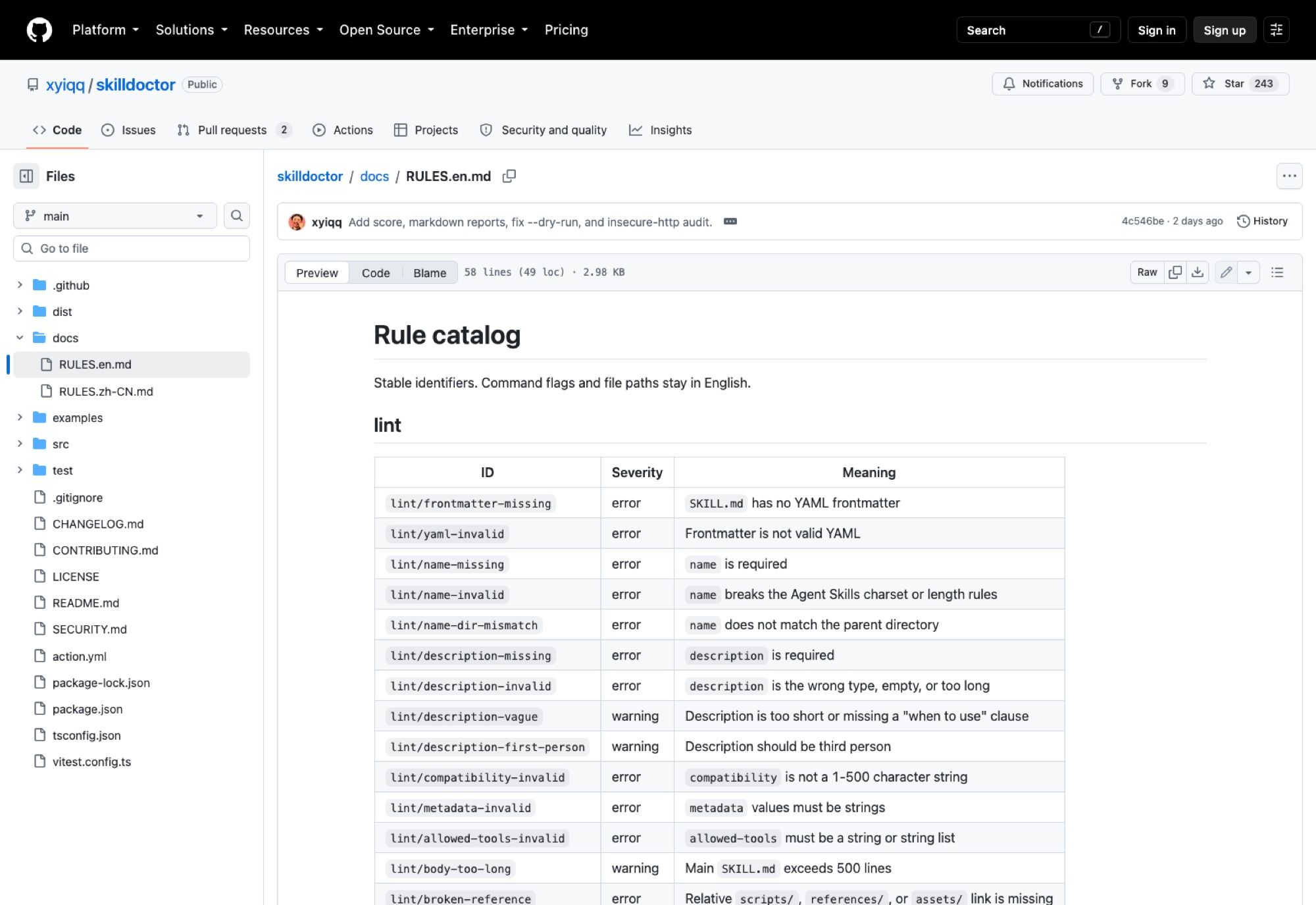
Severity, laid out across the whole rule catalog, is the design decision that makes this usable. Structural problems are errors, judgement calls are warnings, and spec-adjacent oddities like lint/unknown-portable-field are info. You can suppress by exact ID or by prefix with --suppress lint/*, which is how you adopt this on an existing repo without a wall of red on day one. The README is blunt about not using suppression to silence security findings forever, and that warning exists because everybody does it anyway.
The reason audit/credential-path needs to exist is that the agent has those credentials to begin with. That's ambient authority, and no amount of linting removes it from a laptop that holds your production keys. Running the agent on a MoClaw instance changes what's reachable rather than what's written: the hosted machine has whatever you deliberately put on it, so a skill that goes looking for ~/.aws/credentials finds an environment that never had them.
Does your SKILL.md survive outside Claude Code?
This is the quietly useful command. compat/context-fork tells you context: fork is Claude-only. compat/claude-only-field catches other frontmatter that won't travel. compat/allowed-tools-support marks allowed-tools as experimental rather than settled.
Here's a discrepancy worth knowing before you rely on it. The README advertises portability checks across six runtimes: Claude Code, Cursor, Codex, OpenCode, Gemini CLI and GitHub Copilot. The rule catalog, though, describes compat/unknown-field as flagging fields "unrecognized by the four tracked agents". Four, not six. I can't tell from the docs alone which reading is current, and given the release cadence it may simply be that the catalog hasn't caught up with the README. Treat compat as a strong hint about portability, not a certificate.
Static portability checking has a ceiling anyway. Knowing that context: fork is Claude-only is not the same as knowing your skill produces sensible output under Codex, and finding out properly means having all of those runtimes installed and a machine free to run them. That provisioning problem is the one a MoClaw box absorbs: a cloud AI computer you can load with a toolchain you'd rather not maintain locally, kept separate from the laptop you're actually working on.
Running it, and wiring it into CI
There's no install step if you don't want one:
npx --yes github:xyiqq/skilldoctor lint ./my-skill
npx --yes github:xyiqq/skilldoctor audit ./my-skill
npx --yes github:xyiqq/skilldoctor compat ./my-skill
ci runs all three together, and score produces a number you can gate on with --fail-on score:80. There's a fix command with a --dry-run flag, which you should use first. Configuration lives in a JSON file at the repo root or a .skilldoctorignore listing one path prefix per line.
For GitHub, the published action pins cleanly:
- uses: xyiqq/skilldoctor@v0.2.4
  with:
    path: .
    fail-on: error
    output: skilldoctor-report.md
SARIF output is the detail I'd care about most on a team, since it lands findings in the GitHub security tab alongside everything else rather than in a log nobody opens.
A CI gate fires when a pull request opens, which is the right time to catch a bad skill and the wrong time to be the only check you have. The agent that eventually runs the approved skill still needs a machine that's awake, and a laptop that sleeps when you close it is a poor host for anything long-running. MoClaw covers that shift specifically: a hosted computer that stays up between your sessions, so the work an agent picks up at 3am has somewhere to land. The free trial runs 3 days and 1,000 credits; a $20 subscription is 1,000 credits a month.
What skilldoctor can't tell you
It's static analysis, so anything sufficiently indirect walks past it. A skill that fetches a remote file and then follows whatever it finds there will pass an audit cleanly, because the dangerous instruction isn't in the file being audited. audit/obfuscated-code catches the obvious cases of that pattern, not the careful ones.
The rules are also heuristics with a three-day track record. False positives on lint/description-vague seem likely given how subjective "missing a when-to-use clause" is, and I haven't seen enough real-world runs to say where the false negatives cluster. Anyone adopting this in week one should read the findings rather than trusting the exit code.
And it says nothing about whether a skill is any good. score measures structural quality: does the frontmatter parse, do references resolve, is the body under 500 lines. A skill can score 95 and still give terrible instructions for the task it claims to handle. Judging that is still yours.
Who it's for shapes which command you'll actually use. If you publish skills, ci in your own repo is the whole point, and the markdown report gives reviewers something to read in the pull request. If you review other people's, audit before merge is the cheap check. If you just install things you found on a list, scan is the one to know about, because it inspects what's already sitting in your agent directories, and most people have accumulated more of those than they remember. Running it against a folder of skills collected over a few months tends to be informative, in the way that reading your own browser extensions list is informative. Our roundup of the best Claude skills is a reasonable place to see how fast that layer has been growing.
None of this makes the tool less worth running. The install decision used to be a vibe check on a README, and 35 rules with stable IDs is a substantial improvement over that.
FAQ
How do I validate a SKILL.md file?
Run npx --yes github:xyiqq/skilldoctor lint ./my-skill and point it at either the skill directory or the repo root. Lint covers the spec; add audit for safety checks and compat for portability, or run ci to do all three at once.
Is skilldoctor free?
Yes. It's MIT licensed, confirmed in the LICENSE file, and runs through npx without any account. You need Node.js 18.18 or newer.
What runtimes does skilldoctor support?
The README lists Claude Code, Cursor, Codex, OpenCode, Gemini CLI and GitHub Copilot. As noted above, the rule catalog currently refers to four tracked agents, so verify against the version you install.
Can skilldoctor fix problems automatically?
There's a fix command, and it supports --dry-run. Run the dry run first and read the diff, since automated edits to instruction files are exactly the category of change you want to see before it happens.
Continue Reading
More Guide
Claude Model Upgrades: Protect Recurring AI Workflows

Relay.app Alternative: Move Before Sep 14

What Is pgbot? Read-Only Postgres Checkups

What Is Cumora? AI Agents as Teammates

Mistral OCR: Your Version Gates Features

Kimi K2.6 Pricing Hides a Precision Trade
The MoClaw editorial team writes about workflow automation, AI agents, and the tools we build. Default byline for industry overviews, listicles, and collaborative pieces.
Ready to put this into practice?
MoClaw runs browser tasks, research, and schedules automatically. Try it free.
References: xyiqq/skilldoctor on GitHub · skilldoctor releases · skilldoctor rule catalog · skilldoctor LICENSE (MIT) · Agent Skills specification site